16 WIKA operating instructions, model CPG1200
EN
14603921.02 06/2023 EN/DE
5. Design and function
5. Design and function
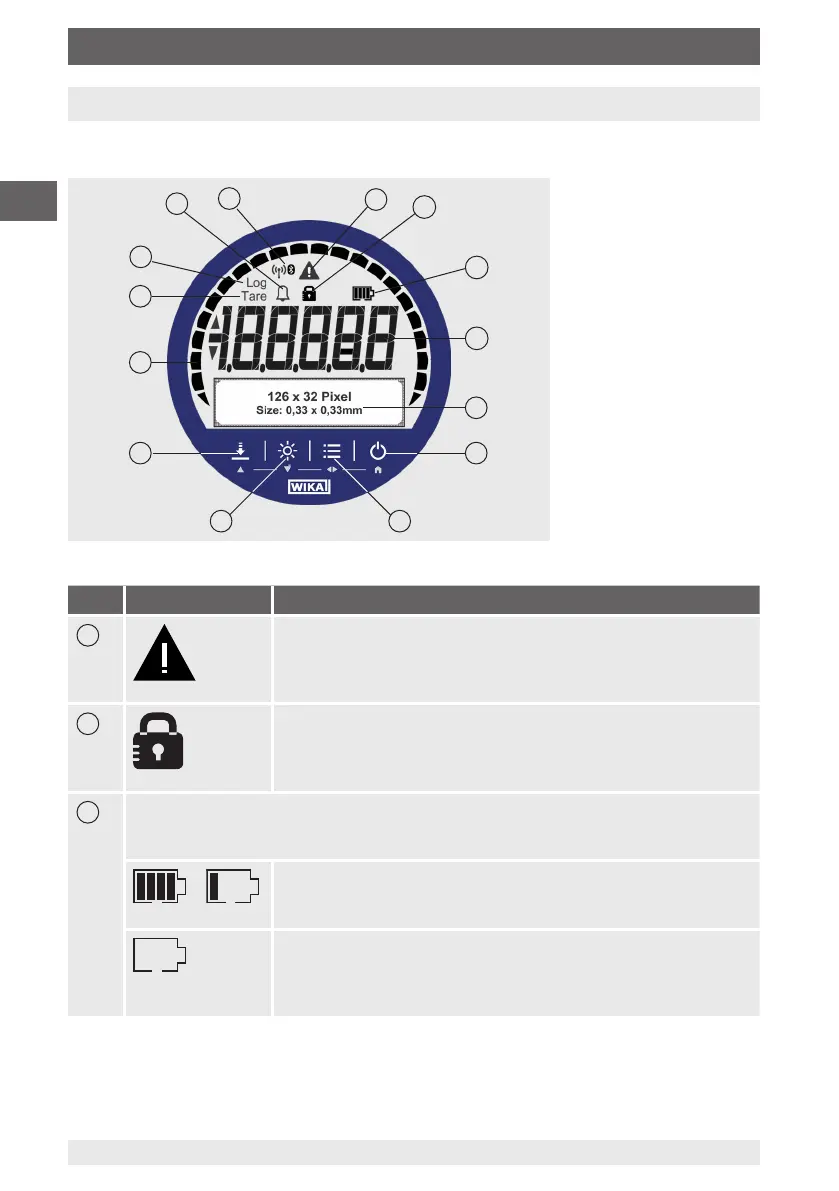
5.1 Front foil
Item Symbol The symbol is displayed on:
1
■
Exceeding or dropping below the pressure range
■
Exceeding or dropping below the temperature range
■
Logger memory is more than 90 % full
■
Instrument defect or battery status < 10 %
2
It is locked, if the [ZERO/▲] or [MENU/◀▶] buttons have been
locked via WIKA-Cal and must be pressed manually.
The password protection is only implemented via the WIKA-Cal
calibration software or the free-of-charge WIKA-DCS software.
3
Battery symbol
■
The battery symbol is displayed only during battery operation.
■
On connection of a USB power supply unit, no battery symbol is displayed.
...
Battery status 100 % ... 40 %
■
Outline is displayed continuously
■
One segment is displayed for each 20 %
Battery status 20 %
■
Outline is displayed continuously
■
New batteries must be used, see chapter
9.2 “Battery replacement”.
5
9
78
6
12
10
4
3
2
11
13
14
1



 To Next Page