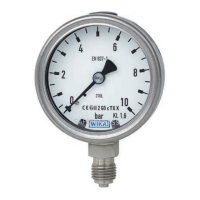
Specifications Model DG-10
Pressure ranges bar 2 5 10 20 50 100
Over pressure safety bar 5 10 20 40 100 200
Burst pressure bar 6 12 25 50 120 800
Pressure ranges bar 160 250 400 600
Over pressure safety bar 320 500 800 1200
Burst pressure bar 1000 1200 1700 2400
Pressure ranges psi 30 60 145 300 600 1450
Over pressure safety psi 70 145 290 580 1450 2900
Burst pressure psi 85 170 360 725 1740 11600
Pressure ranges psi 2000 3000 5000 7500 10000
Over pressure safety psi 4640 7250 11600 17400 21750
Burst pressure psi 14500 17400 24650 34800 43500
Materials
Wetted parts
Pressure connection» 1.4571
Pressure sensor» Ceramic Al
2
O
3
96%, NBR {EPDM} (up to 0 ... 50 bar)
XM-13 (1.4534) (as of 0 ... 100 bar)
Case 1.4301
Power supply 2x 1.5 V Mignon cell AA
Operating time h 4000 (AA 2000 mAh)
Internal sampling rate ms 200
Insulation voltage VDC 500
Display accuracy % of span ≤ ± 0.5 ± 1 Digit (according to IEC 61298-2)
Zero offset % of span ≤ 0.1 (Power-up reset)
Adjustability zero % of span ≤ 20 (via Tara-Function with model DG-10-E)
Hysteresis % of span ≤ 0.1
7. Starting, operation
GB
Tare Function DG-10-E
In this mode the positive deviation of the measured value from the tared value (max. 20% of
the measuring range) is constantly indicated by the main display. The untared pressure value
is always shown on the bar graph display. Thus the digital gauge’s actual working load can be
read off even if the tare function is active. When the tare function is active, a function
indicator appears on the display. There are 2 possible ways of activating this mode:
1) Select the tare function and set the value to be tared using the keys .
When set, the measured value to be tared is backed up as tare. The main display and the
auxiliary display then show the value “0000” in the unpressurised state.
Example: If a value to be tared is set as 2 bar, the main display indicates 0 bar in the
unpressurised state.
2) Load the digital gauge with the pressure to be tared.
The current measured value appears in the main display field of the main display. Select
the tare function and then operate both keys simultaneously . The current
measured value will be backed up as tare. The main display and the auxiliary display are
set to (0000).
Setting the tare value to (0000) resets the tare function in both models.
7. Starting, operation
GB



 To Next Page