7. Starting, operation
GB
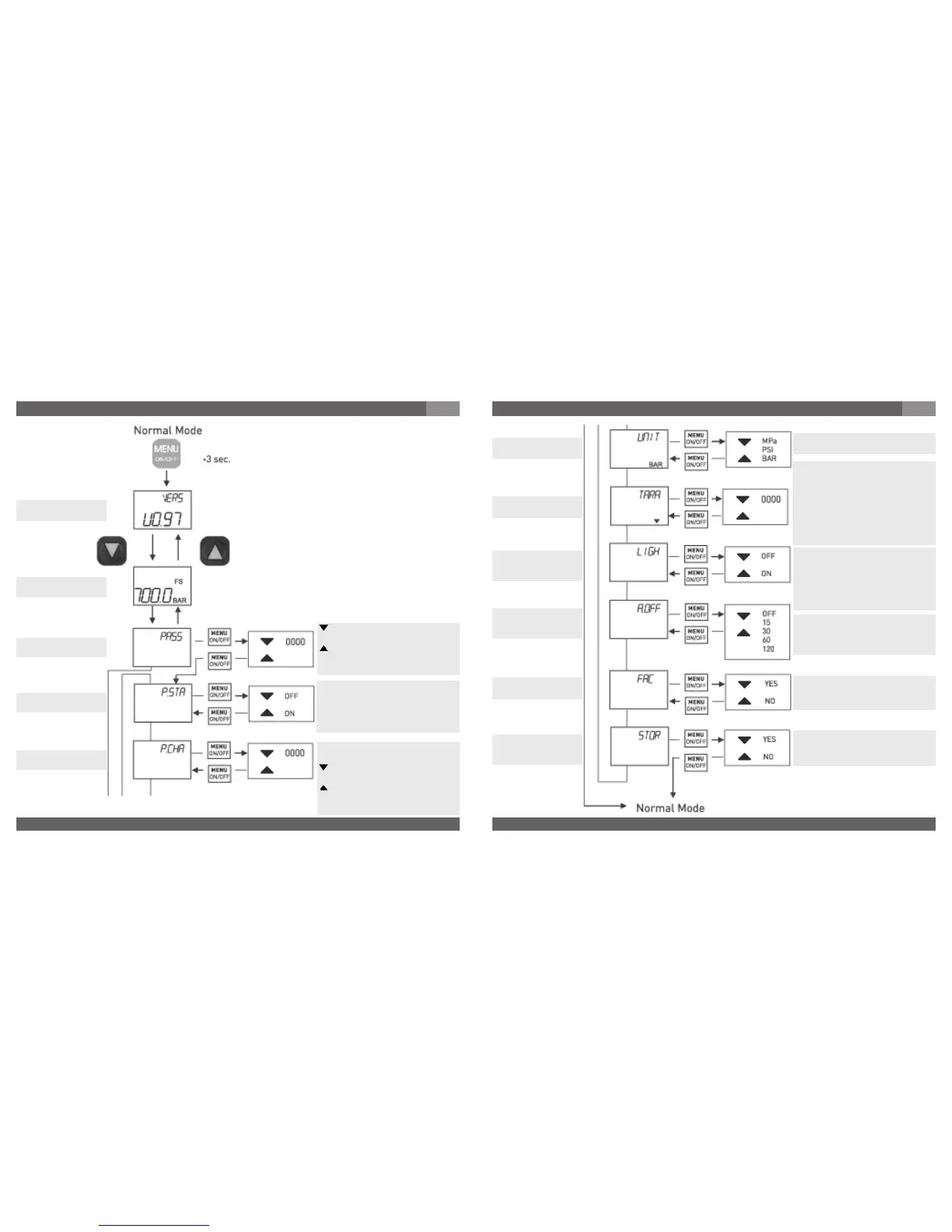
-Key changes figure of display
on entry.
-Key sets display value
0 ... 9 on entry.
Factory setting "0000".
Display
Measuring range
Password entry
PASS
Software version
Password status
P.STATUS
Password change
P.CHANGE
Password is only active in "ON"
position.
"PASS" does not appear in menu
in "OFF" position.
Factory setting "OFF".
The password is generated/
changed using this function
-Key changes figure of display
on entry.
-Key stes display value
0 ... 9 on entry.
Factory setting "0000".
Model DG-10-E
7. Starting, operation
GB
Unit may be selected
Factory setting "BAR"
Unit
UNIT
1. Version without initial pressure:
enter tare value using keys.
2. Version with initial pressure:
press both keys together.
Entry is coninuous without
changing character see Chapter
Programming / Tara function.
Factory setting "0000".
Background illumination may be
selected.
In "ON" position illumination
remains switched on for 15 secs
after every key operation.
Factory setting "OFF".
Automatic switch off time of
device may be selected in
minutes.
Factory setting "OFF".
Resets all parameters to factory
setting.
Factory setting "NO".
Stores all parameter settings.
Factory setting "NO".
Tare function
TARA
Background
illumination
LIGHT
Automatic
Switch off time
A.OFF
Factory settings
FACTORY
Storage of
settings
STORE



 To Next Page