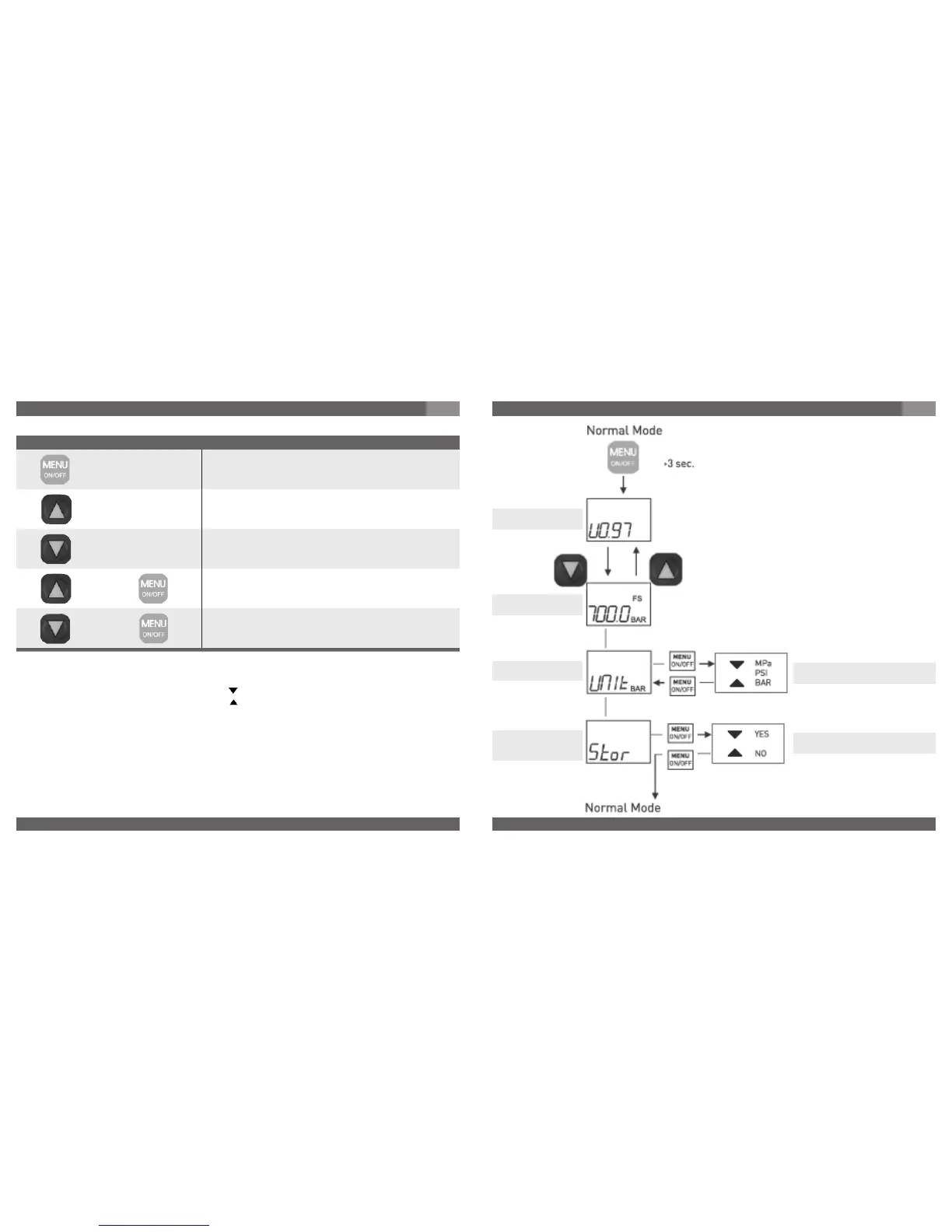
Function in normal mode
Key Function / Action
Switches the device on / off
Changes to programming mode if pressed for longer than 3 secs
Display indicated max. value as long as key is pressed
Display indicates min. value as long as key is pressed
Resets max. value to “ 0 “
Resets min. value to “ 0 “
+
+
7. Starting, operation
GB
Bar Graph with Trailing Pointer Function
The integrated bar graph display with trailing pointer function additionally indicated on the
display shows the trend in current working pressure directly regardless of the digital display.
With the help of the trailing pointer function, the max. stored value is also indicated in the bar
graph display in addition to the digital display in the form of a bar segment. This bar segment
is also updated to the current measure value when the min./max. value is reset.
Min/Max Memory
The min/max memory is updated with the current measured value in every measuring cycle.
The min. value is displayed by pressing the -key.
The max. value is displayed by pressing the -key.
Pressing and holding the appropriate key (min. or max.) and quickly pressing the menu key at
the same time resets the device to the current measured value.
7. Starting, operation
GB
Unit may be selected.
Factory setting "BAR".
Display
Measuring range
Software version
Unit
UNIT
Storage of
settings
STORE
Model DG-10-S
Stores all parameter settings.
Factory setting "NO".



 To Next Page