143
Displa
Use the phone's display settings menu to adjust items such as wallpaper, brightness, screen
timeout, and more.
1. From home, swipe up to access Apps, and tap Settings .
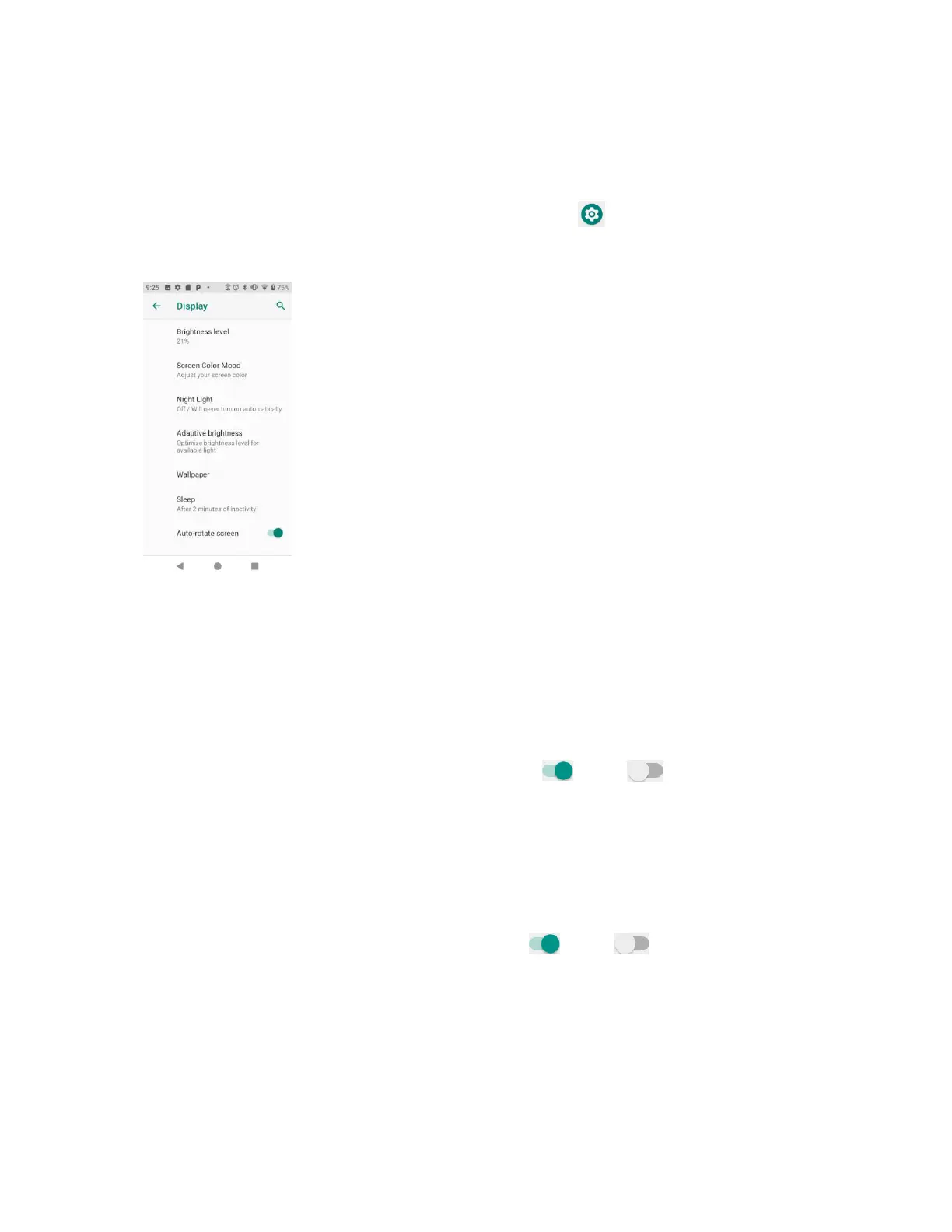
2. Tap Display.
• Brightness level: Tap to adjust brightness level. Drag the slider towards right or left to
manually set brightness level.
• Screen color mood: Tap to adjust the color temperature. Drag the slider towards right or
left to manually set color temperature.
• Night light: Tap to set night light schedule, intensity, and enable or disable turn on until
sunrise.
• Adaptive brightness: Slide the switch to the On or Off position to turn the
adaptive brightness mode on or off. When it is turned on, your phone will automatically
adjust screen brightness based on the lighting conditions.
• Wallpaper: Tap to choose a picture to set as wallpaper.
• Sleep: Tap to set sleep duration. When set, your screen will be turned off after the sleep
duration.
• Auto-rotate screen: Slide the switch to the On or Off position to turn the auto-
rotate screen on or off.
• Font size: Drag the slider towards right or left to set font size. You can view sample text
for reference.
• Display size: Drag the slider towards right or left to set the screen item display size. You
can take the display of preview window for reference.


 To Next Page