59
Tap to set all display name and order.
Tap to set all ringtone, enable or disable vibration and keypad
tones.
Tap to view messages for quick response.
Tap to set call forwarding and call waiting, enable or disable
enhanced privacy mode.
Tap to add blocking numbers.
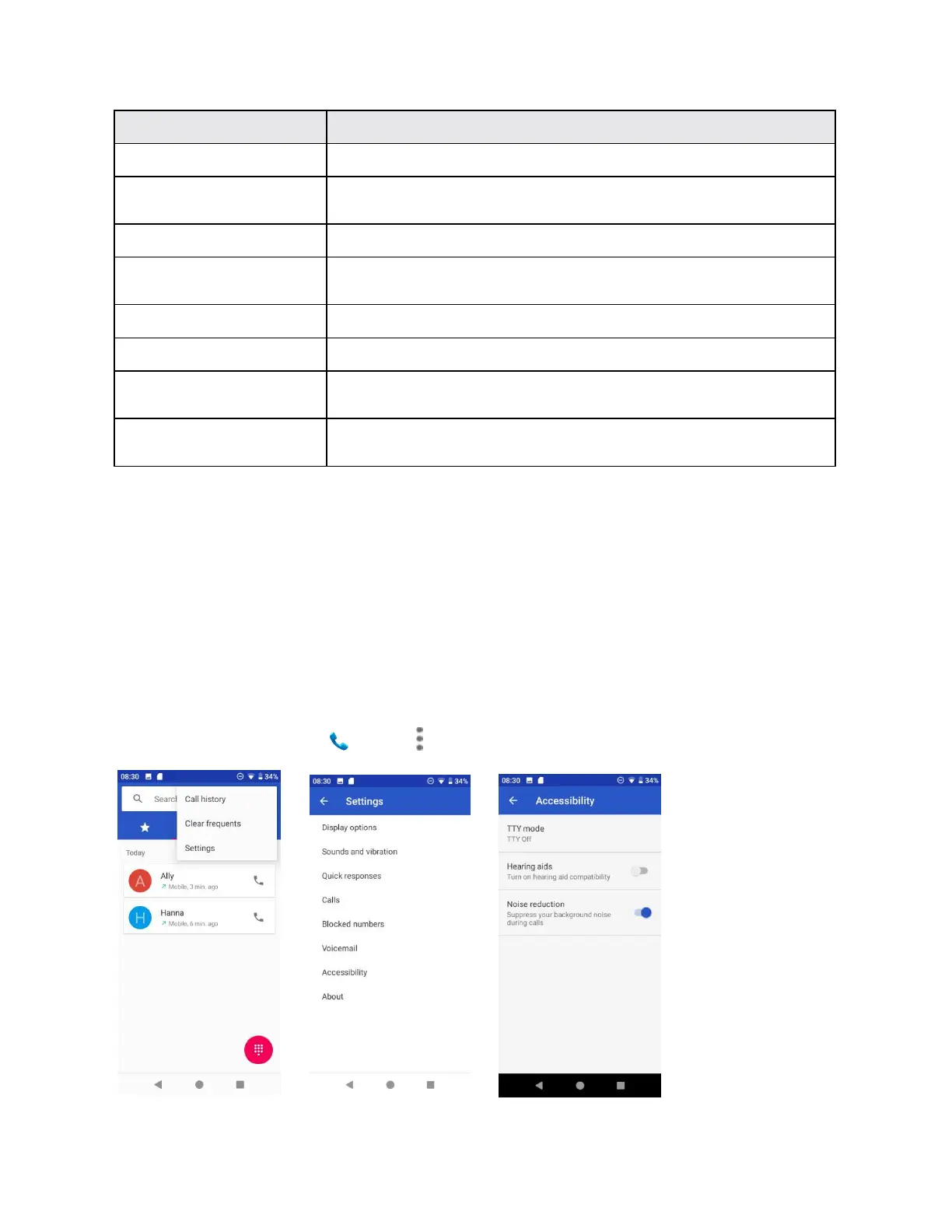
Tap to set TTY mode, enable or disable Hearing aids and Noise
reduction mode.
Tap to know more about the build version, licenses, privacy policy,
and terms of service.
TTY ode
A TTY (teletypewriter, also known as a TDD or Text Telephone) is a telecommunications device
that allows people who are deaf, hard of hearing, or who have speech or language disabilities,
to communicate by telephone.
Your phone is compatible with select TTY devices. Please check with the manufacturer of your
TTY device to ensure that it supports digital wireless transmission. Your phone and TTY device
will connect using a special cable that plugs into your phone‟s headset jack. If this cable was
not provided with your TTY device, contact your TTY device manufacturer to purchase the
connector cable.
To turn TTY Mode on or off:
1. From home, tap Phone > Menu > Settings > Accessibility > TTY mode.



 To Next Page