17
EN
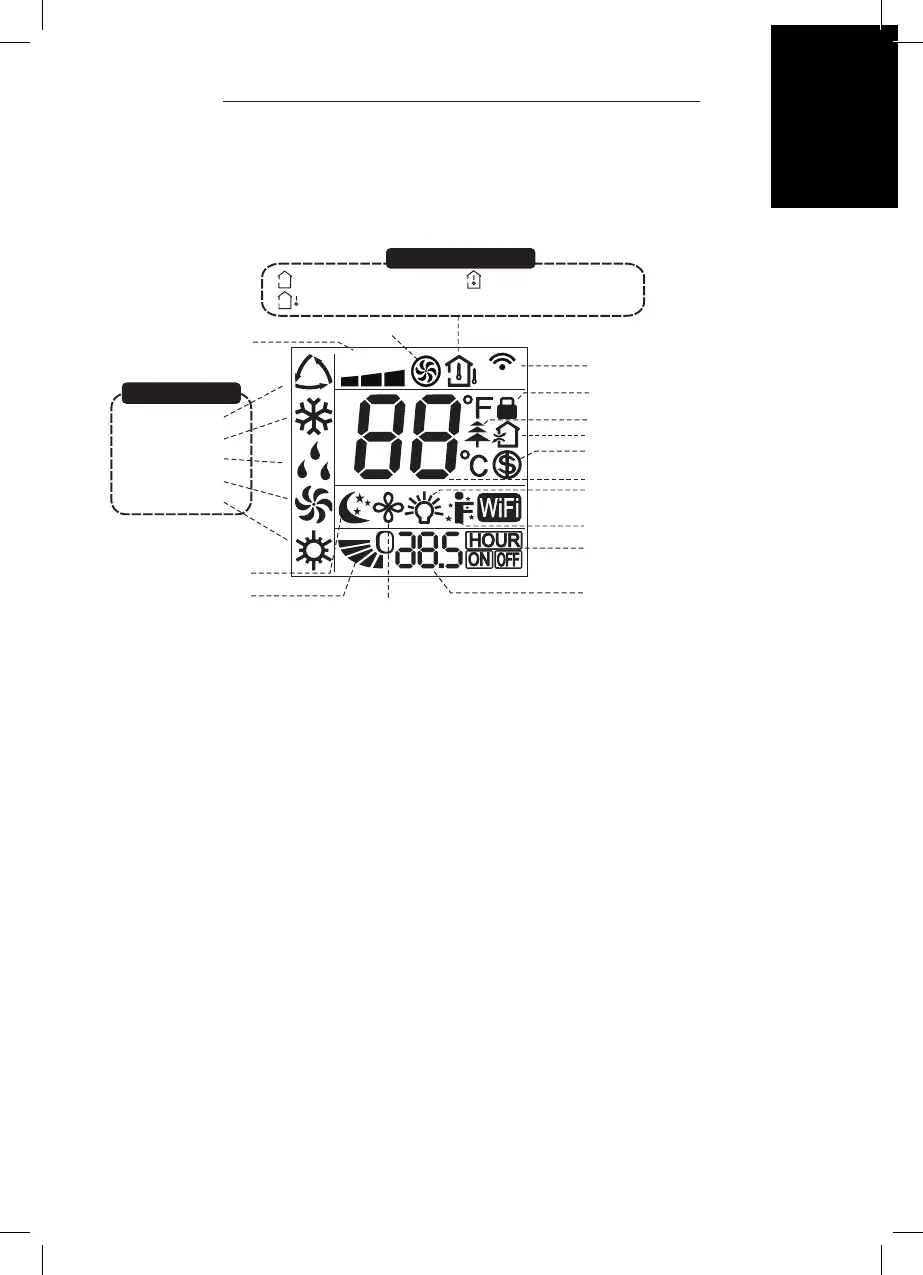
AIR CONDITIONER · COOL 9 CONNECTED
FAN
AUTO
OPER
Fan Swing
ModeOn/Off
Sleep Timer
Health WiFi
FAN
AUTO
OPER
I feel function
Turbo mode
Send signal
Health function
Light function
8°C heating function
TIMER ON /TIMER OFF
Set temperature
Child lock
Up & down swing
Set fan speed
Auto mode
Cool mode
Dry mode
Fan mode
Heat mode
Sleep mode
Set temp.
Outdoor ambient temp.
Indoor ambient temp.
Operation mode
Temperature display type
PRODUCT OVERVIEW – REMOTE CONTROL DISPLAY
Ventilation operation
Set time
NOTE:
This is a general use remote controller, and some functions, as described are
non-functioning.
USE
1 ON/OFF button
Press this button to turn on the unit. Press this button again to turn off the unit.
2 Mode button
Press this button and the mode will circulate according to below sequence:
Auto -> Cool -> Dry-> Fan-> Heat
• Auto: During auto the unit will automatically adjust the settings. The set
temperature cannot be changed.
• Cool: Under this mode, air conditioner operates under cooling mode. Cooling
indicator will be on. Press “Fan Speed” button to adjust the fan speed.
• Dry: Under this mode, the unit runs in low fan speed for dehumidication and
the corresponding indicator is on. The fan speed cannot be adjusted.
• Fan: Under this mode, air conditioner will not cool or heat, only blow wind. Fan
indicator will be on. Press “Fan Speed” button to adjust the fan speed.
• Heat: Not available


 To Next Page