support01@wimius.com support01@wimius.com
EN EN
18 19
• Choose the media signal channel :“HDMI”
• Use a Type-C to HDMI adapter to connect your MacBook, or a Mini Display to HDMI adapter to connect with your
MacBook Air (adapter not included).
• Use the 3.5mm audio cable coming with the projector to connect with sound bar.
• Turn on the projector and the sound bar, select [ AV ] as the signal source
• More details, please contact seller at
support01@wimius.com
.
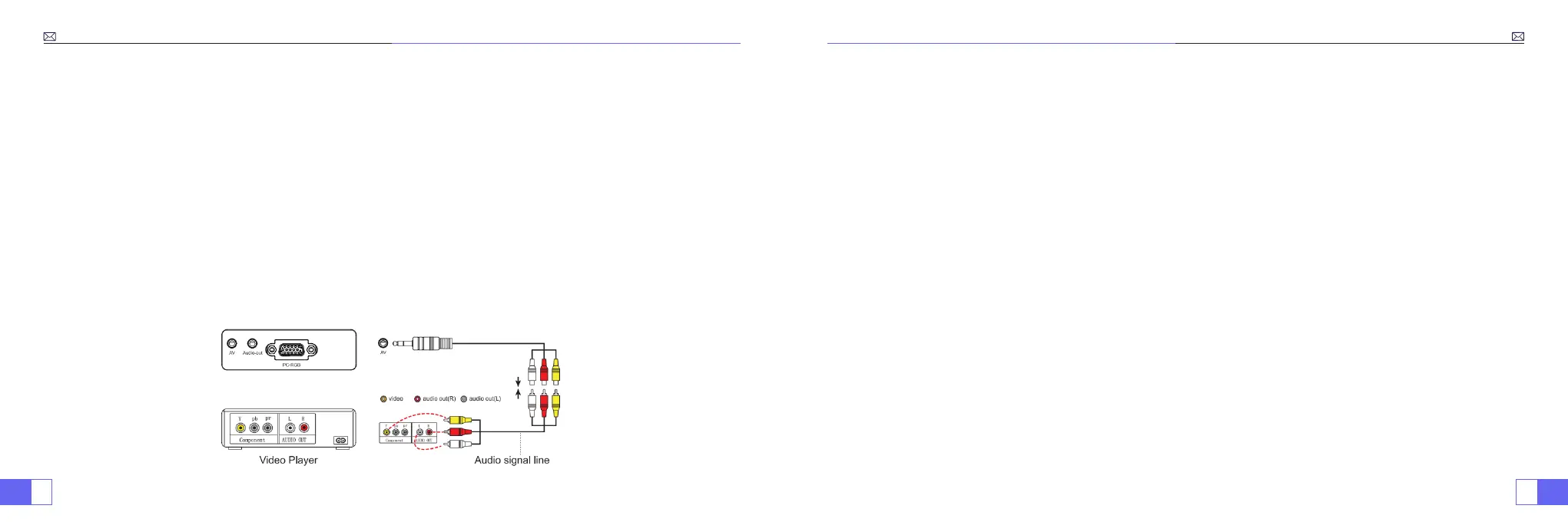
• Use the 3-in-1 AV cable, connect the colorful female connectors to your DVD player's RCA cable.
• Connect the black connector to the AV port of the projector, enter the home page to select [ AV ] as the signal
source.
3.Connecting with MacBook or Mac Book Air
4.Connecting with Sound bar
5.Connecting with DVD
• Plug the TV stick into HDMI port of the projector.
• Choose the media signal channel :“HDMI”
• P.S:
It only supports 1080P TV stick, not 4K TV stick.
• Choose the media signal channel :“HDMI”
• Use HDMI cable connect to XBOX/PS4
6.Connecting with re TV Stick
7.Connecting with XBOX/PS4



 To Next Page