he mirroring screen through the corresponding data line for all mobile phone
Android and iOS).
ow: The method is the same as the wireless mirroring
you dont know how to connect, feel free to contact us at email suppott02@wimius.com
Operations
l. Install
1.Projection Distance and Size
Please refer to the following table to adjust your picture size and distance. (From the
lens to the screen)
Aspect ratio
Distance (m)
1.55
2.17
3.10
3.72
5.5
16:9
Picture size (inch)
70"
100"
120"
200"
Warning: The image size depends on the distance between projector and screen,
there may be 3% deviation among above listed data. Different settings cause
various distance. If you use the zoom function, the corresponding screen will be
scaled down.
2.1nstalI Method
Keep the projector vertical with projector screen and keep it on the same level o
attach it to a hanging bracket
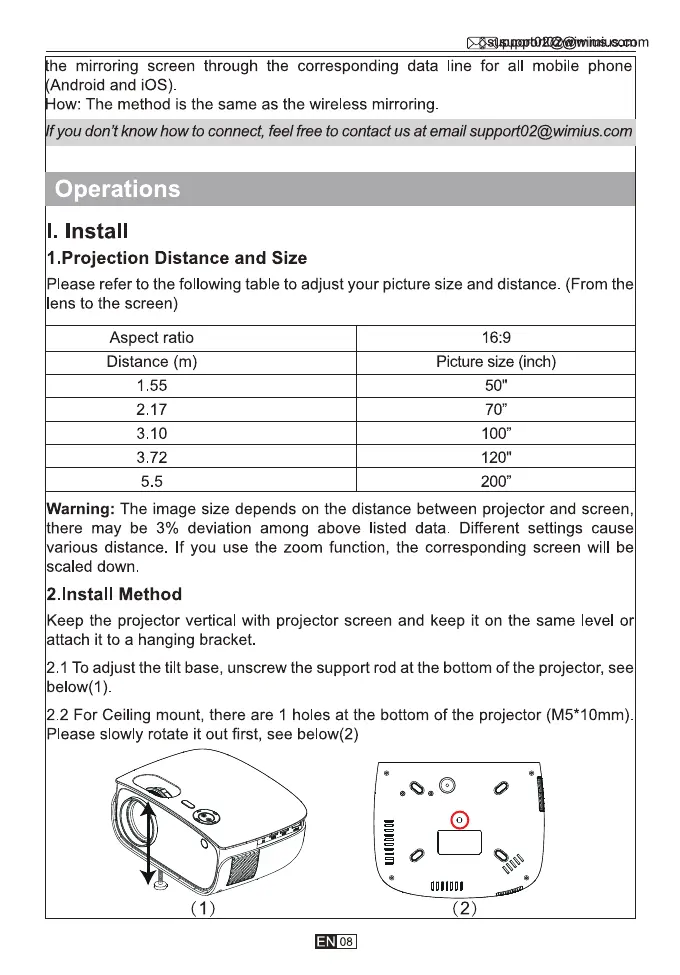
2.1 To adjust the tilt base, unscrew the support rod at the bottom of the projector, see
below(l)
2.2 For Ceiling mount, there are 1 holes at the bottom of the projector (M5*10mm)
Please slowly rotate it out first, see below(2)
(1)
08
(2)



 To Next Page