II. Power On/Power Off
I. First connect the power cord to the projector, then connect the power cord to the outlet
before the power is turned on.
2.0nce the projector is plugged in, itwill be in Standby mode.
3. If not use for a long time or encounter thunder and lightning, please unplug the powe
cord
Power on: Press the power button on the remote control once to turn the projector on.
Power off: Press the power button twice tum the projector off.
Ill. Keystone Correction & Focus
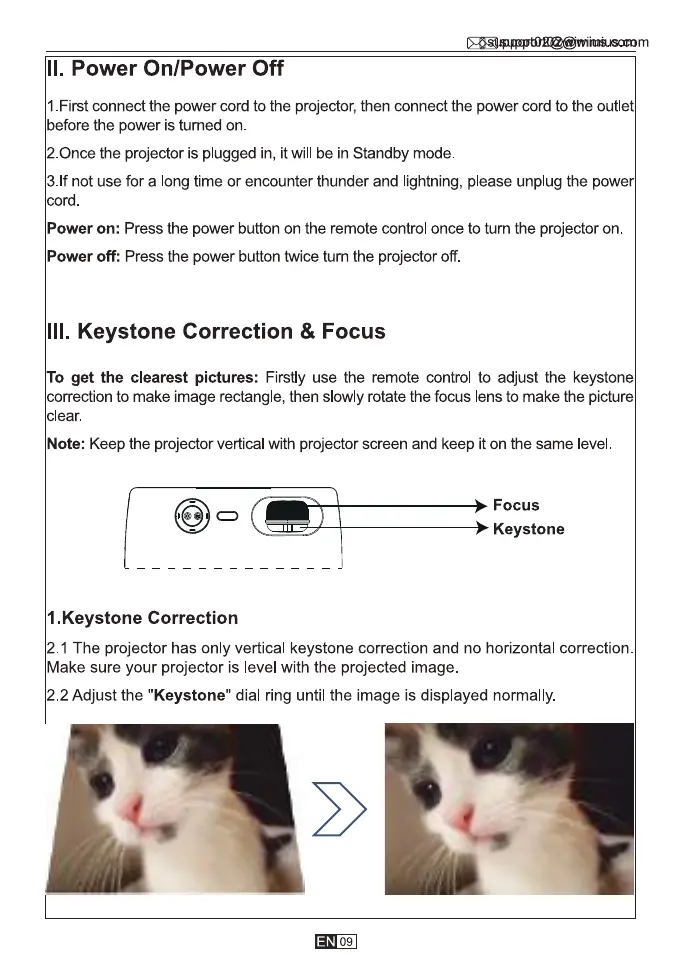
To get the clearest pictures: Firstly use the remote control to adjust the keystone
correction to make image rectangle, then slowly rotate the focus lens to make the picture
clear.
Note: Keep the projector vertical with projector screen and keep it on the same level
Focus
Keystone
1.Keystone Correction
2.1 The projector has only vertical keystone correction and no horizontal correction.
Make sure your projector is level with the projected image.
2.2 Adjust the "Keystone" dial ring until the image is displayed normally.
09.



 To Next Page