P C- RG B I N
HD M I 1
H D MI 2
P C- RG B I N
HD M I 1
H D MI2
4. Basic Operation
① Power on/o
A. Power on
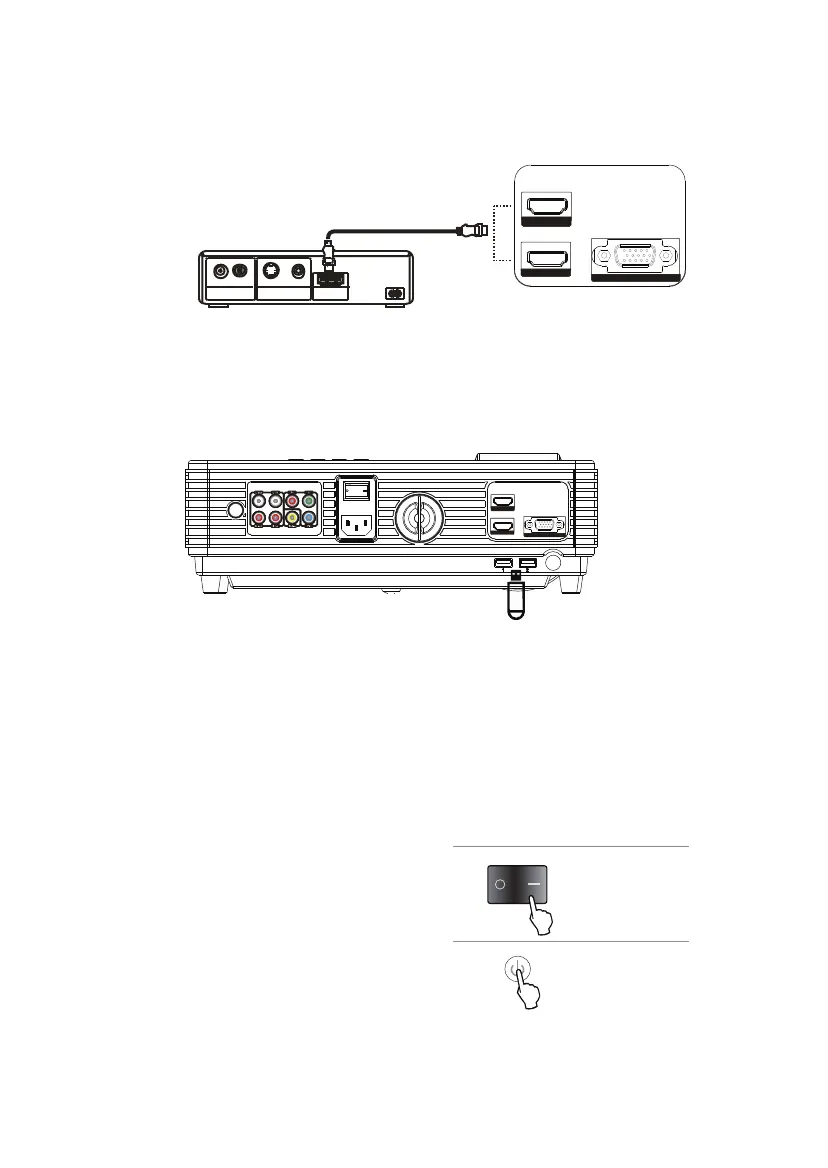
F. HDMI input
Connect to the devices with HDMI interface, including PC, laptop, DVD players, video
box, set top box and game console, etc.
G. Insert U disk
Insert the U disk or portable hard disk into the USB interface. The projector can
connect to two USB devices in maximum at the same time.
Note: The projector supports the portable hard disk under 500GB without external
power; And the portable hard disk above 500GB need external power supply.
After connect with the power cable and
power on, turn on the power switch on the
back of the projector, and then the indicator
turns in red. Press the Power button on the
control panel or remote control and the
indicator turns to green. The projector goes
into normal working mode.
B. Power o
Press the Power button on the control panel or remote control again, and the
projector will go to the state of standby. The indicator turns back into red.
Video player
HDMI Cable
L
AUDIO OUT
VIDEO OUT
HDMI OUT
R
S-VIDEO VIDEO
11



 To Next Page