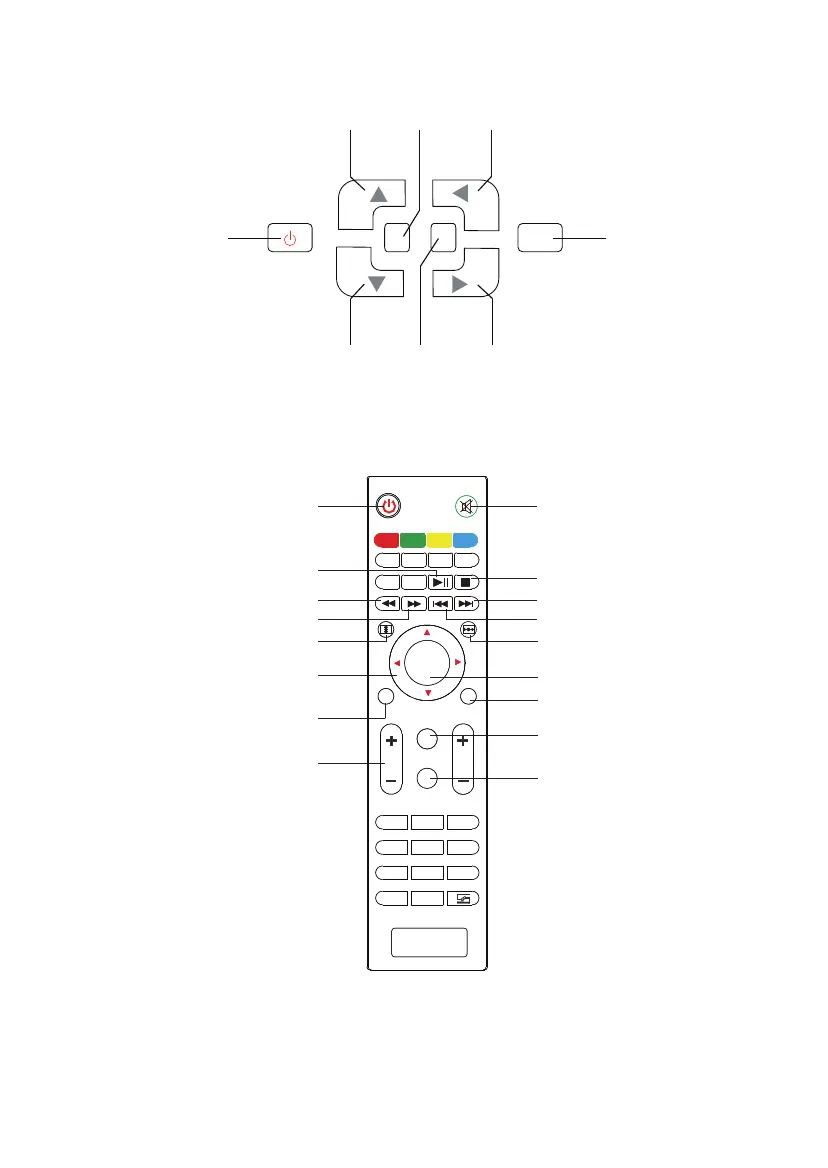
Panel de control
Control Remoto
Potencia OK
ARRIBA Menú Izquierda
Power: Power on/o
Play/Pause
Fast Backward
Fast Forward
Menu
Flip Vertical: Rotate the
image up or down
Direction key: Adjust the
specications when setting
Volume Up / Volume Down
Mute: Open / close the sound
Stop
Abajo Fuente Derecha
M S
OK
TTX
C H
TTX
1 2 3
4
5 6
7
8
9
0
OK
DT V
A-SCAN
SUPAGE
GOTO
EPG
REC
VOL
1 2 3
4
5 6
7
8
9
0
OK
DT V
M
S
EXIT
GOTO
16:9/4:3
EPG
REC
MO D E ZOOM
SCHEDULE
Next
Last
Flip Horizon: Rotate the image
left or right
OK: Conrm
Exit
Source: Source menu
16:9/4:3: Changes the
picture's aspect ratio
Nota: Cuando utilice el mando a distancia, haga que la parte frontal del mando a
distancia hacer frente al receptor remoto dentro del rango de 6 metros y 30 grados.
De lo contrario, es posible que no funcione.
66
WIMIUST6
LCD液晶投写
3000:1
1280*800(1920*1080対応)
40-150英寸
1.8〜4.5米
16:9/4:3
手動
16.7M色
≥20,000時間
LED光源:80W
5.8inch
コンポーネント端子*1
オーディオ出力*1(L/R)
オーディオ入力*1(L/R)
AV端子*1
HDMI端子*2
USB端子*2
VGA端子*1
120W
3W*2
±15度
AC110-240V50Hz/60Hz
ビデオフォーマット:MPEG1、MPEG2、MPEG4、RMVB、
AVI、MP4、WMV、FLV
オーディオフォーマット:WMV、MP3、M4A(AAC)、WAN:
ドルビ非対応
写真フォーマット:PNG、GIF、JPEG、JPG
TXTフォーマット:TXT
対応
325*250*110mm
+5℃~+35℃
-10℃~+60℃



 To Next Page