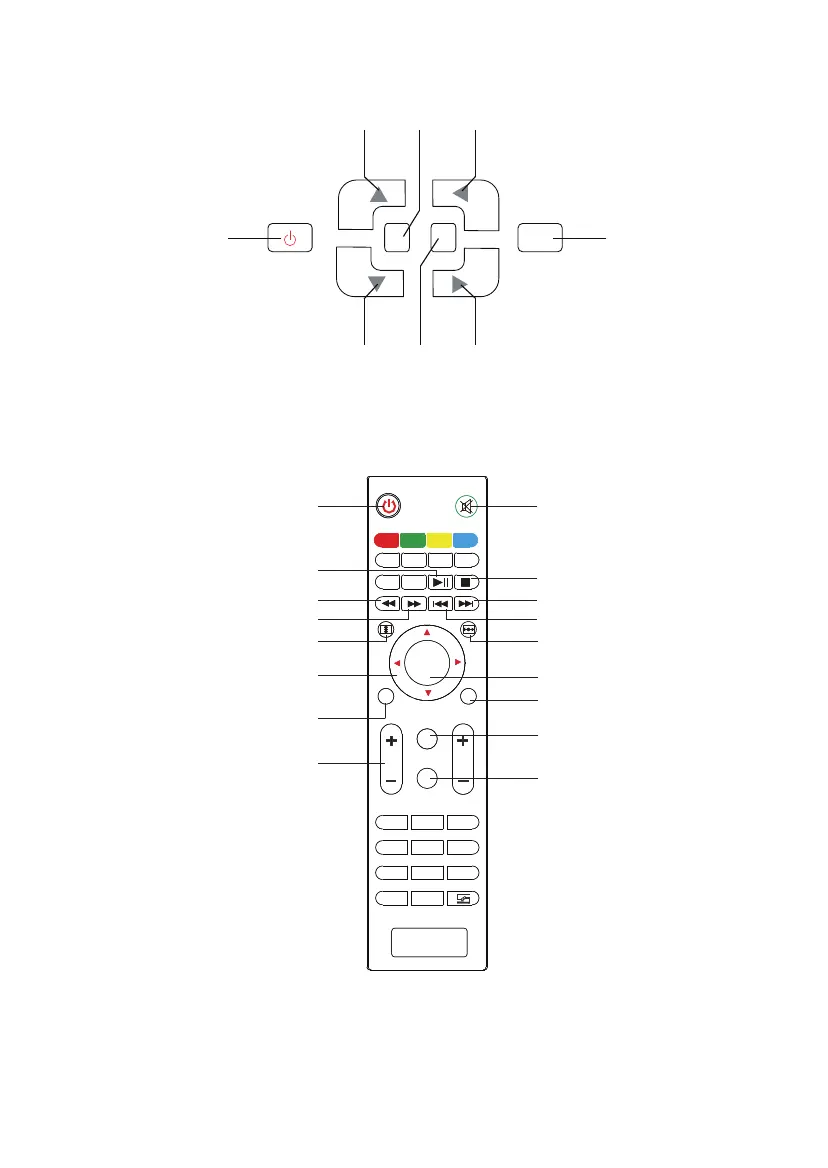
Control Panel
Remote Control
Power OK
UP Menu Left
Power: Power on/o
Play/Pause
Fast Backward
Fast Forward
Menu
Flip Vertical: Rotate the
image up or down
Direction key: Adjust the
specications when setting
Volume Up / Volume Down
Mute: Open / close the sound
Stop
Down Source Right
M S
OK
TTX
C H
TTX
1 2 3
4
5 6
7
8
9
0
OK
DT V
A-SCAN
SUPAGE
GOTO
EPG
REC
VOL
1 2 3
4
5 6
7
8
9
0
OK
DT V
M
S
EXIT
GOTO
16:9/4:3
EPG
REC
MO D E ZOOM
SCHEDULE
Next
Last
Flip Horizon: Rotate the image
left or right
OK: Conrm
Exit
Source: Source menu
16:9/4:3: Changes the
picture's aspect ratio
Note: When using the remote controller, please make front of the remote controller
face the remote receiver within the range of 6 meters and 30 degrees. Otherwise, it
is possible that it will not work.
5



 To Next Page