Get Printing
Replacing the Thermal Receipt Paper
The thermal receipt paper size is 58mm x
40mm.
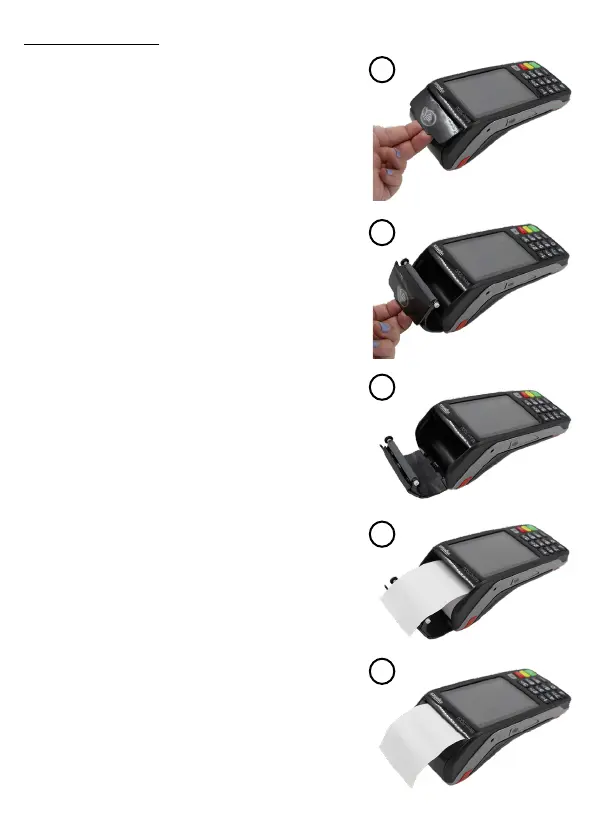
1. Open the receipt paper tray by gently
lifting the tab as shown in the images, the
tray will pop open allowing you to insert the
thermal receipt paper.
2. Take the new thermal receipt paper roll
and locate the end of the roll, this will be
stuck down to prevent the roll unraveling.
3. Insert the new paper roll and feed the
paper out the top of the tray, when holding
the unit with the keypad towards you the
paper should feed out away from the
Move 5000 terminal as shown in the
images to the right.
4. Close the lid of the receipt tray and
perform a test print by performing a logon
through the payment menu.
5. A small logon receipt should print with
the current date and time, if so you are
ready to start processing transactions.
Please ensure that the correct trading
name and address is printed at the top
of the receipt. If installed incorrectly no
text will be printed on the receipt, this is
because the thermal receipt paper will
only print on one side. Open the printer
tray and ip the paper roll over then
perform another logon test.
1.
2.
3.
4.
5.


 To Next Page