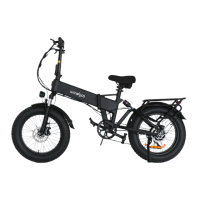
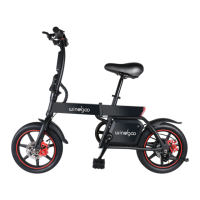
The device described in this manual is the Windgoo F21 Pro, an electric bicycle designed for urban commuting and recreational use. It is a folding e-bike, emphasizing portability and ease of storage.
Function Description
The Windgoo F21 Pro serves as a personal electric transport vehicle, offering pedal-assisted riding. It combines traditional cycling with an electric motor to provide assistance, making rides less strenuous, especially on inclines or over longer distances. The folding mechanism allows for convenient storage and transport, making it suitable for users with limited space or those who need to carry their bike in a car or public transport. The e-bike features a display that provides essential information to the rider, and it includes safety features like front and rear lights, disc brakes, and a horn.
Important Technical Specifications
Dimensions:
- Unfold Size: 1700*650*1200mm
- Folding Size: 970*500*760mm
- Tire Size: 20"*4.0 fat tire
Performance:
- Max Load: 120kg
- Maximum Speed: 25km/h
- Product Weight: 33kg
- Max Mileage (Pedal-assisted mode): 60-70km
- Operation Temperature: -10°C to 60°C
Electronics:
- Battery Type: Lithium-ion battery
- Battery Capacity: 12.5Ah
- Rated Battery Voltage: 48V
- Motor Power: 250W
- Rated Motor Voltage: 48V
- Charging Time: 6-7 hours
- Input Voltage: 48V 2A
- Display: Multi-functional LCD Display
- Front Light: Yes
- Brake method: Dual disc brakes
- Waterproof: IP54
Usage Features
Unboxing and Assembly:
The F21 Pro comes partially assembled. The unboxing includes the user manual, pedals, key, charger, and a wrench. Assembly primarily involves unfolding the bike, attaching the pedals, securing the front wheel, and adjusting the handlebar and seat. The manual recommends taking the new bike to a bike shop for assembly and inspection if the user is not confident in performing these tasks themselves.
Folding Mechanism:
The bike features a vertical folding clasp and a middle folding clasp. To unfold, users must carefully position their fingers between the latch and the frame, unfold the rear wheel/section, push the latch closed, and then open the kickstand to place the entire bike.
Pedal Installation:
Pedals are marked "R" (right-side) and "L" (left-side) and should be attached accordingly. The right pedal is threaded onto the right crank clockwise, and the left pedal counter-clockwise. Chain alignment should be checked after installation.
Start-up Procedure:
- Battery Security Check: Ensure the key port is aligned with the OFF icon, indicating the battery is off and locked onto the frame.
- Battery Pull-up: Carefully pull up on the battery to test that the lock is secure.
- Power On: Turn the F21 Pro on/off by inserting the key and turning it clockwise to the ON position. Locate the LCD Display (near the left handlebar grip).
- Power Button: Press and hold the lower power button for about 3 seconds to turn the F21 Pro on/off.
- Front Light: Long press the "+" button to turn on and off the front light.
- Riding Safely: Begin riding carefully, with proper safety gear and knowledge.
- Throttle Usage: The throttle is used by slowly and carefully pressing it downward. It should not be used unless the user is on the F21 Pro.
Battery Key Positions:
The battery key has three positions:
- ON, Locked to Frame: The battery is on and locked to the frame. The display power button will turn the bike on and off, but the battery cannot be removed.
- OFF, Locked to Frame: The battery is off and locked to the frame. No buttons or controls can be activated, the bike will remain off, and the battery cannot be removed.
- OFF, Unlocked from Frame (for battery removal): The battery is off, unlocked from the frame, and can be removed from the bike by moving or riding the bike.
Battery Removal:
To remove the battery, locate the seat quick release lever and turn it over the saddle. Press and rotate the UNLOCK icon key. Carefully slide the battery upwards and lift it off the frame.
Charging:
Before using the bike, the battery must be fully charged.
- Ensure the battery is off by rotating the key to align with the OFF icon.
- Remove the rubber cover on the charging port on the opposite side of the battery from the key switch.
- Plug the charger into the battery's charging port.
- Plug the charger into a power outlet. The LED charge status lights on the charger will turn red during charging and green when fully charged.
- Unplug the charger from the wall outlet first, then remove the charger output plug from the battery charging port.
- Maintain adequate ventilation during charging.
Display and Setting:
The multi-functional LCD display shows Battery Level, Speed (km/h), and TRIP distance.
Quick Setup (Smart APP):
Users can control the Windgoo F21 Pro and interact with it using the Windgoo Smart APP.
- Download "Windgoo Smart" App.
- Add a device: Open "Add Devices" to connect your F21 Pro. One device can only connect to one cellphone; remember to disconnect the device when switching to another phone.
Maintenance Features
Cleaning and Storage:
- Cleaning: For stains on the bike body, wipe them off with a damp cloth. For stubborn stains, use toothpaste and a toothbrush, then wipe them off with a damp cloth. Do not use alcohol, gasoline, kerosene, or other corrosive and volatile chemical solvents to clean the bike. Do not wash the bike with a high-pressure water spray. During cleaning, ensure the bike is turned off, the charging cable is unplugged, and the rubber flap is closed to prevent water leakage.
- Storage: The bike should not be exposed to temperatures below 14°F (-10°C) or above 140°F (60°C). In extremely humid environments, the interior of the bike may suffer condensation or water accumulation, which may damage the battery rapidly.
Battery Maintenance:
- Do not use other brands or models of batteries, as they may pose safety risks.
- Do not touch the contacts. Do not dismantle or puncture the casing. Keep the contacts away from metal objects to prevent short circuits, which may result in battery damage or even injuries and deaths.
- Use the original power adapter to avoid potential damage or fire.
- Mishandling of used batteries may do tremendous harm to the environment.
- After every use, fully charge the battery to prolong its life span.
- Try to avoid recharging the bike after completely exhausting the battery. If the battery power is low, charge it as soon as possible.
- Charge the battery every month if it is not in use.
Troubleshooting:
The manual provides a table of symptoms, possible causes, and most common solutions for various issues, including:
- Bike not working (insufficient battery power, faulty connections, battery not fully seated, improper turn sequence, broken brakes, blown discharge fuse).
- Irregular acceleration and/or reduced top speed (insufficient battery power, loose or damaged throttle, misaligned or damaged magnet ring).
- Motor not responding when the bike is powered on (loose wiring, loose or damaged throttle, loose or damaged motor plug wire, damaged motor).
- Reduced range (low tire pressure, low or faulty battery, riding with too many hills/headwind/braking/excessive load, battery discharged for long periods without regular charges, aged/damaged/unbalanced, brakes rubbing).
- Battery not charging (charger not well connected, charger damaged, battery damaged, wiring damaged, blown charge fuse).
- Wheel or motor makes strange noises (loose or damaged wheel spokes or rim, loose or damaged motor wiring).
Product Safety Notice:
- Always wear a helmet.
- Keep two keys properly.
- Make sure the electric bike has a full battery before taking it out to ride.
- Be aware of local road laws and follow them.
- Do not ride under the influence of drugs or alcohol.
- Respect pedestrians.
- Do not ride under wet conditions.
Warning Message:
The manual includes extensive warnings regarding:
- Prolonged exposure to sun or rain.
- Physical damage due to negligent care and extreme riding.
- Risk of severe injury or even death from loss of control, collisions, and falls.
- Modifying the product from original design.
- Exceeding posted speed limit and traffic laws.
- Touching the charging port directly.
- Keeping hands and body parts away from moving parts.
- Checking the electric bike over before riding.
- Checking the braking system.
- Checking all safety labels.
- Checking all axle guards, chain guards, or other covers/guards.
- Checking tire conditions.
- Max load of 264.5 lbs (120kg).
- Minimum user age of 18.
- Max speed of 25 km/h.
- Additional insurance.
- Consulting a company or broker for advice and consultation.
- Conserving electricity, using assist mode, and avoiding zero starting.
- Frequent braking, riding against the wind, carrying heavy loads, and riding with insufficient air pressure.
The lithium battery should be charged every 3 months during shelf life (keep SOC above 50%). It's best to maintain the battery at least 30% charge. Avoid leaving the battery completely discharged for an extended period. Do not overcharge or discharge.

 Need help?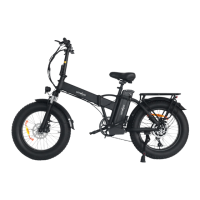

 To Next Page
 General