07
Battery Key Positions
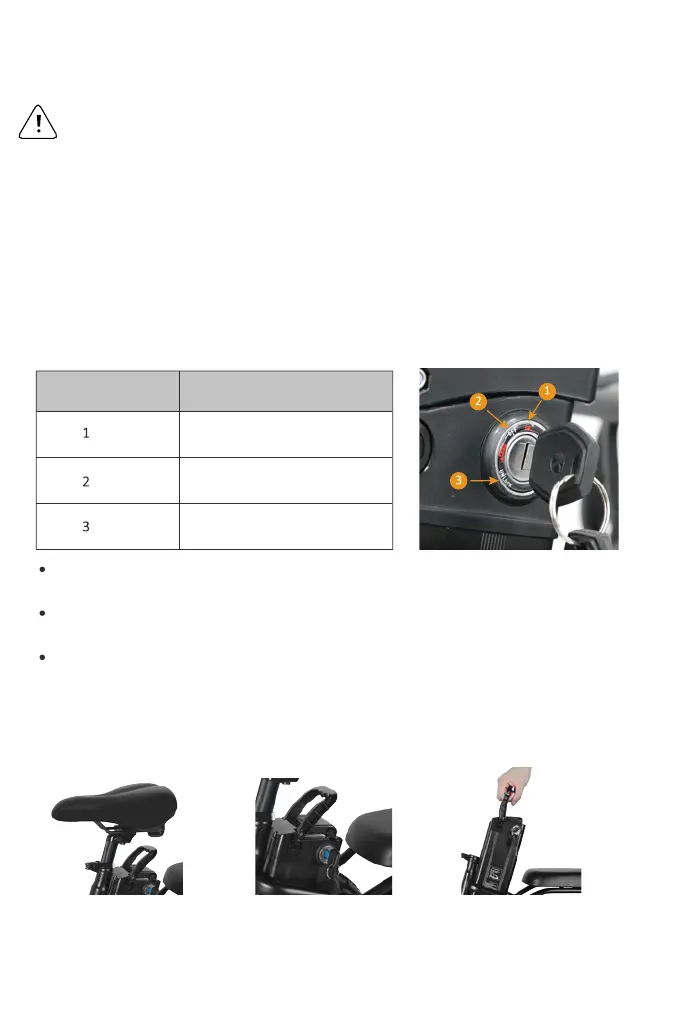
Familiarize yourself with the key port and key positions before riding the bike.The photo
below shows the key port aligned in key position 1, in line with the ON icon. In key position
1, the battery is in the "on" position, with the battery locked to the frame, and the key can't
be removed.
NOTICE: You have to press the key then you can switch to unlock position.
Anytime the battery is in key position 1, (on, locked to the frame) the display power button
will turn the bike on and off, but the battery cannot be removed.
lf the battery is in key position 2,(off, locked to the frame) no buttons or controls can be
activated, the bike will remain off, and the battery cannot be removed.
Anytime the battery is in key position 3, (off, unlocked from the frame) the battery must be
removed from the bike before moving or riding the bike.The key can be removed from
battery.
Remove the battery
For your convenience, the bike battery can be removed.
Locate the seat quick
release lever and turn
over the saddle.
Press and rotate the key to
the UNLOCK icon.
Carefully slide the battery
upwards and lift it off the
frame.
Key Position/lcon Directions
ON, Locked to Frame
OFF, Locked to Frame
OFF, Unlocked from Frame
(for battery removal)
Do not use the throttle while dismounted.Avoid accidental
application of the throttle while dismounted; anytime you
are moving the F1 while dismounted, ensure the F1 is
powered off to prevent accidental application of the throt-
tle.


 To Next Page