06
Start-up procedure
After the F21Pro has been properly assembled according to the assembly video, all compo-
nents are secured correctly, and you have read this entire manual, turn on the F21Pro and
select a pedal assist level following the steps below:
1. Test the battery lock security.Ensure the key port is aligned with the OFF icon, which
indicating the battery is off and locked onto the frame mount.Carefully use both hands to pull
up on the battery to test that the lock is secure.
2. Turn the F21Pro on/off.Insert the key and turn clockwise to the ON position.Locate the
LCD Display (near the left handlebar grip).Press and hold the lower power button for about
3 seconds to turn F21Pro on/off.
3. Front light:Long press the "+" button to turn on and off the front light.
4. Begin riding carefully. With the proper safety gear and rider knowledge, you may now
operate your F21Pro.
5. The throttle is used by slowly and carefully press the throttle downward. Do not use the
throttle unless you are on the F21Pro.
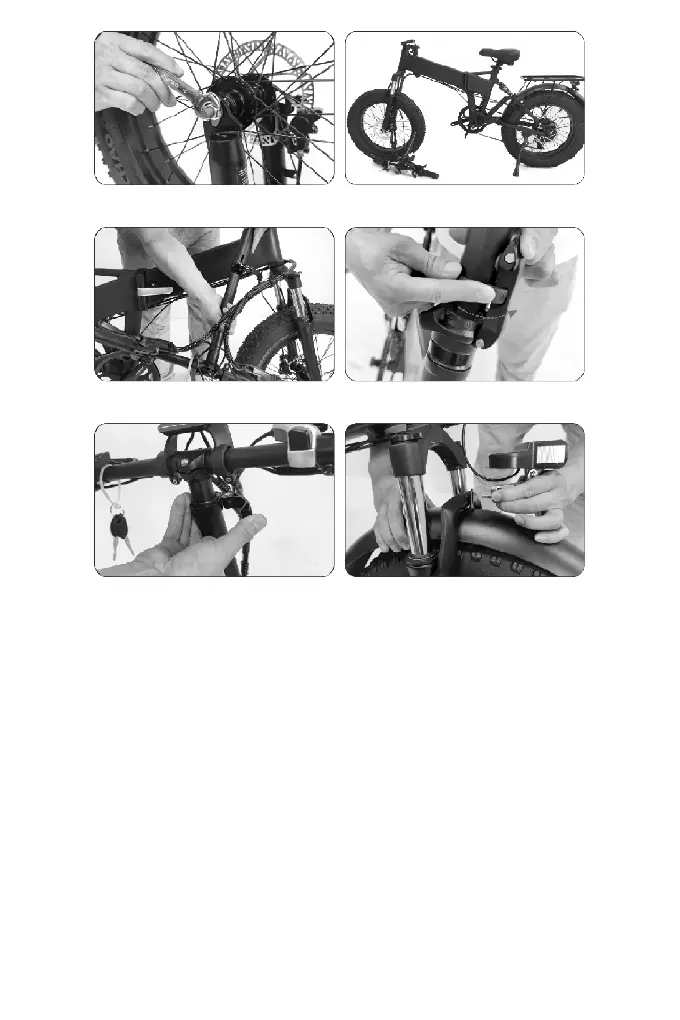
5. Tighten the nuts on both sides. 6. Turn it over again.
7. Insert the upper part of the column
into the lower part.
8. Stand the steering column and lock the
column folding quick release lever.
9.Lock closure. 10. Use the bolt to join the headlight.fork arch
and fender.


 To Next Page