Camera
TheWingtraOnecanbeequibedwithdifferentcameraconfigurations.Pleaserefertotherespective
sectionofthechapterwhichmatchesyourequipment.
1. WingtraOneQX1
2. WingtraOneRX1R2
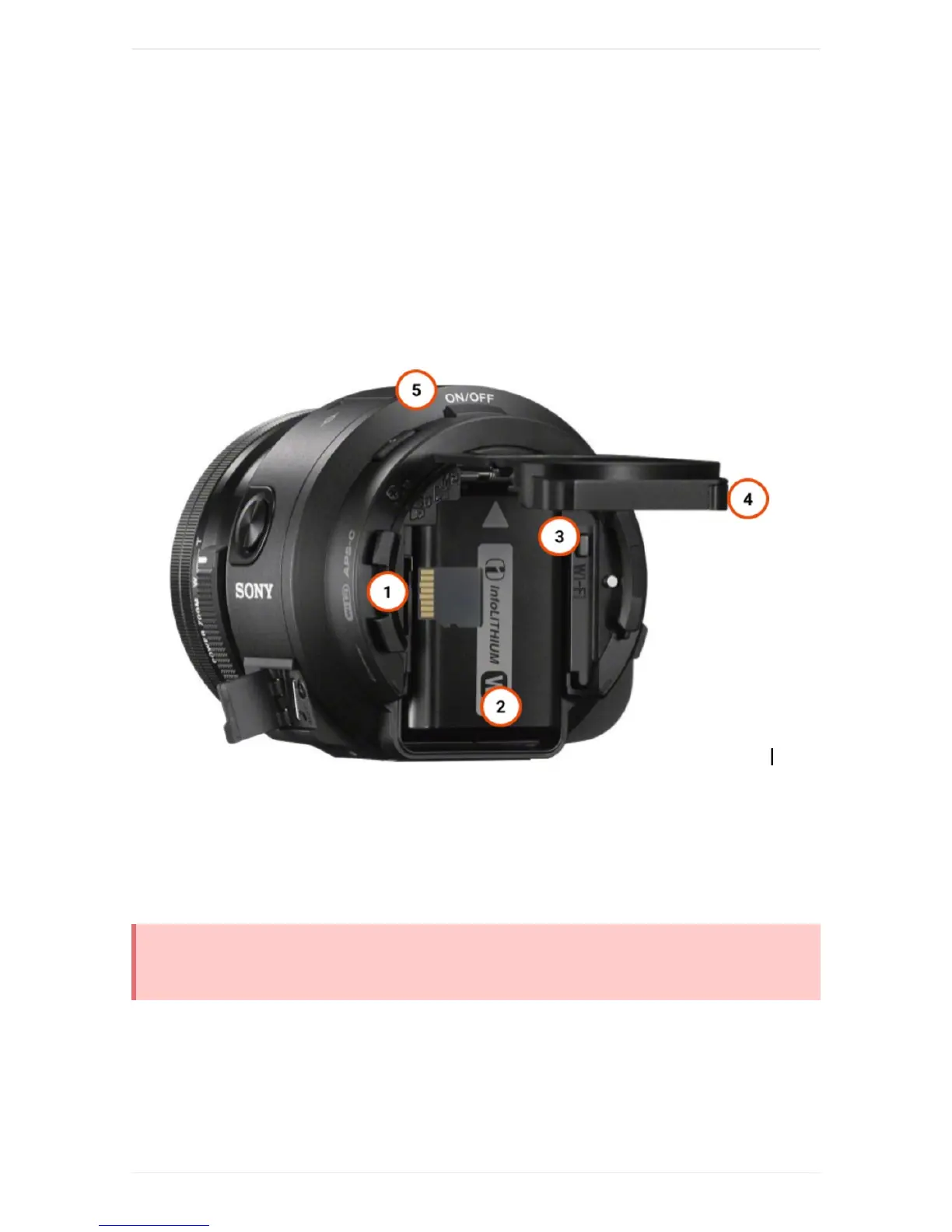
WingtraOneQX1
1. SDcardslot
2. Batterycompartment(thecameraispoweredexternallyfromWingtraOne)
3. Wi-Fibutton
4. Closurelid
5. Poweron/offbutton
TheSDcardcanbeinsertedinthewrongdirection-alwayscheckifyouinsertitasdisplayedonthe
figure.
CheckandAdjustCameraSettingsQX1
Inmostcases,thedefaultcamerasettingsshouldbefine.Ifyouwanttochangethesettings,youhaveto
powerWingtraOne,manuallyswitchonthecamera(pressOn/Offbuttononcamerahousing),openthe
PlayMemoriesapponyourtablet,andconnecttothecamera(Seethetroubleshootingsectionifitdoes



 To Next Page