CreateaNewFlightPlan
Tostartplanningaflight,youhaveto"CreateanewFlightPlan"fromthewelcomemenuofWingtraPilot.
YoucanopenthewelcomemenubyclickingontheorangeWingtraicononthetopleft.Followthe
interfacetosetupthehigh-levelsettingsoftheFlightPlan—Doyouwanttostartfromscratchorbased
onanexistingFlightPlan?DoyouuseanRGBormultispectralsensor?Clickonfinishandyouwillenter
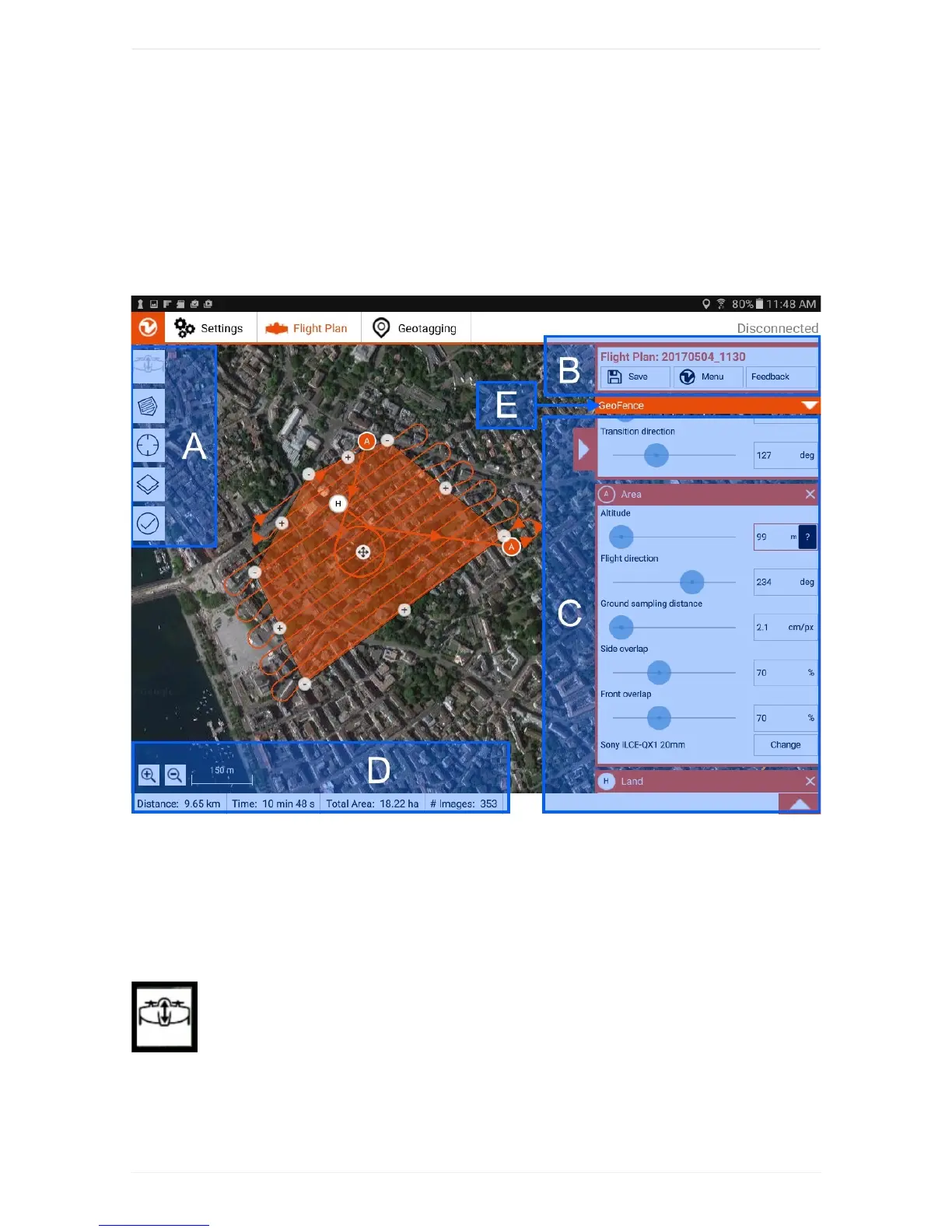
theflightplanningdisplayofWingtraPilot:
Theflightplanningprocedureitselfcontainsthesesteps:
1. SetHome
2. AddArea(s)
3. (Optional)AdjustGeofence
Step1SetHomefortakeoffandlanding
AddHomebyclickingonthefirstbuttonontheleft(A).Ifyouareonthefieldandthe
WingtraOneispoweredandconnectedtothetablet,HomeissettoWingtraOne'scurrentposition
automatically.Ifyouplantheflightbeforehandinoffice,youcanmoveittotheplacewhereyouintendto
takeoff—itwillbeadjustedtoWingtraOne'slocationonceyouareonthefield.Adjust"transitionaltitude"
and"transitiondirection"ontherightside(C)suchthatWingtraOnewillnotcollidewithanyobstacle.



 To Next Page