INSTALLATION OPERATION
1413
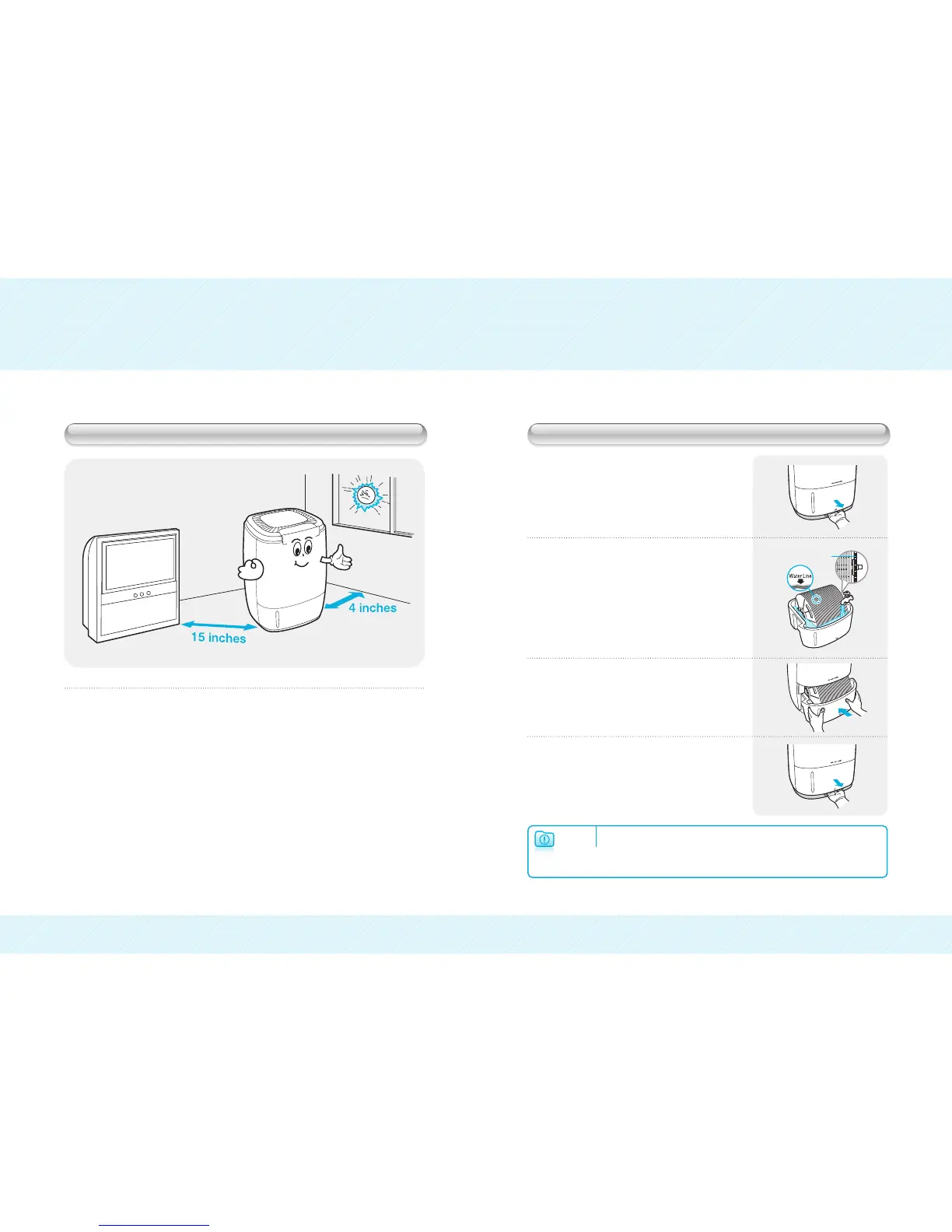
❷ Fill the water tank with cool tap water
up to the indicator line on the inside
of water tank.
❸ Replace the water tank by sliding it
back into the unit until you hear it click
into place.
❹ Gently slide down the front panel and
make sure that it is seated properly and
lines up correctly.
❶ Slide water tank out, by using the
release lever located below the water
tank on the front of the unit.
Selecting a Location
Do not install the unit under direct sunlight.
Long Exposure to direct sunlight can cause defects.
HumidiPür
TM
‚ must be installed and operated on an even surface.
Vibrations and noise can occur on soft or non-flat surfaces.
Product must be installed approximately 10cm/ 4 inches away from
the wall and 30-40cm/ 15 inches from other electronic appliances.
Before operating the HumidiPür
TM
, remove any plastic bags and
polyfoams from outside and inside the unit.
Set-Up Instructions
▶ Make sure to unplug the power cord before filling the unit with water.
▶ We recommend to use filtered water to prolong the life of the product.
▶ Use cautions when moving the unit filled with water.
Warning
Saw Tooth Gear Disc


 To Next Page