OPERATION
15 16
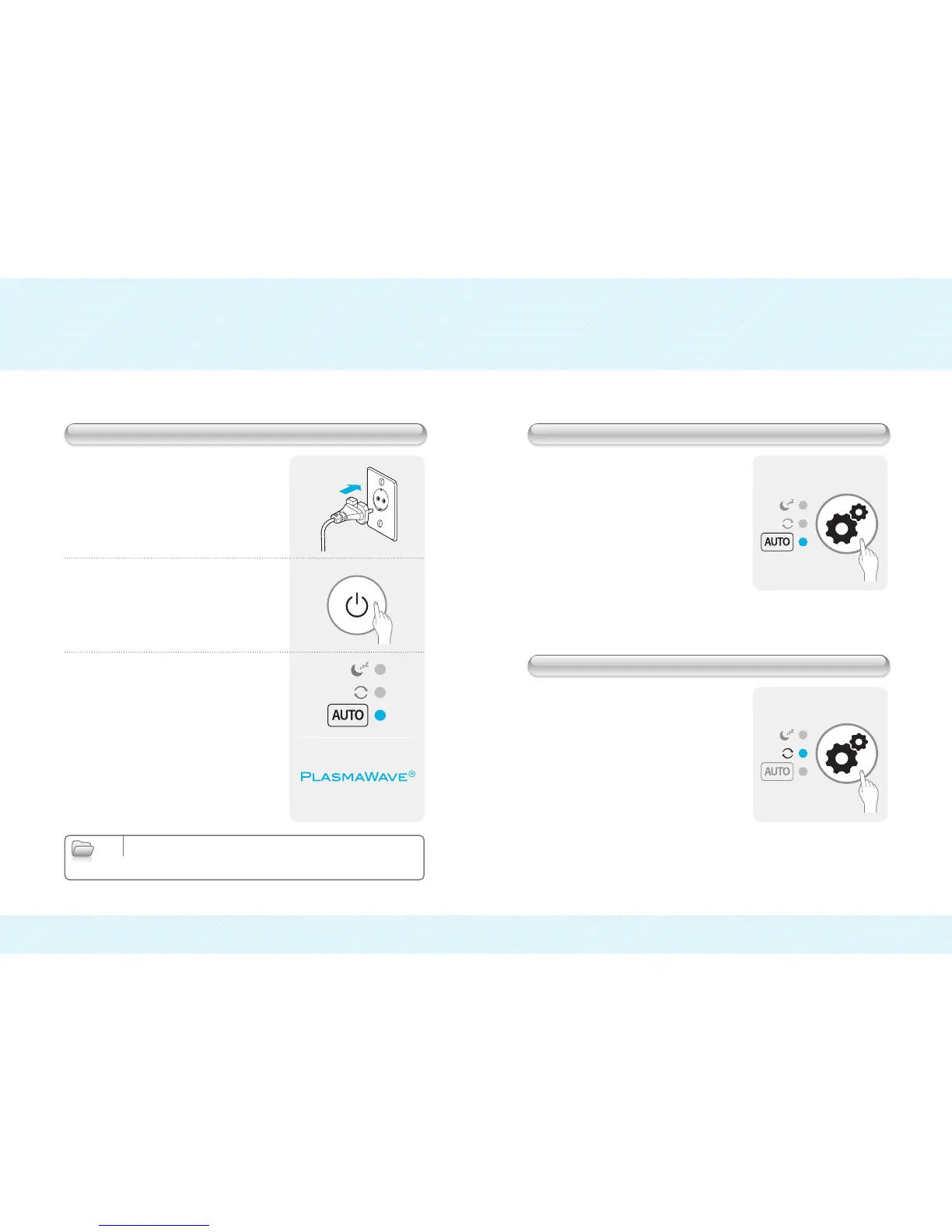
❶ Plug the power cord into a power
outlet.
❷ Push the POWER button.
❸ The unit will start on AUTO MODE and
the PlasmaWave
®
function will be ON.
● Push FUNCTION button to select
Auto Mode
AIR FLOW:
When ambient humidity is sensed at less that
60%, the unit will operate at “High” fan speed.
When the ambient humidity is sensed at greater
than 60% the unit will operate at “Low” fan speed.
CLEANING DISCS:
When ambient humidity is sensed at greater than
75% humidity the cleaning discs will stop spinning.
When ambient humidity is sensed at less than
60%, the disc resumes to circulate.
● Push the FUNCTION button to select
Continuous Mode.
Continuous Mode Indicator will illuminate.
The FUNCTION button will cycle the unit
between the following:
Auto Continuous Sleep
Before Turning On Auto Mode
Continuous Mode
Note
▶A soft buzzing or clicking sound may occur during operation;
if this is uncomfortable, you can turn off the PlasmaWave
®
feature by using the
PlasmaWave
®
ON/OFF button.


 To Next Page