Operation | Operating the air cleaner
12
English
HR 1000
6.
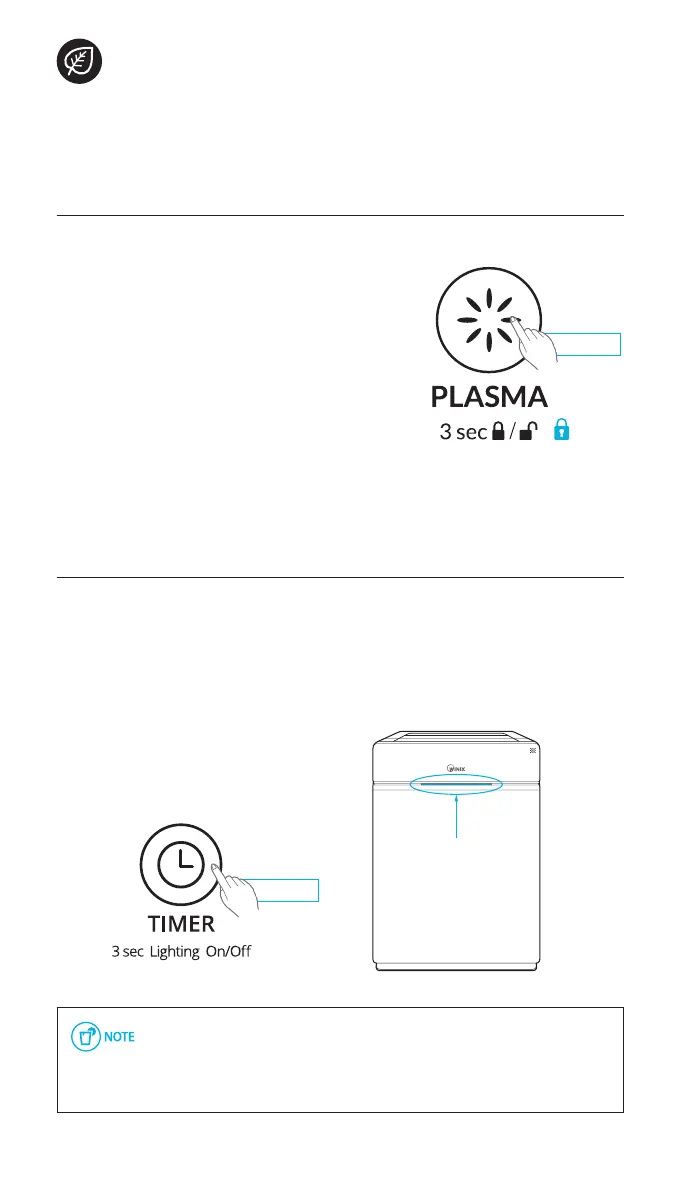
Child Lock
This feature prevents children from tampering with the control panel.
Press and hold the Plasma/Child Lock
button for 3 seconds to enable or
disable the feature.
x
When the Child Lock indicator is lit, the
feature is enabled.
x
When Child Lock is enabled, the control
panel is locked and the settings cannot
be changed.
x
To disable, press and hold the Child Lock
button again for 3 seconds.
3 seconds
7.
Air Quality LED Light
The Air Quality LED light may be turned on or off.
To turn the Air Quality LED light on or off,
press and hold the Timer button for 3 seconds.
x
When on, the LED light will indicate the
current indoor air quality according to
three levels
BLUE (good), AMBER (fair), RED (poor)
▶
When Auto Mode is enabled the Air Quality LED light may or may not
be on, depending on the amount of ambient light in the room.
▶
When Sleep Mode is activated, the Air Quality Indicator light is
turned off.
CHILD LOCK, AIR QUALITY LED
3 seconds
▶
Air Quality Indicator


 To Next Page