6
Set up | Installation
English
HR 1000
3 Anti-microbial
True HEPA filter
2
CD Carbon
filter
1 Pre-filter
INSTALLING THE FILTERS
This product comes with all of the required filters. The protective plastic wrap must be
removed from the filters before use.
Operating the unit without removing the plastic wrap may result in product failure.
Unplug and make sure the unit is turned off before installing filters.
The unit will automatically power off when front panel is opened.
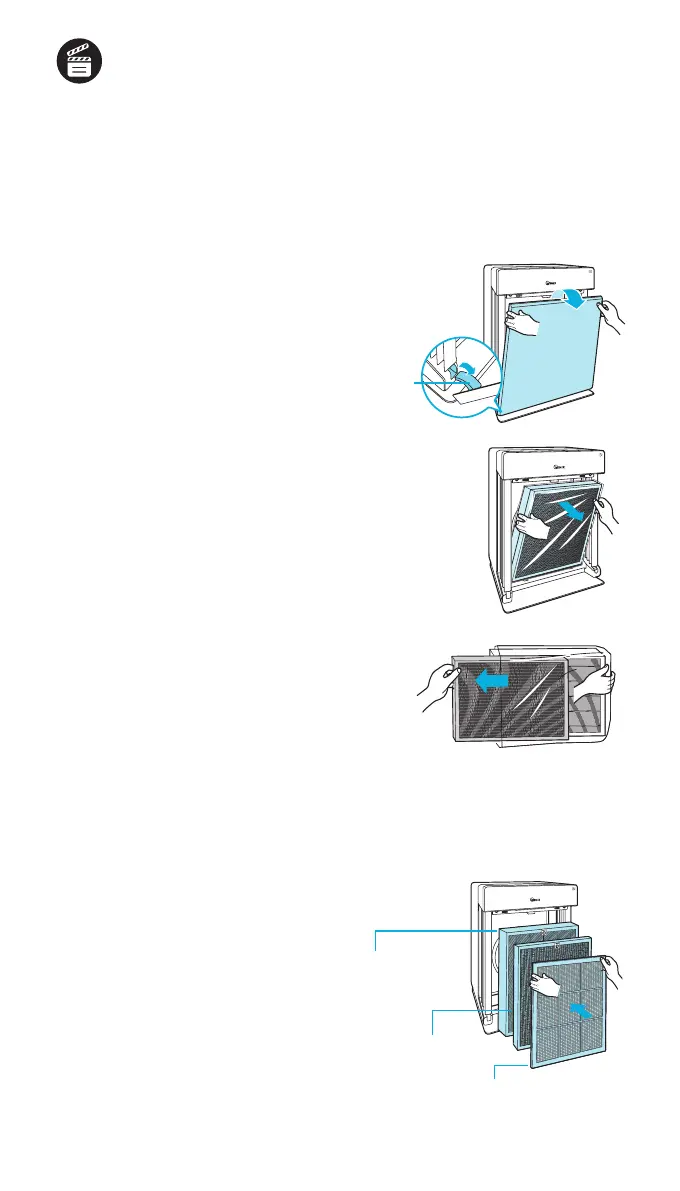
Remove the front panel by grasping
its upper edge and gently pulling
towards yourself.
x
To remove the front panel, the latch
at the lower edge of the panel must
be released from its position.
Latch
Remove the filters from the unit,
they are protected inside a plastic
wrap.
Remove filters from protective
plastic wrap.
x
Operating the unit without removing
lters from plastic may cause abnormal
noise, deformation, or re as a result of
overheating.
Install the filters until they fit
securely in place.
Filters must be installed in this order:
3 Anti-microbial True HEPA filter
(rear)
2 CD Carbon filter
(middle)
1 Pre-filter
(front)
x
To install the pre-lter, insert
bottom tabs into the slots on either side
of the lower part of the unit, then rotate
upward to insert the upper tabs into the
slots at the top part of the unit until both
sides audibly click into place.


 To Next Page