Care and Maintenance
19
English
HR 1000
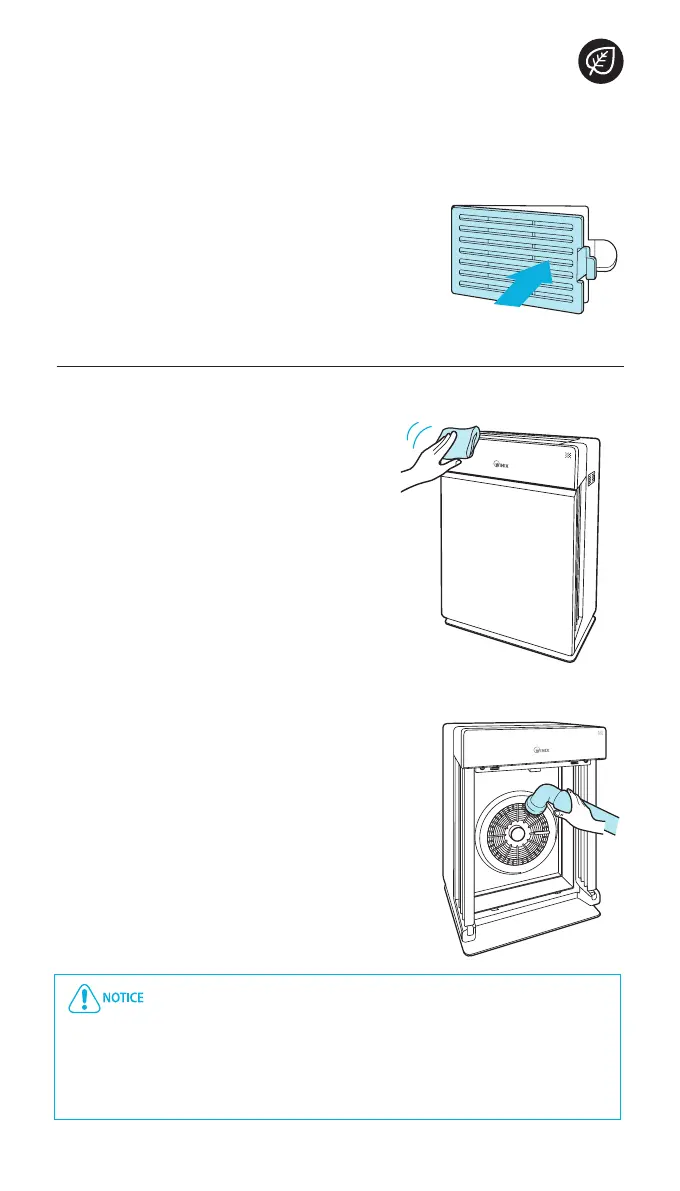
Close the Dust Sensor cover.
x
The Dust Sensor cover may be cleaned using
a vacuum cleaner.
Cleaning the exterior and interior
Cleaning the exterior
Wipe with a soft damp cloth using room
temperature water. Afterwards, wipe it
down with a clean dry cloth.
x
For optimal performance, clean the front
panel 1-2 times a month.
Cleaning the interior
Open the front panel and clean the
interior with a vacuum cleaner.
x
For optimal performance, clean the interior
1-2 times a month.
When cleaning the unit, always unplug the power cord first and
then wait until the unit has cooled off.
Never disassemble, repair or modify this unit yourself
Do not use flammable sprays or liquid detergents
Do not allow children to clean or maintain the unit
Before cleaning or maintaining, ensure unit is off and unplugged
CLEANING CARE
5.


 To Next Page