SECTION 12 –
MISCELLANEOUS
12-8
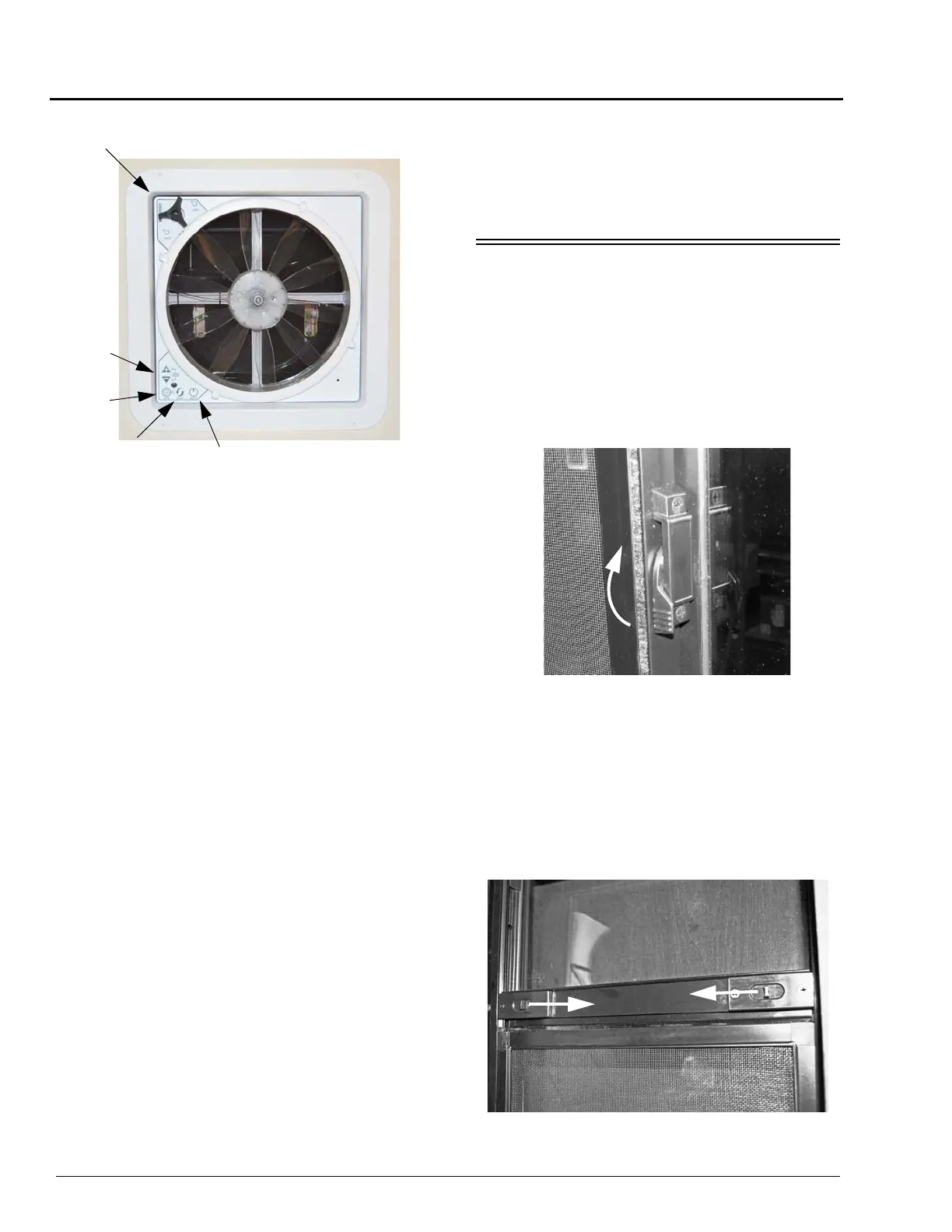
• ON/OFF – Press to turn the fan on or off. The
vent lid will open automatically when the fan
is turned on and close when the fan is turned
off.
• IN/OUT – Press to reverse the direction of the
fan. The fan will slow down and pause for two
(2) seconds before resuming operation in the
opposite direction.
NOTE: In Auto Mode the fan direction is
automatically positioned to Exhaust, but
may be overridden and changed to
Intake by depressing the button.
• AUTO – Press to enter Auto Mode. You will
hear three (3) quick beeps to confirm the fan
is in Auto Mode. To exit Auto Mode, press the
On/Off button.
• ARROW – In Auto Mode press the +/- arrow
buttons to adjust thermostat temperature up or
down. Press the +/- arrow buttons at the same
time to open or close the vent lid.
NOTE: For best results, close all other roof
vents, windows, and doors, then open
one (1) window the farthest distance
from the roof ventilator. The fan speed
selector allows you to control the amount
of circulation you need at any time.
Further Information
See the power ventilator manufacturer’s
operating instructions supplied in your InfoCase
for further instructions, care, and cleaning
information.
WINDOWS
Horizontal Slider Windows
Swing the latch handle straight out or up
(depending on the style of window). Grasp the
sliding window edge frame and slide the window
to the side. Ensure the latch is open before trying
to slide the window closed.
Vertical Slider Windows
Vertical windows have spring-loaded catches
on both sides of the window that pop out to hold
the window in its fully raised position. Press both
catches inward while opening and closing the
window.
Power Roof Ventilator
Arrow
Auto
In/Out
On/Off
Dome Crank



 To Next Page