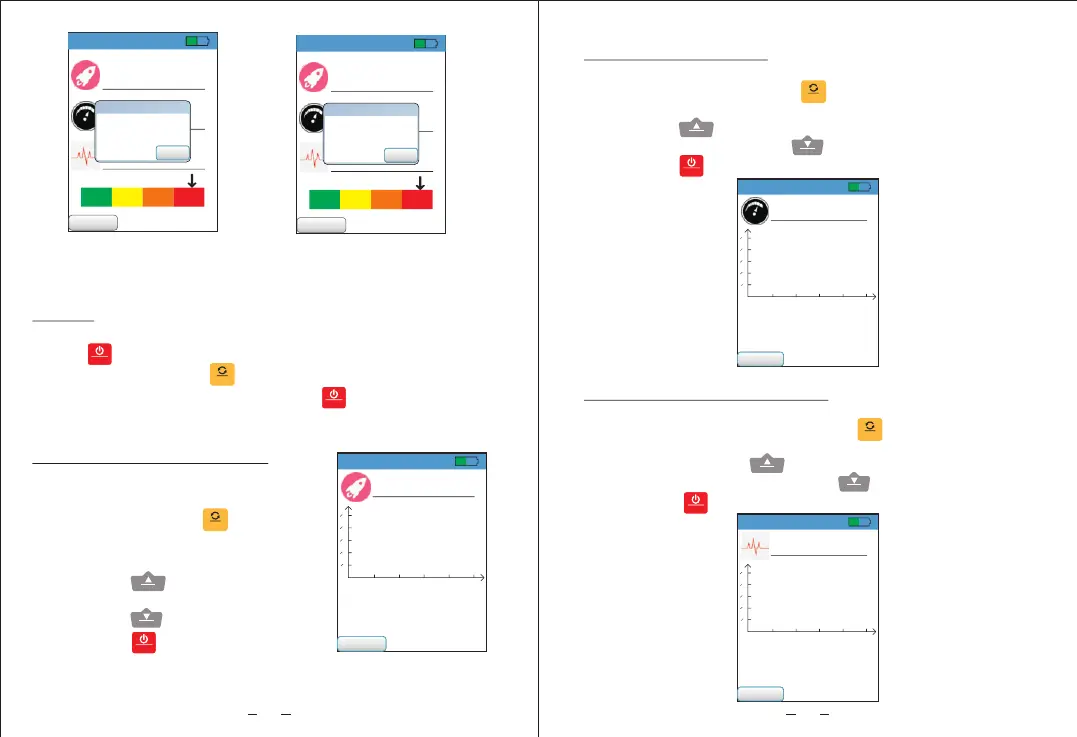
Success prompt of
data storage
Indicator of full memory
52%
20Hz~1KHz
Mode:Lo Freq
12.8
2
m/s
30.2
mm/s
0.112
mm
Menu
OK
Tips
Full storage!
8
52%
0.0
2
m/s
2
m/s
Max:0.0 A :0s
Min:0.0 Dec-t:0s
Avg:0.0 Dif:0.0
cc-t
1 2 3 4 5
s
0.5
0.4
0.3
0.2
0.1
Menu
Mode:Lo Freq
20Hz~1KHz
Acceleration interface
5. Acceleration measurement
Enter menu interface, press
up/ down button to select acceleration
measurement, press “ ” button to
enter the interface. This interface also
has graph analysis function.
Short press “ ” to switch high/low
frequency mode measurement,
short press “ ” to save data and
short press “ ” to return to the
previous interface.
OK
LO/H I
SAVE
MENU
4. Menu
Full display interface appears after powering on,
press “ ” button to enter menu interface, press up/ down
button to select, press“ ” button to enter the
corresponding interface. Short press“ ” button again to
return to the previous screen.
MENU
OK
MENU
9
52%
0.0
mm/s
mm/s
Max:0.0 Acc-t:0s
Min:0.0 Dec-t:0s
Avg:0.0 Dif:0.0
1 2 3 4 5
s
0.5
0.4
0.3
0.2
0.1
Menu
Mode:Lo Freq
20Hz~1KHz
6. Speed measurement
Enter menu interface, press up/ down button to select
speed measurement, press“ ” button to enter the
interface. This interface also has graph analysis function.
Short press“ ” to switch high/low frequency mode
measurement, short press“ ” to save data and
short press“ ” to return to the previous interface.
OK
LO/H I
SAVE
MENU
52%
0.000
mm
mm
Max:0.000 Acc-t:0s
Min:0.000 Dec-t:0s
Avg:0.000 Dif:0.000
1 2 3 4 5
s
0.5
0.4
0.3
0.2
0.1
Menu
Mode:Lo Freq
20Hz~1KHz
7. Displacement measurement
Enter menu interface, press up/ down button to select
displacement measurement, press“ ” button to enter
the interface. This interface also has graph analysis
function. Short press“ ” to switch high/low frequency
mode measurement, short press“ ” to save data and
short press “ ” to return to the previous interface.
OK
LO/H I
SAVE
MENU
52%
20Hz~1KHz
Mode:Lo Freq
12.8
2
m/s
30.2
mm/s
0.112
mm
Menu
OK
Tips
Oper ation Success!


 To Next Page