10
8. View files
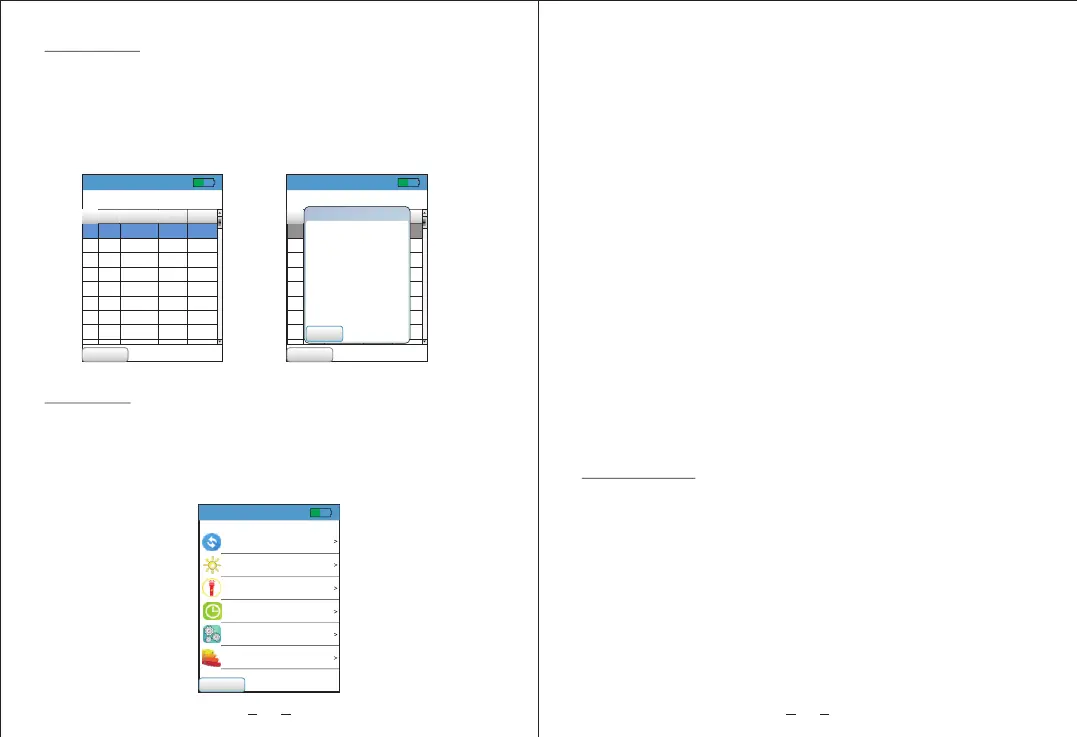
Enter menu interface and select file item, the saved data
can be viewed under file interface; press up/down button to
scroll, long press for fast reading. Press OK button, a window
showing up with operations like delete this line/delete this
group/delete all/view acceleration line chart/view speed line
chart/view displacement line chart, and memory margin is
displayed on the lower right corner.
9. Settings
Enter menu interface and select setting item. Language
setting / screen brightness / flashlight / shutdown time /
restoring factory setting / machine level are displayed under
setting interface, among which settings of language switching,
screen brightness and shutdown time can be memorized.
52%
Menu
Selet language
Screen light
Flashlight
Shut down time
Factory reset
Machine size
[English]
Low
0 minute
11
a. Language selection;
Users can choose English/Chinese interface.
b. Screen brightness;
Users can choose low brightness / medium brightness /
high brightness.
c. Flashlight;
Users can choose to turn flashlight on/off.
d. Shutdown time;
Users can set automatic shutdown time from 0 min to 9 mins.
0 min means that automatic shutdown is prohibited.
e. Restore factory settings;
Users can choose whether to restore factory settings.
f. Machine grade;
four levels to choose from:
Small
Medium
Large hard base
Large soft base
10. Calibration
a. Select calibration interface to enter.
b. Press up/down button to select item and press OK button
to enter.(Note: There is no order for calibration)
Item 1: Zero calibration,
Item 2: Acceleration calibration,
Item 3: Speed calibration,
Item 4: Displacement calibration,
Item 5: High frequency calibration,
Ⅰ: (P<15kW)
Ⅱ: (15KW<P<=75KW)
Ⅲ: (P>75KW)
Ⅳ: (P>75KW)
0m/s2,0Hz
50m/s2,160Hz
50mm/s,160Hz
0.2mm,160Hz
10m/s2,2000Hz
52%
View the storage
Menu
Remain 56%
20Hz~1KHz
Line
1
2
3
4
5
6
7
8
Group
ACCELER ATE
Velocity
Distance
1
0.9
17.3 0.939
1
7.9
21.3 0.863
1
2
2
2
2
2
7.8
0.9
7.3
7.8
2.9
6.9
17.9
18.3
20.2
17.9
5.0
14.3
0.889
0.937
0.939
0.883
0.330
0.690
52%
View the storage
Menu
Remain 56%
20Hz~1KHz
Line
1
2
3
4
5
6
7
8
组
加速度 速度
Distance
1
0.9
17.3 0.939
1
7.9
21.3 0.863
1
2
2
2
2
2
7.8
0.9
7.3
7.8
2.9
6.9
17.9
18.3
20.2
17.9
5.0
14.3
0.889
0.937
0.939
0.883
0.330
0.690
Close
Options
Delete current row
Delete current group
Delete all data
View accelerate chart
View velocity chart
View distance chart


 To Next Page