7
4
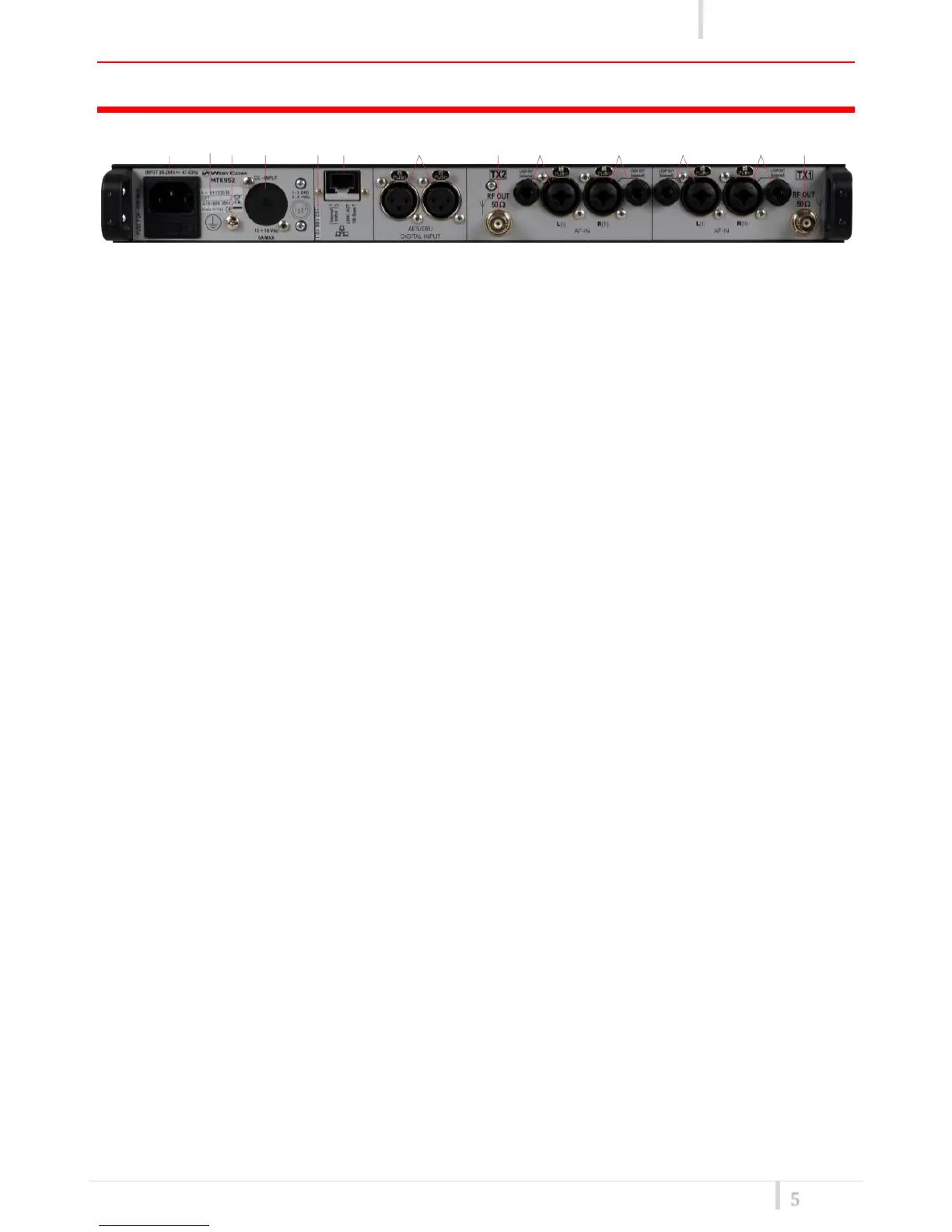
❶ AC Power Plug AC mains power input, IEC Connector 90-264 Vac
❷ Product label with Serial Number, Options and Bandwidth
❸ Ground point To connect the rack to ground
❹ DC Power Plug (optional) DC power input, 10-16Vdc, Max 6A
❺ label with IP address of Ethernet interface configured on the MTK952 (it can be modified using
the Manager application)
❻ Ethernet socket (RJ45) for connection to a network or computer
❼ AES/EBU (XLR 3 pin connector) for digital audio input TX1 and TX2
❽ Antenna output TX1 (RF output) BNC socket
❾ Audio input left TX1 (balanced AF input) ¼” (6,3mm) jack/XLR-3 combo socket and ¼” jack
❿ Audio input right TX1 (balanced AF input) ¼” (6,3mm) jack/XLR-3 combo socket and ¼” jack
⓫ Audio input left TX2 (balanced AF input) ¼” (6,3mm) jack/XLR-3 combo socket and ¼” jack
⓬ Audio input right TX2 (balanced AF input) ¼” (6,3mm) jack/XLR-3 combo socket and ¼” jack
⓭ Antenna output TX2 (RF output) BNC socket



 To Next Page