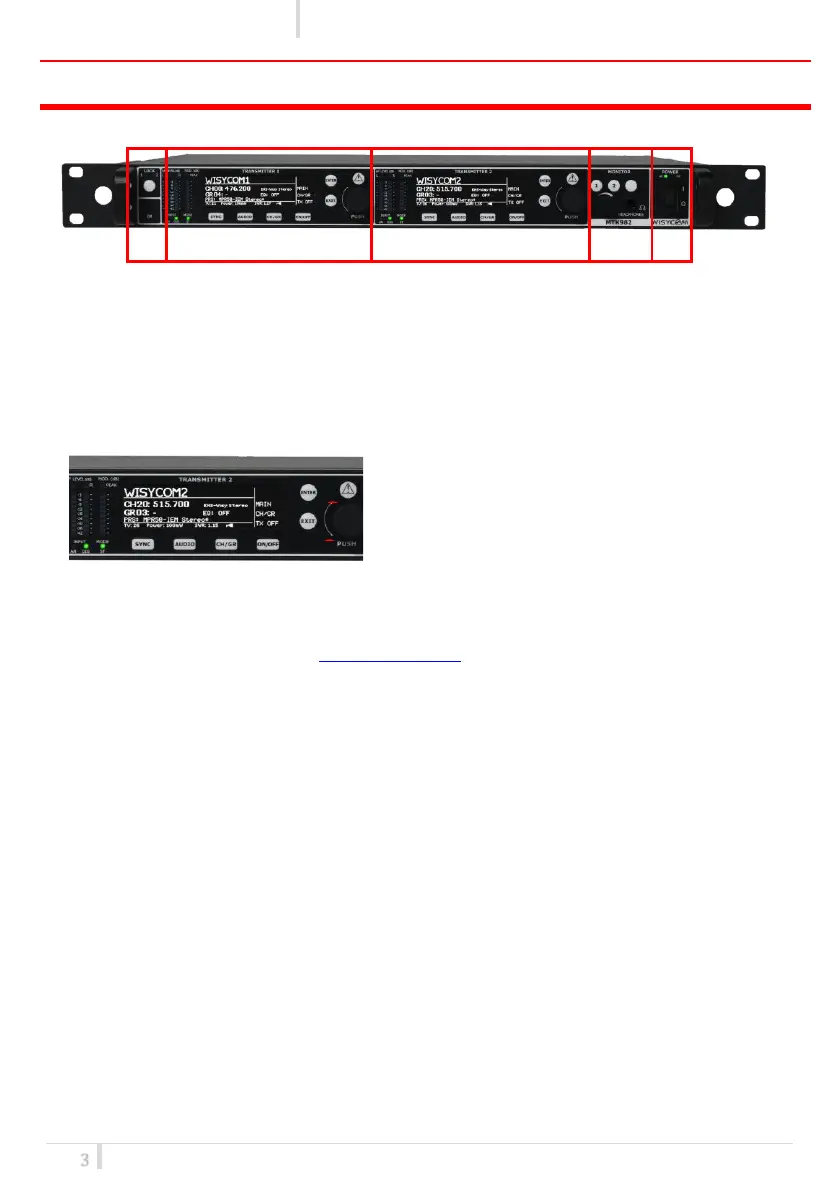
FRONT PANEL CONTROL AND FUNCTIONS
MTK982 allows an easy and quick configuration using buttons, push knobs and displays.
The front panel is functionally divided in the following section:
A – LOCK and IrDA
Lock button allows to lock editing of one of both the transmitters.
Put the receiver in front to the IrDA interface to synchronize the devices.
B and C - TRANSMITTER1 and TRANSMITTER2
Transmitter 1 and 2 configuration and monitor of
radio/audio levels.
❶ Audio and Modulation indicators
• two LED bars for the AF levels (L=left &
R=right levels): they can show AF input levels or modulation levels (after the pre-
emphasis and compander phases, before the modulation phase) according to the AF
level meter parameter on Audio source menu
• FM modulation of the transmitter channel (modulation in dB referred to the nominal
deviation)
❷ LCD display.(64 x 254 white-lighted display)
❸ 2 push buttons (membrane). The function of each button (ENTER, EXIT) will be readable from
the context menu on the display.
❹ 4 push buttons for quick setup (SYNC, AUDIO, CH/GR, ON/OFF)
❺ Push rotary knob. Rotate and push to select.
❻ Warning (YELLOW) and Alarm (RED) light indicator
D - MONITOR
Monitor 1 and 2: it actives monitor audio on headphone jack output (6.3mm - ¼”) for transmitter 1
and 2, respectively (a green LED is lighted when audio is enable). Audio level can be adjusted with
the rotary knob. The red led (CLIP) indicates a clipping in the audio monitor output.
E - POWER
POWER: ON/OFF button turns on/off the device. When in OFF position both phases are
disconnected from power.



 To Next Page