MTP61 mul-band miniature transmier
10
RECORDING
MTP61 is equipped with 64 GB micro SD memory card (industrial grade heavy duty).
The MTP61 records on SD card exFAT formatted.
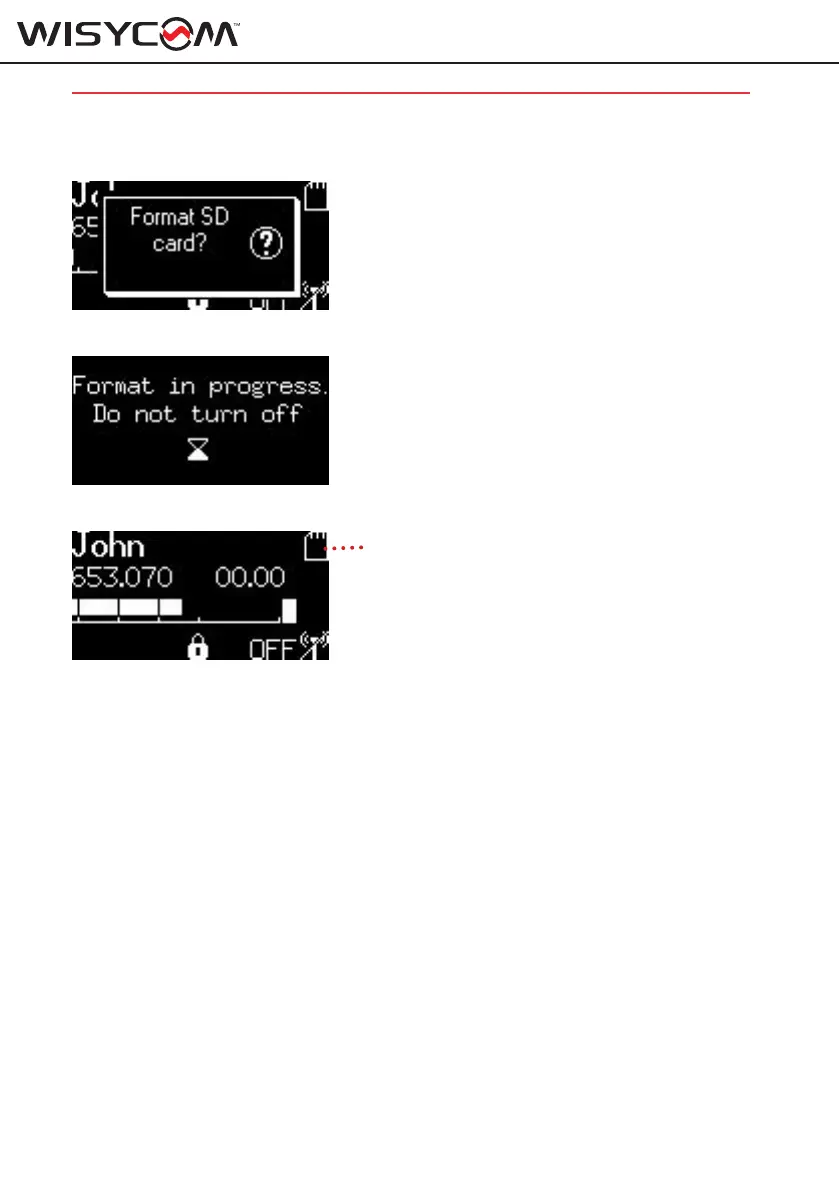
To format the card enter on the “Recorder > SD Card > Format” menu.
Press “SEL/ON” to format the card and wait some seconds until the process is completed.
DO NOT turn off the transmitter during formatting!
If the card is detected correctly, the card icon appears at the top right of the MAIN menu
To start recording enter on the Recorder menu and set REC to ON or use the recording short cut
pushing UP and DOWN arrows together and press START.
If during recording accidentaly the battery dies, the transmitter automatically save the file up to
15 seconds prior the event. If the transmitter restarted with the same SD card in, the recording
file is completely recovered without any data loss.
NOTE:
MTP61 fully support EX-FAT (extended Fat) with a storage limit of 2 TB.
Recorded audio is full quality not compressed.
example:
24 bit is 3 bytes with 48000 samples/sec.
That makes 144000 bytes/sec.
That makes around 520 Mb/hour.
SD card Icon



 To Next Page