18
INSTALLATION N
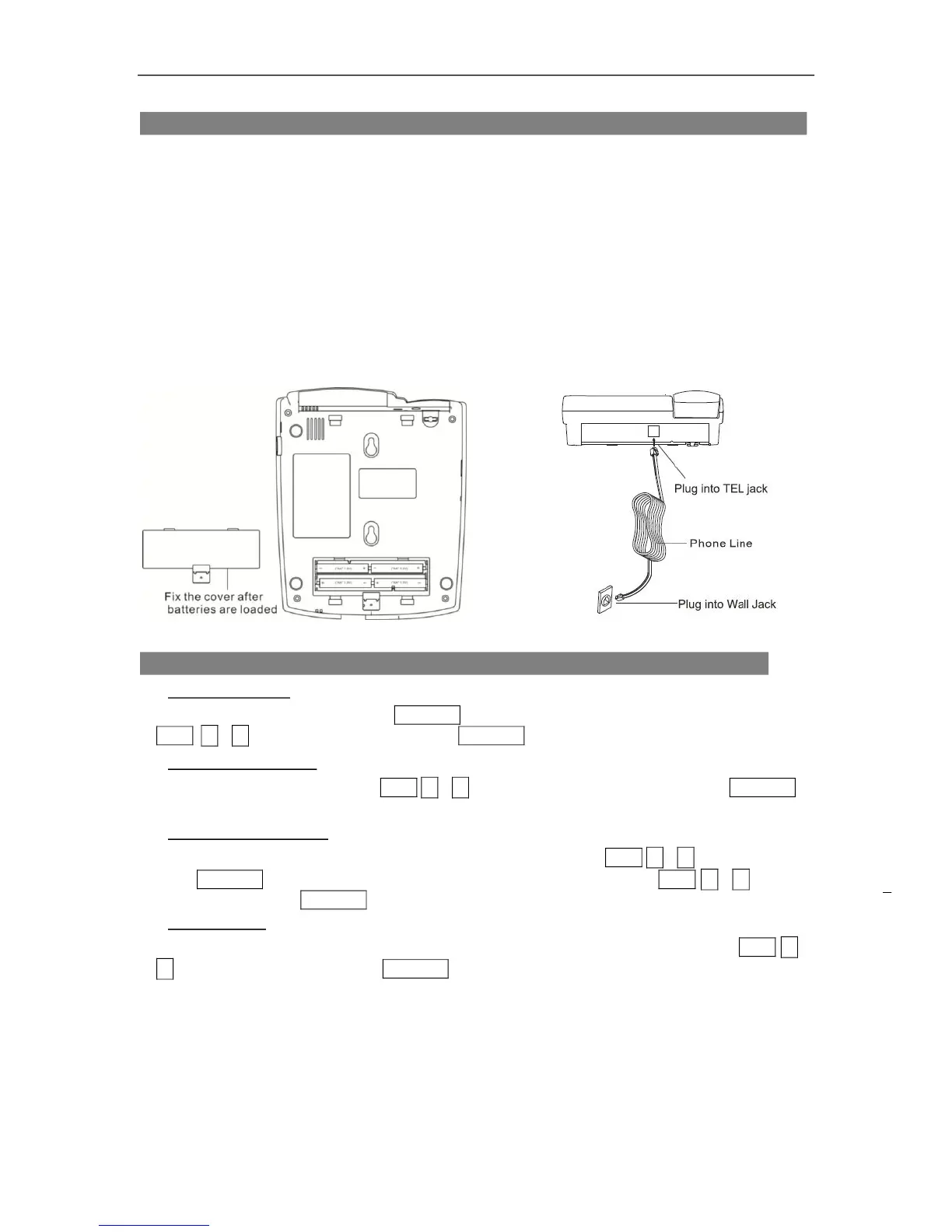
1. The phone can work well even without batteries. In case the condition of
telephone line provided by operator is not good, user might need to place 4xAA
batteries into the battery compartment and renew the batteries every half a year.
Remember to disconnect the phone set from the line cord to avoid risk of
thunderstrike.
2. Connect one end of the curly cord to the handset jack and connect the other end
to the jack on the base of the telephone (see page 17 / No. 21).
3. Plug one end of the phone line into the line jack on the telephone base and
connect the other end to the wall jack.
FUNCTION SETTING G
1. Set the language
In on-hook status, press and hold DEL/SET for 3 seconds to enter LANGUAGE SETUP. Press
CLID ▲or▼ to select the language. Press DEL/SET to confirm.
2. Set the LCD contrast
After setting the language, press CLID ▲or▼ to select the contrast(1-5), then press DEL/SET to
confirm.
3. Set year, date and time
After setting the LCD contrast, the digits of the year flashes. Press CLID ▲or▼ to select the year,
press DEL/SET again to confirm. The digits of the month will flash, press CLID ▲or▼ to select
the month and press DEL/SET to confirm. Repeat the procedure to set the day / date and time.
4. Set local code
After setting year, date and time, the first digit of LOCAL AREA CODE flashes, press CLID ▲or
▼ to select the digit and press DEL/SET to confirm. Repeat the procedure to set other area
codes. Once an area code has been set and a call is received with the same area code, only the
telephone number will display on the LCD without the area code. Example: Area code 210 is set
in the phone memory a call is received with number 210-1234567,only 1234567 will display on
the LCD
Note: The system will time out after 3 seconds and exit the function setup menu if no key is
pressed.


 To Next Page