Switching the Supplementary Light on and off with the Wöhler VIS 3xx
13
4:
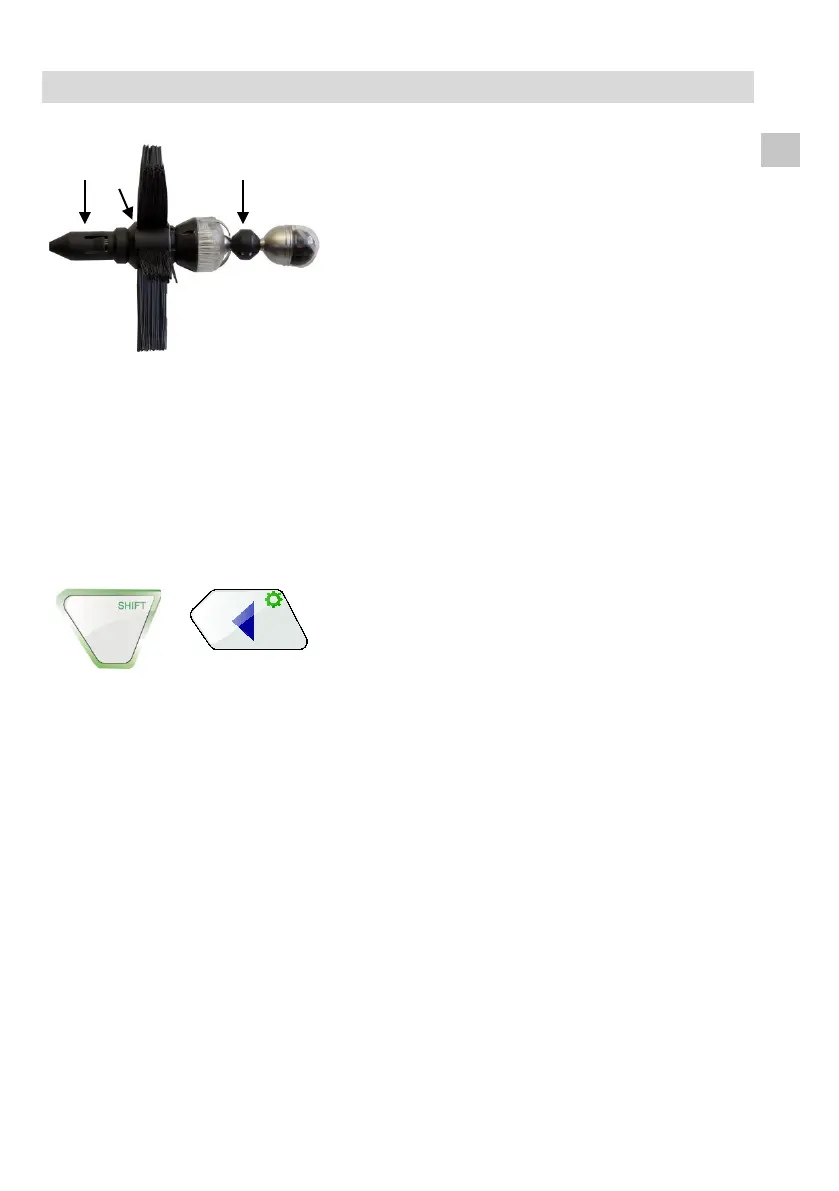
Supplementary light mounted with
guidance ball (1), centering brush (2) and
stabilization tube (3
)
The Supplementary light 26/40 can be used to-
gether with other Wö
hler VIS accessories.
4 Switching the Supplementary Light on and off with the
Wöhler VIS 3xx
The Supplementary Light will automatically be
switched on, when the camera system is switched
on.
If your camera system has a shift-key, it is possi-
ble to switch the light on and off with the keys of
the camera system.
Press the Shift key and the illumination key:
Press 1 x: LEDs of camera head and supple-
mentary light switched off.
Press 2 x: LEDs of camera head shine on the
lowest level, supplementary light switched on.
Press 3 x: LEDs of camera head shine on the
middle level, supplementary light switched off.
Press 4 x: Initial Situation – highest illumina-
tion level: LEDs of camera head and supple-
mentary light switched on.



 To Next Page