EasyManua.ls Logo

Woods AD series - User Manual

Woods AD series
16 pages
Print Icon
To Next Page IconTo Next Page
Loading...
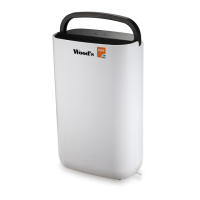
Wood’s dehumidier AD-series
Users manual

Questions and Answers

  • K
    kimberly34Jul 27, 2025
    What to do if my Wood’s Dehumidifier doesn’t work?
    • J
      Jessica VaughnJul 27, 2025
      If your Wood’s Dehumidifier isn’t working, there are a few potential causes: * Check if the power cord is properly connected to a power outlet and connect it if it is not. * Ensure that the room temperature is between 5°C and 35°C. Adjust the temperature accordingly. * Verify that the ambient humidity level is not below the set value. If it is, decrease the set value or select continuous dehumidification.
  • B
    brittanyyoungAug 2, 2025
    Why does my Wood’s Dehumidifier make abnormal noise?
    • J
      Justin WolfAug 2, 2025
      Abnormal noise from your Wood’s Dehumidifier can be due to a couple of reasons: * If the unit is inclined, move it to a flat and solid surface. * A blocked filter may also cause unusual noises. Try cleaning or replacing the filter.
  • R
    rangelbrandonAug 8, 2025
    What does error code C1 mean on my Wood’s Dehumidifier?
    • J
      Jeffrey PattersonAug 8, 2025
      Error code C1 on your Wood’s Dehumidifier indicates that the room temperature is above 50°C or below 0°C. Adjust the room temperature accordingly. If the issue persists, it could indicate a malfunction of the defrost sensor, and you should contact your retailer.
  • T
    Todd FranklinAug 14, 2025
    What does error code C2 mean on my Wood’s Dehumidifier?
    • R
      Raymond HarrisAug 14, 2025
      Error code C2 on your Wood’s Dehumidifier means that the room temperature is above 50°C or below 0°C. Increase or decrease the room temperature. If the issue continues, this may indicate a malfunction of the humidity or temperature sensor, and you should contact your retailer.
  • N
    Nancy JacksonAug 20, 2025
    What does error code C8 mean on my Wood’s Dehumidifier?
    • J
      jasoncummingsAug 20, 2025
      Error code C8 on your Wood’s Dehumidifier indicates refrigerant leakage. In this case, you should contact your retailer.

Summary

Technical Drawings

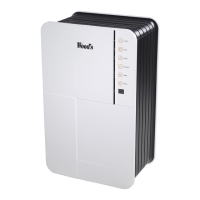
Control Panel Overview

Details the functions and indicators of the dehumidifier's control panel.

Security Warnings

Installation and Placement

Using the AD-series

Humidistat Controlled Operation

Unit runs only when ambient humidity exceeds the set value.

Pollution Detection

Unit detects air pollution and starts air cleaning automatically.

Automatic Restart Function

Unit resumes operation with the latest settings after a power failure.

Automatic Defrost

Unit defrosts automatically when needed; defrost icon illuminates.

Operating Instructions

Unit Functions

AD-series units clean and dehumidify indoor air; air purifying is always active.

Operating Modes

Unit has four modes: manual, automatic, quiet, and clothes dry.

Manual Mode Operation

Set fan speed manually. Choose between 4 or 5 speeds depending on mode.

Quiet Mode

Unit operates on the lowest fan speed; air quality indicator is off.

Clothes Dry Mode

For quickest drying of clothes; uses maximum fan speed continuously.

Automatic Mode Operation

Fan speed adjusts automatically based on detected air quality.

Setting Humidity Level

Unit stops automatically when set humidity level is reached.

Setting Shut Off Timer

Set automatic shut off time between 1 and 12 hours.

Selecting Fan Speed

Choose from 4 fan speeds for dehumidification and 5 for air purification.

Active Ionizer Function

Activates ionizer for more efficient air cleaning by charging air particles.

Child Lock Activation

Activates or deactivates child lock by pressing and holding the button for 3 seconds.

Displaying Room Temperature

Press and hold mode button to display room temperature.

Security Functions

Automatic Shut Off

Unit shuts off automatically after 12 hours of inactivity.

Compressor Protection

3-minute delay before compressor restarts to protect it.

Low;High Temperature Shut Off

Unit stops dehumidifying below 3°C or above 40°C.

Low Humidity Operation

Unit stops dehumidifying when humidity is 30% or lower.

Water Overflow Protection

Unit stops when water bucket is full; indicator flashes.

Over Heat Protection

Fan speed may increase to prevent overheating at high temperatures.

Water Drainage

Water Bucket

Unit shuts off when water reservoir is full; indicator lights up.

Connecting a Water Hose

Attach a hose to the unit to drain water directly to a drain.

Active ION HEPA Filter

Filter Replacement

Filter needs regular replacement to maintain capacity and prevent damage.

Maintenance

Service Information

Warranty Details

Operational Hints

Trouble Shooting

Contact Information

Woods AD series Specifications

General IconGeneral
BrandWoods
ModelAD series
CategoryDehumidifier
LanguageEnglish

Related product manuals