SERVICING
& SPARES
USER
INSTRUCTIONS
INSTALLATION &
COMMISSIONING
ACCESSORY
INFORMATION
CONTENTS
1
CONTENTS
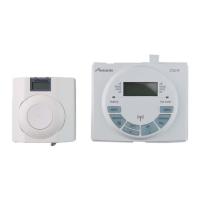
FITTING & OPERATING INSTRUCTIONS FOR WORCESTER BOSCH
TWIN CHANNEL DT20 PROGRAMMER
8-716-106-647 issue b (11.04) UK
USER
INSTRUCTIONS
12
SETTING THE CLOCK
FITTING & OPERATING INSTRUCTIONS FOR WORCESTER BOSCH
TWIN CHANNEL DT20 PROGRAMMER
8-716-106-647 issue b (11.04) UK
ACCESSORY INFORMATION
GENERAL INFORMATION 2
TECHNICAL DATA 3
INSTALLATION & COMMISSIONING
FITTING THE DT20 4
USER INSTRUCTIONS
OPERATING CONTROLS 5
PRESET PROGRAMS 6
SETTING PROGRAMS
Setting CH Mon-Fri Setting HW Mon-Fri 7
Setting individual weekdays 8
Setting CH Sat-Sun Setting HW Sat-Sun 9
Setting individual weekend days 10
SETTING HOLIDAYS 11
SETTING THE CLOCK 12
SETTING THE DATE 13
SERVICING & SPARES
MAINTENANCE & SPARES 14
CONTENTS
SETTING THE CLOCK
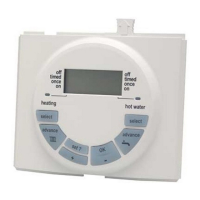
1 Press the 'set?' button until SET &
'CLOCK?' are shown in the display
2 Press 'OK' displays '24hr' & 'ON'
3 Press + to toggle between 24hr
and 12hr display
4 Press 'set?' to set the clock and the
hours flash on the display
5 Press + or - to correct hour
Note: speed up the display by holding
down the + or - buttons.
6 Press the set? button to set the
correct hour
7 Press + or - to correct minutes
8 Press the set? button to set the
correct minutes. SET & DATE?
appears in the display.
Note: if the day displayed is incorrect
the date needs resetting. To change
the date see SETTING THE DATE.
If you do not wish to change the date,
press set? to return to normal display.
1
4
8
77
6
55
2
33


 To Next Page