ACCESSORY
NFORMATION
3
TECHNICAL DATA
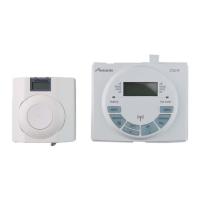
FITTING & OPERATING INSTRUCTIONS FOR WORCESTER BOSCH
TWIN CHANNEL DT20 PROGRAMMER
8-716-106-647 issue b (11.04) UK
USER
INSTRUCTIONS
10
SETTING PROGRAMS
FITTING & OPERATING INSTRUCTIONS FOR WORCESTER BOSCH
TWIN CHANNEL DT20 PROGRAMMER
8-716-106-647 issue b (11.04) UK
DESCRIPTION UNITS DT20
TECHNICAL DATA
Dimensions mm -
Electrical supply - 24v DC <65mA
Ambient operating temperature
C 0 to +50
Humidity operating range % non-condensing up to 45° 30 - 95
Class of protection - II
Degree of protection IP 20
Accuracy @ 25°C sec/day <±1
Battery life years 10
Battery backup time & date years min. 10
Shortest switching period minutes 1
DHW & CH On/Off periods number 3
DHW & CH Programs days 7
Related Standards:
BS EN60730-1:2001
BS EN60730-2-7:1992
Electro Magnetic Compatibility and Radio Spectrum Matters (ERM); Short Range Devices (SRD) ETSI
EN 300 220-1
EC Directives:
European Union Law Directive 2000/84/EC
Low Voltage Directive (73/23/EEC)
Electro Magnetic Compatibility Directive (89/336/EEC)
CE Marking Directive (93/68/EEC)
SETTING PROGRAMS
Setting individual weekend days:
Note: if you do not require individual
weekend times, then press set? until
normal display is shown.
If you do not wish to change the
settings for 'SAT', then press 'set?'
to move to 'SUN'
Setting CH individual weekend
days:
1 Press 'OK' to select day displayed
2 Press 'OK' to select CH
Note: speed up the display by holding
down the + or - buttons.
3 Press + or - to change the ON
time
4 Press set? to set the ON time and
select the OFF time
5 Press + or - to change the OFF
time
6 Press set? to set the OFF time and
select the next ON time
Repeat operations 3 to 6 to set the
2nd and 3rd CH ON/OFF times.
Note: after pressing set? for the 3rd
CH OFF time the display shows SET
HW for that day
Setting HW individual weekend
days:
7 Press OK to select the first ON time
Repeat operations 3 to 6 to set the
1st, 2nd and 3rd HW ON/OFF times.
Press 'set?' until the display returns
to normal mode.
3rd CH OFF
1
2
6
55
33
4
7


 To Next Page