ACCESSORY
INFORMATION
2
GENERAL INFORMATION
FITTING & OPERATING INSTRUCTIONS FOR WORCESTER BOSCH
TWIN CHANNEL DT20 PROGRAMMER
8-716-106-647 issue b (11.04) UK
USER
INSTRUCTIONS
11
SETTING HOLIDAYS
FITTING & OPERATING INSTRUCTIONS FOR WORCESTER BOSCH
TWIN CHANNEL DT20 PROGRAMMER
8-716-106-647 issue b (11.04) UK
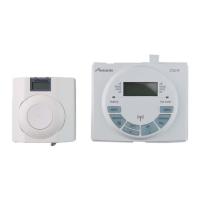
STANDARD PACKAGE:
A - Programmer
B - Instructions
SPECIFICATIONS:
Twin channel programmer for CH &
DHW mounted into the boiler fascia
7 day programmer
3 on/off periods per day
Automatic BST settings
Pre-programmed on/off periods
Dedicated advance buttons
12 or 24 hour back-lit digital display
Holiday function
Pre-wired with PCB connector
GENERAL INFORMATION
SETTING HOLIDAYS
set?
OK
off
timed
once
on
off
timed
once
on
heating hot water
select select
advance advance
MON TUE WED THU FRI SAT SUN
CLOCK? PROG? DATE? HDAY?
AM OFF
CHW ON
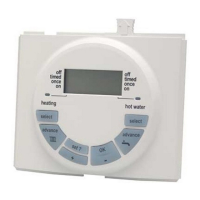
1 Press the 'set?' button until 'SET' &
'HDAY?' is displayed
2 Press 'OK' the display shows 00
3 Press '+' & '-' to set the number of
days you require the system to be
off
4 Press 'set?' then 'HDAY' is shown
in the display and no demand for
heating will be made from the
programmer.
The program will return to normal
after the set number of days.
To cancel the holiday setting and
return to normal operation, press any
button.
Note: the programmer counts each
pass through midnight as a day.
For example, if you don't want the
heating on from Saturday morning until
Tuesday morning, set for 3 days.
A
B
1
33
4
2


 To Next Page