USING YOUR
APPLIANCE
OPERATING
THE APPLIANCE
WORCESTER BOSCH GREENSTAR 27CDi/30CDi/37CDi/42CDi
6 720 614 059b (2007/07)
13
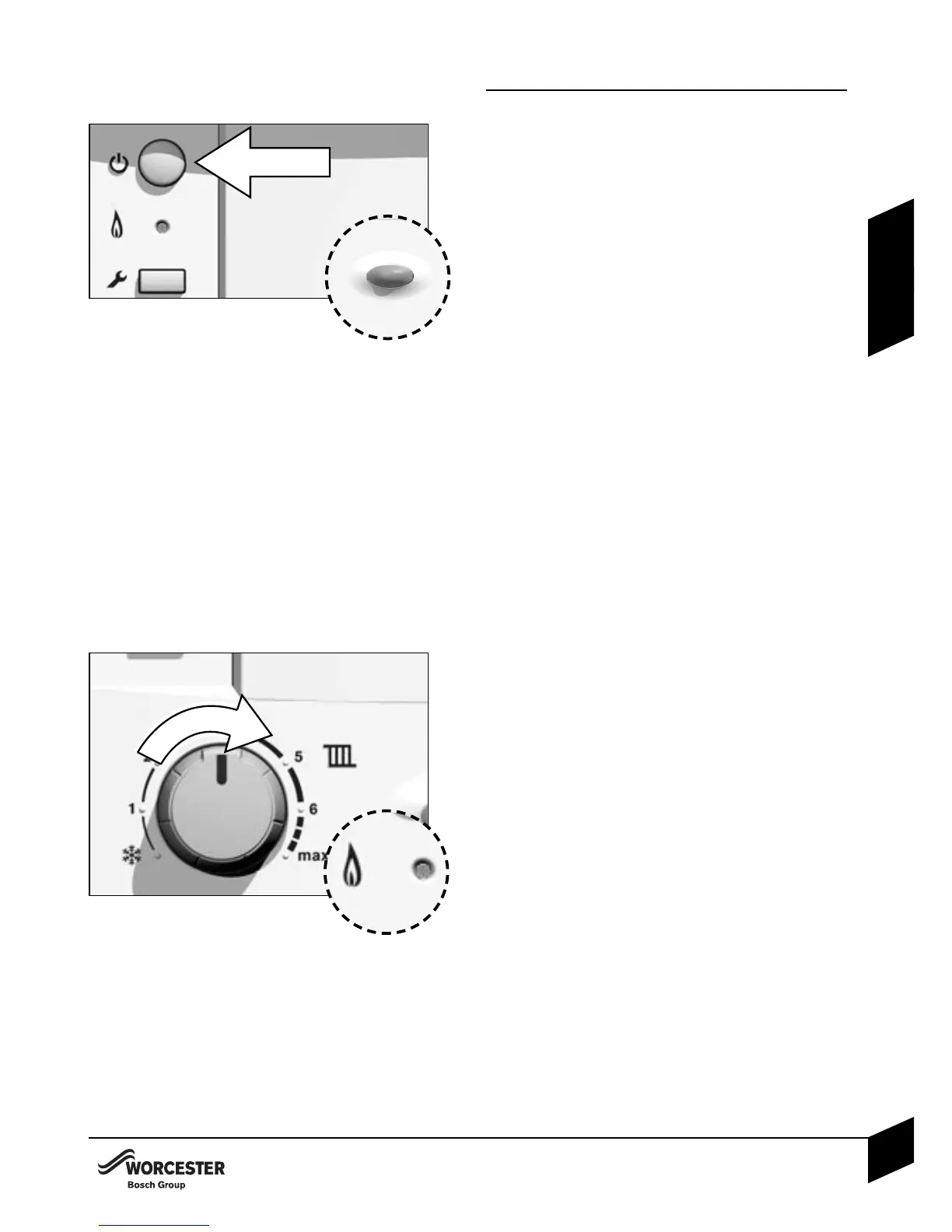
SWITCHING THE APPLIANCE ON/OFF
Switching on
B Switch on the appliance by pressing
the master switch.
The indicator light shows blue
• The boiler runs for 15 minutes at mini-
mum heating output to fill the conden-
sate trap, the display (K) alternates bet-
ween “-II-” and the central heating flow
temperature. This occurs every time the
mains supply has been interrupted.
Switching off
B Switch off the appliance by pressing
the master switch.
The blue indicator light goes out.
SETTING THE CENTRAL HEATING
TEMPERATURE
B Turn the central heating temperature
control to the desired level, between
40 °C and 90 °C.
B When the burner is lit, the green indi-
cator light underneath the on/off switch
is illuminated.
CONTROLLING CENTRAL HEATING
B Set the timer to the correct time.
B Set room thermostat to the desired
room temperature.
B Set the thermostatic radiator valves to
the desired settings.
OPERATING THE APPLIANCE



 To Next Page