2.2.3
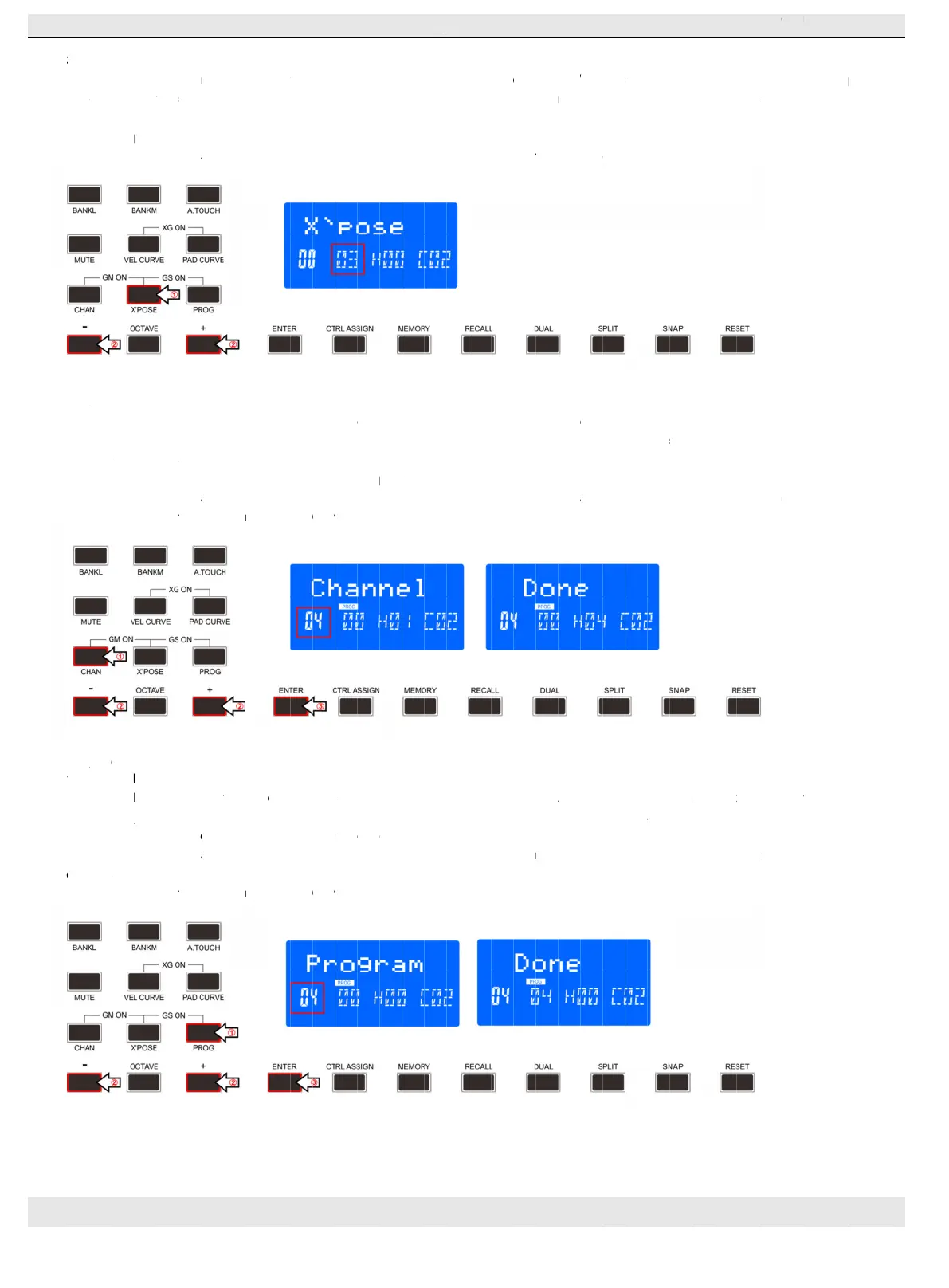
Transpose adjusting func
the value of current transpose. It can be adjusted by +/
following:
(1)
Press the “X’pose” button for one time
(2
2.3
Press the Channel selection function button to adjust the current MIDI channel. When this button is valid, the LCD
channel number. The channel can be selected with +/
steps and LCD displays the
(1
)Press the “Channel” button for one time
(2
(3
)Press the “Enter” button to confirm and the LCD will display “Done”
2.4
2.4.1
Press Program button to adjust the voice of current channel. When this bu
voice can be adjusted or selected with +/
(1
(2
(3
TRANSPOSE
Transpose adjusting func
the value of current transpose. It can be adjusted by +/
following:
Press the “X’pose” button for one time
)Press “+” or “
CHANNEL
Press the Channel selection function button to adjust the current MIDI channel. When this button is valid, the LCD
channel number. The channel can be selected with +/
steps and LCD displays the
)Press the “Channel” button for one time
)Press “+” or “
)Press the “Enter” button to confirm and the LCD will display “Done”
CHANGING VOICE AND VOICE BANK
2.4.1
PROGRAM
Press Program button to adjust the voice of current channel. When this bu
voice can be adjusted or selected with +/
)Press the “Program”
)Press “+” or “
button to
)Press the “
HANGZHOU
WEBSITE:WWW.WORLDE.COM.CN
TRANSPOSE
Transpose adjusting func
the value of current transpose. It can be adjusted by +/
following:
Press the “X’pose” button for one time
)Press “+” or “
CHANNEL
Press the Channel selection function button to adjust the current MIDI channel. When this button is valid, the LCD
channel number. The channel can be selected with +/
steps and LCD displays the
)Press the “Channel” button for one time
)Press “+” or “
)Press the “Enter” button to confirm and the LCD will display “Done”
CHANGING VOICE AND VOICE BANK
PROGRAM
Press Program button to adjust the voice of current channel. When this bu
voice can be adjusted or selected with +/
)Press the “Program”
)Press “+” or “
o change the program speedy.
)Press the “
HANGZHOU
WEBSITE:WWW.WORLDE.COM.CN
TRANSPOSE
Transpose adjusting func
the value of current transpose. It can be adjusted by +/
Press the “X’pose” button for one time
)Press “+” or “
CHANNEL
Press the Channel selection function button to adjust the current MIDI channel. When this button is valid, the LCD
channel number. The channel can be selected with +/
steps and LCD displays the
)Press the “Channel” button for one time
)Press “+” or “
)Press the “Enter” button to confirm and the LCD will display “Done”
CHANGING VOICE AND VOICE BANK
PROGRAM
Press Program button to adjust the voice of current channel. When this bu
voice can be adjusted or selected with +/
)Press the “Program”
)Press “+” or “
change the program speedy.
)Press the “Enter” button to confirm and the LCD will display “Done”.
HANGZHOU BLUE WHALE MUSIC TECHNOLOGY
WEBSITE:WWW.WORLDE.COM.CN
TRANSPOSE
Transpose adjusting func
the value of current transpose. It can be adjusted by +/
Press the “X’pose” button for one time
)Press “+” or “
-
” button to adjust the keyboard transpose, the LCD will display the current keyboard transpose on the bottom
CHANNEL
Press the Channel selection function button to adjust the current MIDI channel. When this button is valid, the LCD
channel number. The channel can be selected with +/
steps and LCD displays the
)Press the “Channel” button for one time
)Press “+” or “
-
” button to adjust the keyboard channel, the LCD will displa
)Press the “Enter” button to confirm and the LCD will display “Done”
CHANGING VOICE AND VOICE BANK
PROGRAM
Press Program button to adjust the voice of current channel. When this bu
voice can be adjusted or selected with +/
)Press the “Program”
)Press “+” or “
-
” button to adjust the keyboard program, the LCD will display the current keyboard program on the bottom
change the program speedy.
Enter” button to confirm and the LCD will display “Done”.
BLUE WHALE MUSIC TECHNOLOGY
WEBSITE:WWW.WORLDE.COM.CN
TRANSPOSE
Transpose adjusting func
the value of current transpose. It can be adjusted by +/
Press the “X’pose” button for one time
” button to adjust the keyboard transpose, the LCD will display the current keyboard transpose on the bottom
Press the Channel selection function button to adjust the current MIDI channel. When this button is valid, the LCD
channel number. The channel can be selected with +/
steps and LCD displays the
)Press the “Channel” button for one time
” button to adjust the keyboard channel, the LCD will displa
)Press the “Enter” button to confirm and the LCD will display “Done”
CHANGING VOICE AND VOICE BANK
Press Program button to adjust the voice of current channel. When this bu
voice can be adjusted or selected with +/
)Press the “Program”
” button to adjust the keyboard program, the LCD will display the current keyboard program on the bottom
change the program speedy.
Enter” button to confirm and the LCD will display “Done”.
BLUE WHALE MUSIC TECHNOLOGY
WEBSITE:WWW.WORLDE.COM.CN
Transpose adjusting function allows the keyboard to change the Pitch up/down by semi
the value of current transpose. It can be adjusted by +/
Press the “X’pose” button for one time
” button to adjust the keyboard transpose, the LCD will display the current keyboard transpose on the bottom
Press the Channel selection function button to adjust the current MIDI channel. When this button is valid, the LCD
channel number. The channel can be selected with +/
steps and LCD displays the
)Press the “Channel” button for one time
” button to adjust the keyboard channel, the LCD will displa
)Press the “Enter” button to confirm and the LCD will display “Done”
CHANGING VOICE AND VOICE BANK
Press Program button to adjust the voice of current channel. When this bu
voice can be adjusted or selected with +/
button for on time
” button to adjust the keyboard program, the LCD will display the current keyboard program on the bottom
change the program speedy.
Enter” button to confirm and the LCD will display “Done”.
BLUE WHALE MUSIC TECHNOLOGY
WEBSITE:WWW.WORLDE.COM.CN
tion allows the keyboard to change the Pitch up/down by semi
the value of current transpose. It can be adjusted by +/
Press the “X’pose” button for one time
” button to adjust the keyboard transpose, the LCD will display the current keyboard transpose on the bottom
Press the Channel selection function button to adjust the current MIDI channel. When this button is valid, the LCD
channel number. The channel can be selected with +/
following:
)Press the “Channel” button for one time
” button to adjust the keyboard channel, the LCD will displa
)Press the “Enter” button to confirm and the LCD will display “Done”
CHANGING VOICE AND VOICE BANK
Press Program button to adjust the voice of current channel. When this bu
voice can be adjusted or selected with +/
button for on time
” button to adjust the keyboard program, the LCD will display the current keyboard program on the bottom
change the program speedy.
Enter” button to confirm and the LCD will display “Done”.
BLUE WHALE MUSIC TECHNOLOGY
WEBSITE:WWW.WORLDE.COM.CN
tion allows the keyboard to change the Pitch up/down by semi
the value of current transpose. It can be adjusted by +/
Press the “X’pose” button for one time
” button to adjust the keyboard transpose, the LCD will display the current keyboard transpose on the bottom
Press the Channel selection function button to adjust the current MIDI channel. When this button is valid, the LCD
channel number. The channel can be selected with +/
following:
)Press the “Channel” button for one time
” button to adjust the keyboard channel, the LCD will displa
)Press the “Enter” button to confirm and the LCD will display “Done”
CHANGING VOICE AND VOICE BANK
Press Program button to adjust the voice of current channel. When this bu
voice can be adjusted or selected with +/
button for on time
” button to adjust the keyboard program, the LCD will display the current keyboard program on the bottom
change the program speedy.
Enter” button to confirm and the LCD will display “Done”.
BLUE WHALE MUSIC TECHNOLOGY
WEBSITE:WWW.WORLDE.COM.CN
tion allows the keyboard to change the Pitch up/down by semi
the value of current transpose. It can be adjusted by +/
Press the “X’pose” button for one time
” button to adjust the keyboard transpose, the LCD will display the current keyboard transpose on the bottom
Press the Channel selection function button to adjust the current MIDI channel. When this button is valid, the LCD
channel number. The channel can be selected with +/
following:
)Press the “Channel” button for one time
” button to adjust the keyboard channel, the LCD will displa
)Press the “Enter” button to confirm and the LCD will display “Done”
CHANGING VOICE AND VOICE BANK
Press Program button to adjust the voice of current channel. When this bu
voice can be adjusted or selected with +/
button for on time
” button to adjust the keyboard program, the LCD will display the current keyboard program on the bottom
change the program speedy.
Enter” button to confirm and the LCD will display “Done”.
BLUE WHALE MUSIC TECHNOLOGY
tion allows the keyboard to change the Pitch up/down by semi
the value of current transpose. It can be adjusted by +/
Press the “X’pose” button for one time and
” button to adjust the keyboard transpose, the LCD will display the current keyboard transpose on the bottom
Press the Channel selection function button to adjust the current MIDI channel. When this button is valid, the LCD
channel number. The channel can be selected with +/
)Press the “Channel” button for one time and
” button to adjust the keyboard channel, the LCD will displa
)Press the “Enter” button to confirm and the LCD will display “Done”
CHANGING VOICE AND VOICE BANK
Press Program button to adjust the voice of current channel. When this bu
voice can be adjusted or selected with +/
-
Button. The initial setting is 00, adjusting scale is 0~127.The operation steps and LCD displays the following
button for on time and
” button to adjust the keyboard program, the LCD will display the current keyboard program on the bottom
Enter” button to confirm and the LCD will display “Done”.
BLUE WHALE MUSIC TECHNOLOGY
tion allows the keyboard to change the Pitch up/down by semi
the value of current transpose. It can be adjusted by +/
and
the LCD displays “X’pose”.
” button to adjust the keyboard transpose, the LCD will display the current keyboard transpose on the bottom
Press the Channel selection function button to adjust the current MIDI channel. When this button is valid, the LCD
channel number. The channel can be selected with +/
and
the LCD displays “Channel”.
” button to adjust the keyboard channel, the LCD will displa
)Press the “Enter” button to confirm and the LCD will display “Done”
CHANGING VOICE AND VOICE BANK
Press Program button to adjust the voice of current channel. When this bu
Button. The initial setting is 00, adjusting scale is 0~127.The operation steps and LCD displays the following
and
the LCD displays “Program”.
” button to adjust the keyboard program, the LCD will display the current keyboard program on the bottom
Enter” button to confirm and the LCD will display “Done”.
BLUE WHALE MUSIC TECHNOLOGY CO.,LTD
tion allows the keyboard to change the Pitch up/down by semi
the value of current transpose. It can be adjusted by +/
the LCD displays “X’pose”.
” button to adjust the keyboard transpose, the LCD will display the current keyboard transpose on the bottom
Press the Channel selection function button to adjust the current MIDI channel. When this button is valid, the LCD
channel number. The channel can be selected with +/
the LCD displays “Channel”.
” button to adjust the keyboard channel, the LCD will displa
)Press the “Enter” button to confirm and the LCD will display “Done”
CHANGING VOICE AND VOICE BANK
Press Program button to adjust the voice of current channel. When this bu
Button. The initial setting is 00, adjusting scale is 0~127.The operation steps and LCD displays the following
the LCD displays “Program”.
” button to adjust the keyboard program, the LCD will display the current keyboard program on the bottom
Enter” button to confirm and the LCD will display “Done”.
CO.,LTD
tion allows the keyboard to change the Pitch up/down by semi
the value of current transpose. It can be adjusted by +/
-
button. The initial value is 00, adjusting scale is
the LCD displays “X’pose”.
” button to adjust the keyboard transpose, the LCD will display the current keyboard transpose on the bottom
Press the Channel selection function button to adjust the current MIDI channel. When this button is valid, the LCD
channel number. The channel can be selected with +/
-
Button and confirmed by Enter button.
the LCD displays “Channel”.
” button to adjust the keyboard channel, the LCD will displa
)Press the “Enter” button to confirm and the LCD will display “Done”
Press Program button to adjust the voice of current channel. When this bu
Button. The initial setting is 00, adjusting scale is 0~127.The operation steps and LCD displays the following
the LCD displays “Program”.
” button to adjust the keyboard program, the LCD will display the current keyboard program on the bottom
Enter” button to confirm and the LCD will display “Done”.
CO.,LTD
tion allows the keyboard to change the Pitch up/down by semi
button. The initial value is 00, adjusting scale is
the LCD displays “X’pose”.
” button to adjust the keyboard transpose, the LCD will display the current keyboard transpose on the bottom
Press the Channel selection function button to adjust the current MIDI channel. When this button is valid, the LCD
Button and confirmed by Enter button.
the LCD displays “Channel”.
” button to adjust the keyboard channel, the LCD will displa
)Press the “Enter” button to confirm and the LCD will display “Done”
Press Program button to adjust the voice of current channel. When this bu
Button. The initial setting is 00, adjusting scale is 0~127.The operation steps and LCD displays the following
the LCD displays “Program”.
” button to adjust the keyboard program, the LCD will display the current keyboard program on the bottom
Enter” button to confirm and the LCD will display “Done”.
tion allows the keyboard to change the Pitch up/down by semi
button. The initial value is 00, adjusting scale is
the LCD displays “X’pose”.
” button to adjust the keyboard transpose, the LCD will display the current keyboard transpose on the bottom
Press the Channel selection function button to adjust the current MIDI channel. When this button is valid, the LCD
Button and confirmed by Enter button.
the LCD displays “Channel”.
” button to adjust the keyboard channel, the LCD will displa
)Press the “Enter” button to confirm and the LCD will display “Done”
Press Program button to adjust the voice of current channel. When this bu
Button. The initial setting is 00, adjusting scale is 0~127.The operation steps and LCD displays the following
the LCD displays “Program”.
” button to adjust the keyboard program, the LCD will display the current keyboard program on the bottom
Enter” button to confirm and the LCD will display “Done”.
EMAIL:SALES@WORLDE.COM.CN
tion allows the keyboard to change the Pitch up/down by semi
button. The initial value is 00, adjusting scale is
the LCD displays “X’pose”.
” button to adjust the keyboard transpose, the LCD will display the current keyboard transpose on the bottom
Press the Channel selection function button to adjust the current MIDI channel. When this button is valid, the LCD
Button and confirmed by Enter button.
the LCD displays “Channel”.
” button to adjust the keyboard channel, the LCD will displa
)Press the “Enter” button to confirm and the LCD will display “Done”
Press Program button to adjust the voice of current channel. When this bu
Button. The initial setting is 00, adjusting scale is 0~127.The operation steps and LCD displays the following
the LCD displays “Program”.
” button to adjust the keyboard program, the LCD will display the current keyboard program on the bottom
Enter” button to confirm and the LCD will display “Done”.
EMAIL:SALES@WORLDE.COM.CN
tion allows the keyboard to change the Pitch up/down by semi
button. The initial value is 00, adjusting scale is
the LCD displays “X’pose”.
” button to adjust the keyboard transpose, the LCD will display the current keyboard transpose on the bottom
Press the Channel selection function button to adjust the current MIDI channel. When this button is valid, the LCD
Button and confirmed by Enter button.
the LCD displays “Channel”.
” button to adjust the keyboard channel, the LCD will displa
)Press the “Enter” button to confirm and the LCD will display “Done”
.
Press Program button to adjust the voice of current channel. When this bu
Button. The initial setting is 00, adjusting scale is 0~127.The operation steps and LCD displays the following
the LCD displays “Program”.
” button to adjust the keyboard program, the LCD will display the current keyboard program on the bottom
Enter” button to confirm and the LCD will display “Done”.
EMAIL:SALES@WORLDE.COM.CN
-
7
tion allows the keyboard to change the Pitch up/down by semi
button. The initial value is 00, adjusting scale is
the LCD displays “X’pose”.
” button to adjust the keyboard transpose, the LCD will display the current keyboard transpose on the bottom
Press the Channel selection function button to adjust the current MIDI channel. When this button is valid, the LCD
Button and confirmed by Enter button.
the LCD displays “Channel”.
” button to adjust the keyboard channel, the LCD will displa
Press Program button to adjust the voice of current channel. When this button is valid, the LCD
Button. The initial setting is 00, adjusting scale is 0~127.The operation steps and LCD displays the following
the LCD displays “Program”.
” button to adjust the keyboard program, the LCD will display the current keyboard program on the bottom
EMAIL:SALES@WORLDE.COM.CN
7
-
tion allows the keyboard to change the Pitch up/down by semi
button. The initial value is 00, adjusting scale is
” button to adjust the keyboard transpose, the LCD will display the current keyboard transpose on the bottom
Press the Channel selection function button to adjust the current MIDI channel. When this button is valid, the LCD
Button and confirmed by Enter button.
the LCD displays “Channel”.
” button to adjust the keyboard channel, the LCD will display the current keyboard channel on the bottom
tton is valid, the LCD
Button. The initial setting is 00, adjusting scale is 0~127.The operation steps and LCD displays the following
” button to adjust the keyboard program, the LCD will display the current keyboard program on the bottom
EMAIL:SALES@WORLDE.COM.CN
tion allows the keyboard to change the Pitch up/down by semi
button. The initial value is 00, adjusting scale is
” button to adjust the keyboard transpose, the LCD will display the current keyboard transpose on the bottom
Press the Channel selection function button to adjust the current MIDI channel. When this button is valid, the LCD
Button and confirmed by Enter button.
y the current keyboard channel on the bottom
tton is valid, the LCD
Button. The initial setting is 00, adjusting scale is 0~127.The operation steps and LCD displays the following
” button to adjust the keyboard program, the LCD will display the current keyboard program on the bottom
EMAIL:SALES@WORLDE.COM.CN
tion allows the keyboard to change the Pitch up/down by semi-
button. The initial value is 00, adjusting scale is
” button to adjust the keyboard transpose, the LCD will display the current keyboard transpose on the bottom
Press the Channel selection function button to adjust the current MIDI channel. When this button is valid, the LCD
Button and confirmed by Enter button.
y the current keyboard channel on the bottom
tton is valid, the LCD
Button. The initial setting is 00, adjusting scale is 0~127.The operation steps and LCD displays the following
” button to adjust the keyboard program, the LCD will display the current keyboard program on the bottom
EMAIL:SALES@WORLDE.COM.CN
-tone. When this button is valid, the LCD displays the ‘
button. The initial value is 00, adjusting scale is
” button to adjust the keyboard transpose, the LCD will display the current keyboard transpose on the bottom
Press the Channel selection function button to adjust the current MIDI channel. When this button is valid, the LCD
Button and confirmed by Enter button.
y the current keyboard channel on the bottom
tton is valid, the LCD
Button. The initial setting is 00, adjusting scale is 0~127.The operation steps and LCD displays the following
” button to adjust the keyboard program, the LCD will display the current keyboard program on the bottom
HANGZHOU WORLDE MUSIC ELECTRONIC CO.
EMAIL:SALES@WORLDE.COM.CN
tone. When this button is valid, the LCD displays the ‘
button. The initial value is 00, adjusting scale is
” button to adjust the keyboard transpose, the LCD will display the current keyboard transpose on the bottom
Press the Channel selection function button to adjust the current MIDI channel. When this button is valid, the LCD
Button and confirmed by Enter button.
The initial setting is 1, adjusting scale is 1~16.The operation
y the current keyboard channel on the bottom
tton is valid, the LCD
Button. The initial setting is 00, adjusting scale is 0~127.The operation steps and LCD displays the following
” button to adjust the keyboard program, the LCD will display the current keyboard program on the bottom
HANGZHOU WORLDE MUSIC ELECTRONIC CO.
tone. When this button is valid, the LCD displays the ‘
button. The initial value is 00, adjusting scale is
” button to adjust the keyboard transpose, the LCD will display the current keyboard transpose on the bottom
Press the Channel selection function button to adjust the current MIDI channel. When this button is valid, the LCD
The initial setting is 1, adjusting scale is 1~16.The operation
y the current keyboard channel on the bottom
displays the ‘Program’ and the current voice number. The
Button. The initial setting is 00, adjusting scale is 0~127.The operation steps and LCD displays the following
” button to adjust the keyboard program, the LCD will display the current keyboard program on the bottom
HANGZHOU WORLDE MUSIC ELECTRONIC CO.
tone. When this button is valid, the LCD displays the ‘
button. The initial value is 00, adjusting scale is -
” button to adjust the keyboard transpose, the LCD will display the current keyboard transpose on the bottom
Press the Channel selection function button to adjust the current MIDI channel. When this button is valid, the LCD
The initial setting is 1, adjusting scale is 1~16.The operation
y the current keyboard channel on the bottom
displays the ‘Program’ and the current voice number. The
Button. The initial setting is 00, adjusting scale is 0~127.The operation steps and LCD displays the following
” button to adjust the keyboard program, the LCD will display the current keyboard program on the bottom
HANGZHOU WORLDE MUSIC ELECTRONIC CO.
tone. When this button is valid, the LCD displays the ‘
12~12. The operati
” button to adjust the keyboard transpose, the LCD will display the current keyboard transpose on the bottom
Press the Channel selection function button to adjust the current MIDI channel. When this button is valid, the LCD
The initial setting is 1, adjusting scale is 1~16.The operation
y the current keyboard channel on the bottom
displays the ‘Program’ and the current voice number. The
Button. The initial setting is 00, adjusting scale is 0~127.The operation steps and LCD displays the following
” button to adjust the keyboard program, the LCD will display the current keyboard program on the bottom
HANGZHOU WORLDE MUSIC ELECTRONIC CO.
tone. When this button is valid, the LCD displays the ‘
12~12. The operati
” button to adjust the keyboard transpose, the LCD will display the current keyboard transpose on the bottom
Press the Channel selection function button to adjust the current MIDI channel. When this button is valid, the LCD
The initial setting is 1, adjusting scale is 1~16.The operation
y the current keyboard channel on the bottom
displays the ‘Program’ and the current voice number. The
Button. The initial setting is 00, adjusting scale is 0~127.The operation steps and LCD displays the following
” button to adjust the keyboard program, the LCD will display the current keyboard program on the bottom
HANGZHOU WORLDE MUSIC ELECTRONIC CO.
tone. When this button is valid, the LCD displays the ‘
12~12. The operati
” button to adjust the keyboard transpose, the LCD will display the current keyboard transpose on the bottom
Press the Channel selection function button to adjust the current MIDI channel. When this button is valid, the LCD displays
The initial setting is 1, adjusting scale is 1~16.The operation
y the current keyboard channel on the bottom
displays the ‘Program’ and the current voice number. The
Button. The initial setting is 00, adjusting scale is 0~127.The operation steps and LCD displays the following
” button to adjust the keyboard program, the LCD will display the current keyboard program on the bottom
HANGZHOU WORLDE MUSIC ELECTRONIC CO.
tone. When this button is valid, the LCD displays the ‘
12~12. The operati
” button to adjust the keyboard transpose, the LCD will display the current keyboard transpose on the bottom
displays
The initial setting is 1, adjusting scale is 1~16.The operation
y the current keyboard channel on the bottom
displays the ‘Program’ and the current voice number. The
Button. The initial setting is 00, adjusting scale is 0~127.The operation steps and LCD displays the following
” button to adjust the keyboard program, the LCD will display the current keyboard program on the bottom
HANGZHOU WORLDE MUSIC ELECTRONIC CO.
TEL:86 571 88730848
tone. When this button is valid, the LCD displays the ‘
12~12. The operation steps and LCD displays the
” button to adjust the keyboard transpose, the LCD will display the current keyboard transpose on the bottom
displays
The initial setting is 1, adjusting scale is 1~16.The operation
y the current keyboard channel on the bottom
-
left corner.
displays the ‘Program’ and the current voice number. The
Button. The initial setting is 00, adjusting scale is 0~127.The operation steps and LCD displays the following
” button to adjust the keyboard program, the LCD will display the current keyboard program on the bottom-
HANGZHOU WORLDE MUSIC ELECTRONIC CO.
TEL:86 571 88730848
tone. When this button is valid, the LCD displays the ‘
on steps and LCD displays the
” button to adjust the keyboard transpose, the LCD will display the current keyboard transpose on the bottom
-
“
Channel
The initial setting is 1, adjusting scale is 1~16.The operation
left corner.
displays the ‘Program’ and the current voice number. The
Button. The initial setting is 00, adjusting scale is 0~127.The operation steps and LCD displays the following
-
HANGZHOU WORLDE MUSIC ELECTRONIC CO.
TEL:86 571 88730848
tone. When this button is valid, the LCD displays the ‘
on steps and LCD displays the
left corner.
Channel
The initial setting is 1, adjusting scale is 1~16.The operation
left corner.
displays the ‘Program’ and the current voice number. The
Button. The initial setting is 00, adjusting scale is 0~127.The operation steps and LCD displays the following
left corner.
HANGZHOU WORLDE MUSIC ELECTRONIC CO., LTD
TEL:86 571 88730848
tone. When this button is valid, the LCD displays the ‘
on steps and LCD displays the
left corner.
Channel
”
and the current
The initial setting is 1, adjusting scale is 1~16.The operation
left corner.
displays the ‘Program’ and the current voice number. The
Button. The initial setting is 00, adjusting scale is 0~127.The operation steps and LCD displays the following
left corner.
, LTD
TEL:86 571 88730848
tone. When this button is valid, the LCD displays the ‘
on steps and LCD displays the
left corner.
and the current
The initial setting is 1, adjusting scale is 1~16.The operation
displays the ‘Program’ and the current voice number. The
Button. The initial setting is 00, adjusting scale is 0~127.The operation steps and LCD displays the following
Hold “+” or “
tone. When this button is valid, the LCD displays the ‘
X
’pose’ and
on steps and LCD displays the
and the current
The initial setting is 1, adjusting scale is 1~16.The operation
displays the ‘Program’ and the current voice number. The
Button. The initial setting is 00, adjusting scale is 0~127.The operation steps and LCD displays the following
Hold “+” or “
’pose’ and
on steps and LCD displays the
and the current
The initial setting is 1, adjusting scale is 1~16.The operation
displays the ‘Program’ and the current voice number. The
Button. The initial setting is 00, adjusting scale is 0~127.The operation steps and LCD displays the following
Hold “+” or “
’pose’ and
on steps and LCD displays the
and the current
The initial setting is 1, adjusting scale is 1~16.The operation
displays the ‘Program’ and the current voice number. The
Button. The initial setting is 00, adjusting scale is 0~127.The operation steps and LCD displays the following
:
-”
’pose’ and
on steps and LCD displays the
The initial setting is 1, adjusting scale is 1~16.The operation
displays the ‘Program’ and the current voice number. The



 To Next Page
 Loading...









