Owner’s Manual of Lawn Mowing Robot EN
15
If the Charging Base is left outside for the winter, leave the Boundary Wire connected.
NOTE: When bringing the Landroid
®
back to work after winter hibernation, make sure the Charging Strips (4) and Contact
Pins (2) are clean. We recommend using a fine grade emery cloth to clean the contacts.
8.5 Replacing the battery
WARNING: Power off before attempting any adjustment, replacement or repair.
Before replacing the Blades, turn your Landroid
®
OFF and put on protective gloves.
If you need to replace the Battery, follow these steps:
1. Gently turn your Landroid
®
upside down.
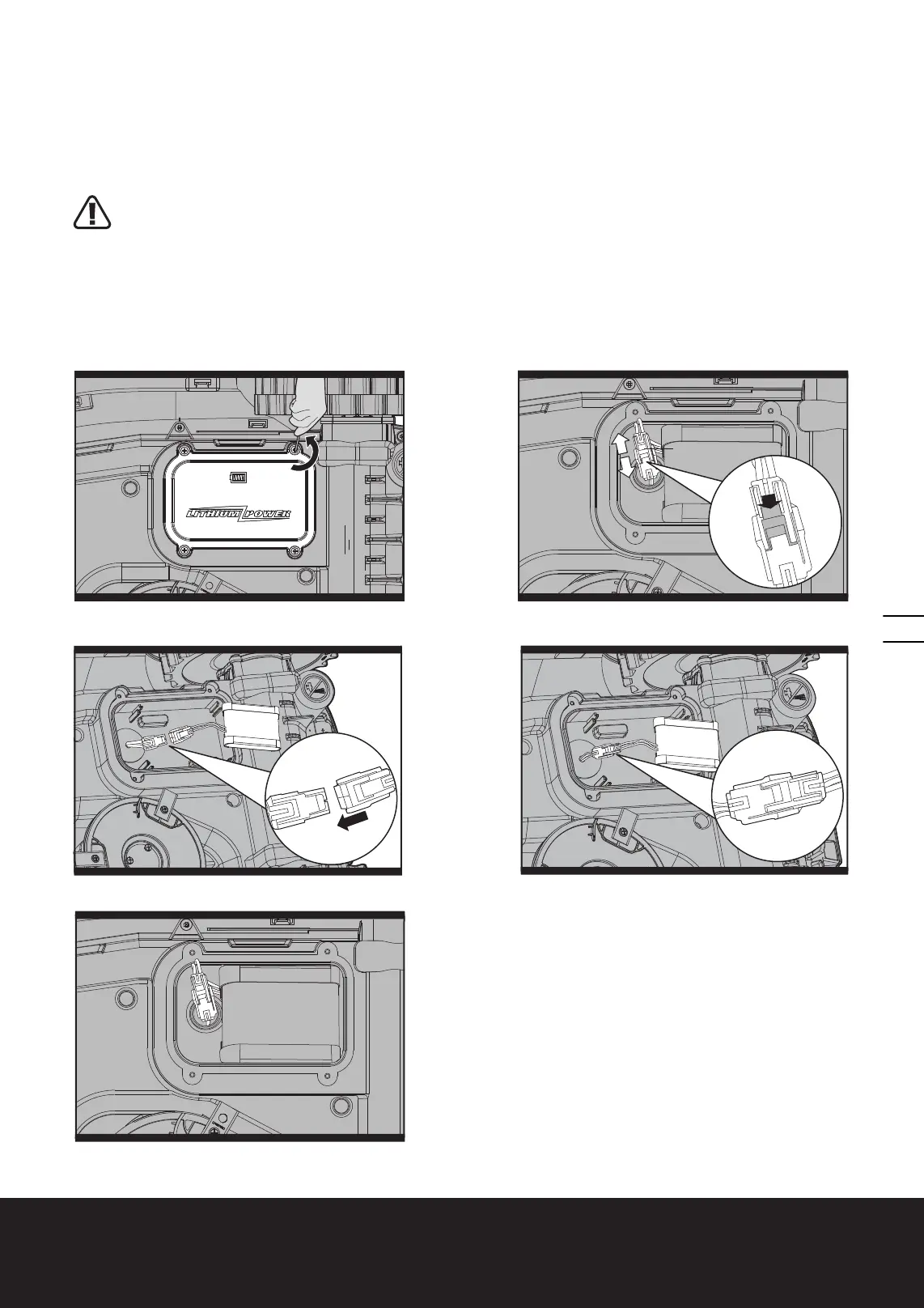
2. Remove the screws on the battery cover. Remove the battery cover. (See Fig. Q1)
3. Lift out the old battery carefully. Press the latch (a) and release the connectors. (See Fig. Q2)
NOTE: Do not pull by the cables. Hold the connectors and release the latch (a).
4. Connect a new original battery by attaching the connectors until they click into position. (See Fig. Q3, Q4)
5. Fit the battery as shown. (See Fig. Q5) Place the cover back in its position and tighten the screws.
Q4
Q1
a
2
2
1
Q2












 To Next Page