Owner’s Manual of Lawn Mowing Robot EN
16
9. Function Messages
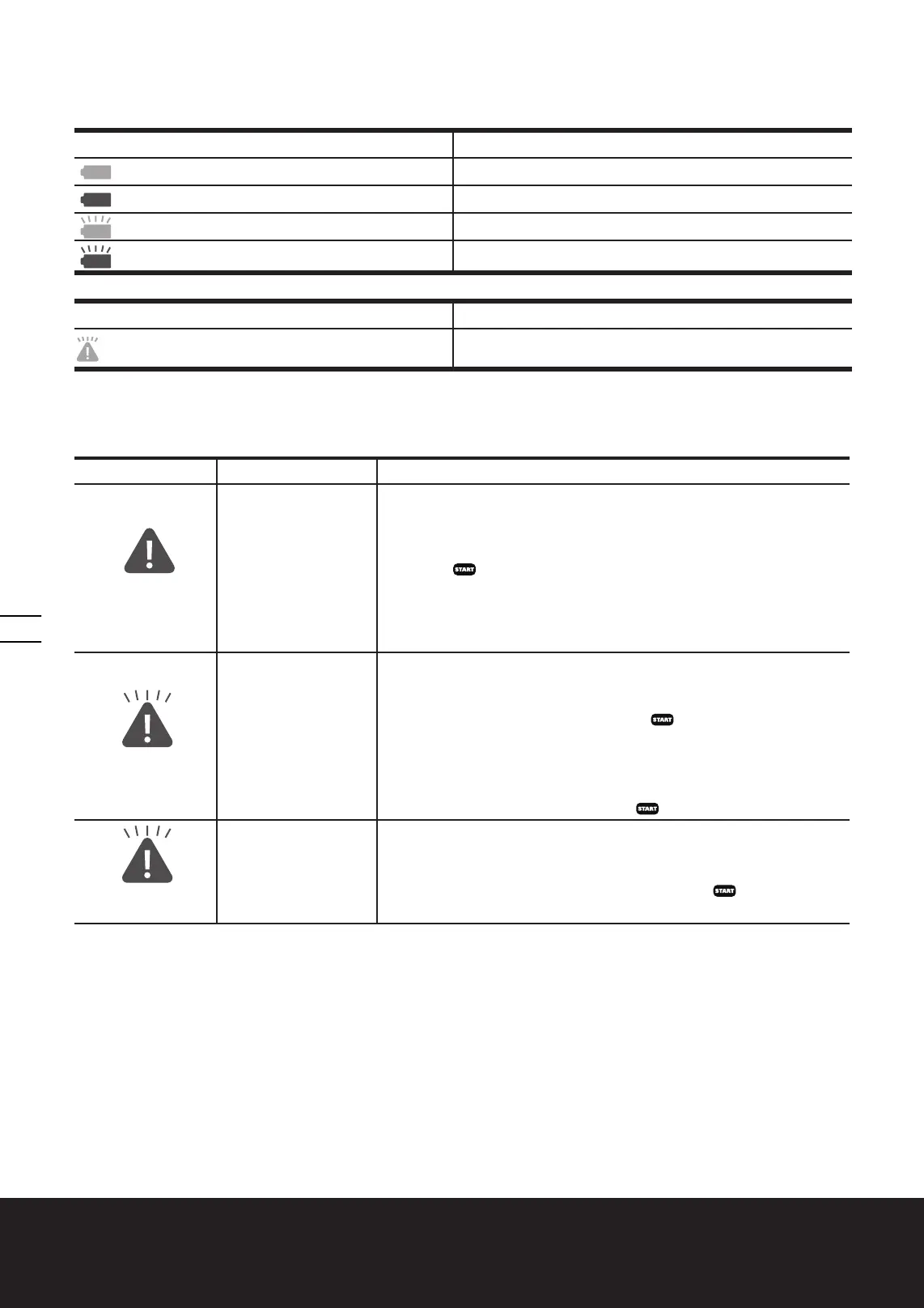
The battery indication light on the interface of Landroid
®
indicates the following status:
Battery indication light Status
Green light on Sufficient power for mowing
Red light on Low power, need to recharge
Green light flashing Auto charging
Red light flashing Battery too hot. Wait until the battery cools down.
Error indication light Status
Blue light flashing four times per cycle Rain delay activated.
10. Error Messages
Symptom Cause Action
Red light on
Landroid
®
is trapped.
1. Turn Landroid
®
off;
2. Take Landroid
®
to an area in your lawn free of obstacles;
3. Turn Landroid
®
on. Wait until the battery indication light stays green. (If
Landroid
®
has low battery capacity, the battery indication light will stay
red.) Press
.
4. If the error message is still displayed; turn power off; turn Landroid
®
upside-down. Check if there is anything preventing the wheels from
rotating.
5. Remove any obstruction, turn the Landroid
®
upright, turn power on.
Red light flashing
twice per cycle
Landroid
®
is outside
working area.
1. If Landroid
®
is actually outside its territory: turn Landroid
®
off, take
Landroid
®
inside its territory. Turn Landroid
®
on. Wait until the battery
indication light stays green. (If Landroid
®
has low battery capacity, the
battery indication light will stay red.) Press
.
2. If the Landroid
®
is inside its territory, check if the LED on the Charging
Base is green. If not, verify that the Charging Base is properly connected
to the charger and that the charger is connected to a suitable power
supply. If they are properly connected, the boundary wires are clamped
incorrectly and must be reversed. Press
.
Red light flashing
three times per cycle
Wire missing
If the LED light flashes green, confirm that the boundary wire is well
connected to the clamps on the charging base. If the problem persists,
check that the boundary wire hasn’t been cut. Press
.







 To Next Page