Owner’s Manual of Lawn Mowing Robot EN
17
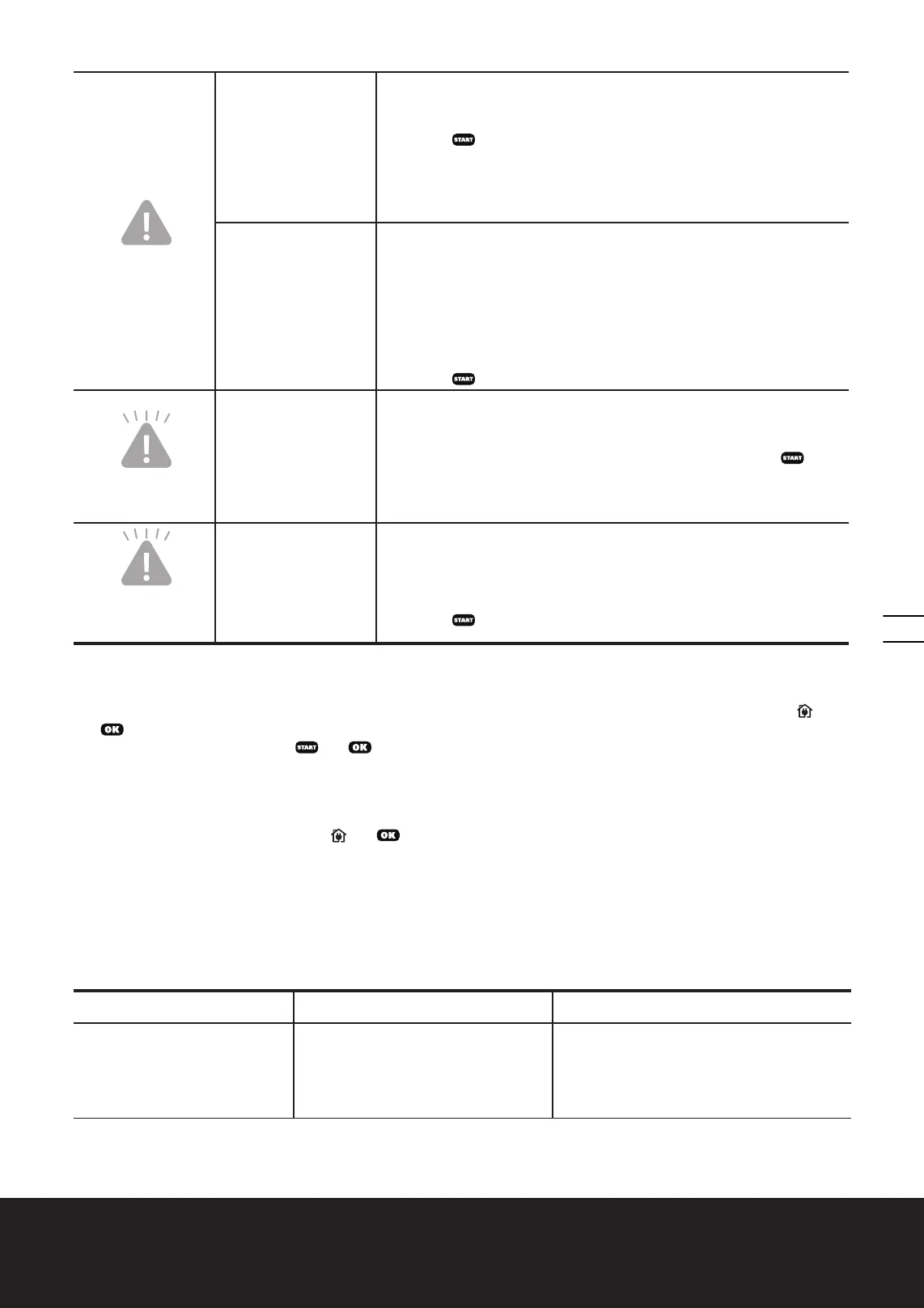
Blue light on
Wheel motor blocked
1. Turn Landroid
®
off; take Landroid
®
to an area free of obstacles;
2. Turn Landroid
®
on. Wait until the battery indication light stays green. (If
Landroid
®
has low battery capacity, the battery indication light will stay
red.) Press
.
3. If the error message is still displayed; turn power off; turn Landroid
®
upside-down and check if there’s anything preventing the wheels from
rotating.
4. Remove any obstruction, turn Landroid
®
upright, turn power on.
Blade disc blocked
1. Turn Landroid
®
off;
2. Turn Landroid
®
upside down and check if there’s anything preventing
the blade disc to rotate.
3. Remove any obstruction.
4. Turn Landroid
®
upright and take it to an area with short grass or adjust
the cutting height;
5. Turn Landroid
®
on. Wait until the battery indication light stays green. (If
Landroid
®
has low battery capacity, the battery indication light will stay
red.) Press
.
Blue light flashing
twice per cycle
Landroid
®
is lifted up.
1. Turn Landroid
®
off.
2. Take Landroid
®
to a lawn area clear of obstacles, turn Landroid
®
on.
Wait until the battery indication light stays green. (If Landroid
®
has low
battery capacity, the battery indication light will stay red.) Press
.
3. If the error message is still displayed: turn Landroid
®
off, turn Landroid
®
upside-down and check there’s nothing lifted up.
4. Remove any possible object, turn Landroid
®
upright, turn Landroid
®
on.
Blue light flashing
three times per
cycle
Landroid
®
is upside
down.
1. Turn Landroid
®
off.
2. Turn Landroid
®
upright.
3. Turn Landroid
®
on. Wait until the battery indication light stays green. (If
Landroid
®
has low battery capacity, the battery indication light will stay
red.) Press
.
NOTES
• Before turning power on, always return Landroid
®
to its territory. If not, the error indication light will flash red. This
message is also displayed when Landroid
®
is sitting over the boundary wire when turned on.
• If for any reason—i.e. a party, children playing...—you want to park your Landroid
®
in the Charging Base: press and
. Landroid
®
will go to its charging base and stay there. Landroid
®
will wait until the next scheduled mowing session.
If you want to re-start it, press
and to start mowing.
• If an error repeatedly occurs in the same area of your lawn, you might have a problem with the boundary wire. Please
refer to the previous installation instructions and check your set up with its help.
• If your lawn is divided in two separate areas connected by a corridor less than 1m, one of which is not provided with
the Charging Base: when Landroid
®
runs out of charge, take it manually to the Charging Base, turn power on by turning
the main switch (8) to “I”(on), press
and , the charge process will start.
• If Landroid
®
runs abnormally once in a while, please try to restart it. If the problem is not resolved, try to removing and
reinstalling the battery. If the problem is still not resolved, please contact a WORX.
• Do not wash the machine with a high pressure washer. This could cause damage to the battery or the machine.
11. Troubleshooting
If your Landroid
®
does not work correctly, follow the troubleshooting guide below. If the issue persists, contact your Dealer.
Symptom Cause Action
Landroid
®
turns on, but the Blade
Disc does not move.
Landroid
®
is searching for the Charging
Base (unless you press the HOME
button to make it go to the charging
base, or the “Enable boundary cut”
function is operating).
This is normal. Landroid
®
needs to recharge,
the Blade Disc does not rotate while it is
searching for the Charging Base automatically.


 To Next Page
 Loading...