PASSION ON THE GO
05
PASSION ON THE GO
06
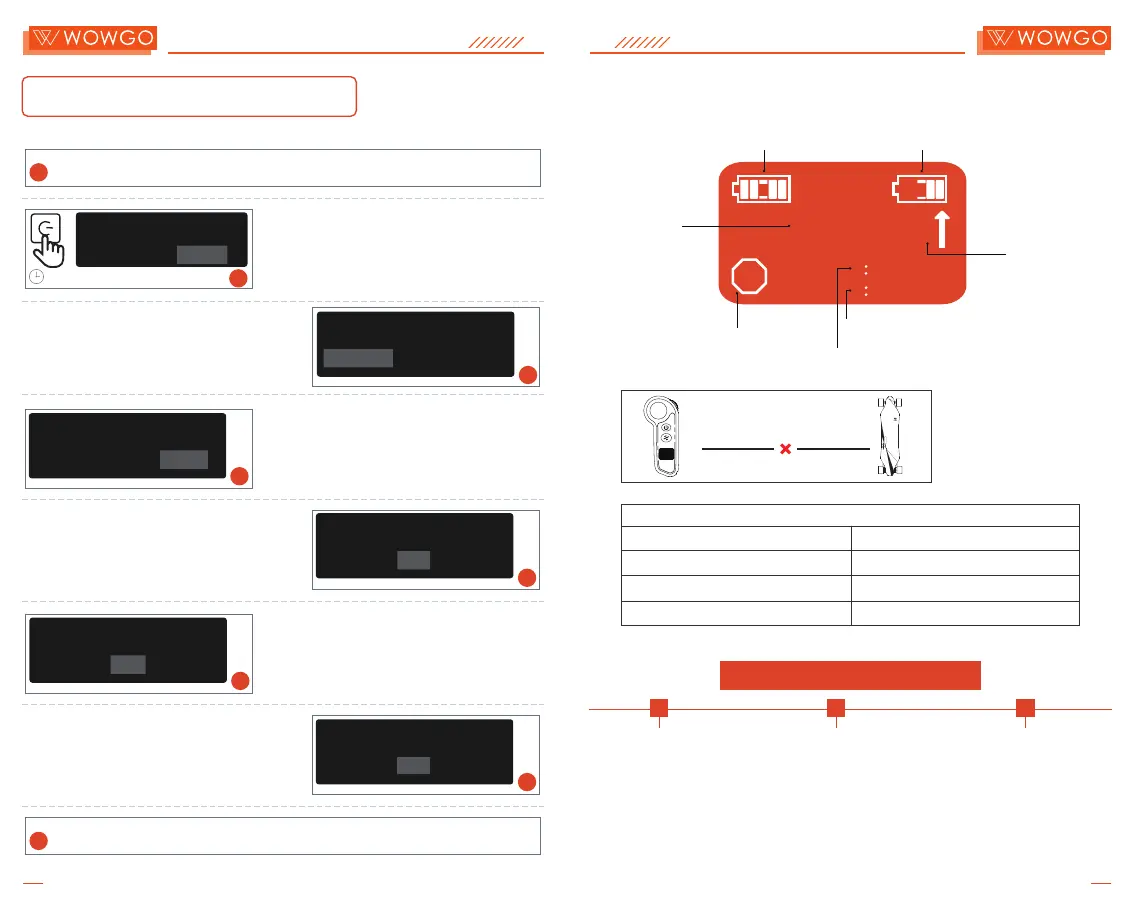
Remote & Board Pairing
Display instructions
Speed Mode
T Turbo mode
3 Fast mode
2 Medium mode
1 Slow mode
45km/h
35km/h
25km/h
15km/h
DISCONNECT!
The board is not
turned on or not
paired with the
remote.
App Installation & Pairing
Step 1
Open the App Store or
Google Play Store on
your phone.Search for
the app by "Tuya Smart"
Download and install it
on your phone.
Step 2
Turn on your phone's Bluetooth,
the "Tuya Smart" App,and the
remote control.(The remote
control has to be paired with the
board)
Step 3
Click the"Add Device" button
to add the board.Now your
phone has connected to the
remote! (Please keep the
remote control on when using
the the APP.)
Single Range
Total Range
Speed
R B
2
22
T
0
0.0mi
mph
5000mi
Remote Battery Board Battery
Forward and
Backward
Speed Mode
2
5S
Long-Press the button on the board and the power
button on the remote at the SAME TIME for about 5
seconds until the remote begins to vibrate and the
screen shows it's connected.
Use the throttle to select your desired speed unit
to display, and press the power button to confirm.
SPEED UNIT SELECT
MPH MILE
Turn off the remote and the board.
1
Great! Now you can enjoy riding your WowGo board
8
3
Use the throttle to select the corresponding wheel
diameter for your electric skateboard, 90 mm or
105 mm and press the power button to confirm.
WHEEL DIAMETER
89 91
5
Use the throttle to select the corresponding motor
type for your skateboard, and press the power
button to confirm.
MOTOR TYPE
HUB
4
Select the corresponding drive ratio for your
WowGo 3E (2.5) and press the power button to
confirm.
DRIVE RATIO
2.4 2.6
6
KPH KM
BOARD TYPE
90059028
BELT
90
Select the corresponding motor pole pairs for your
board and press the power button to confirm.
MOTOR POLE PAIRS
7
6 87
2.5


 To Next Page