Need help?
Do you have a question about the WowWee MiP Arcade and is the answer not in the manual?
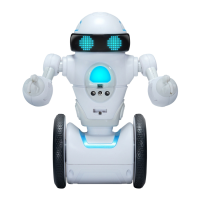
Overview of WowWee's MiP™ Arcade, a self-balancing robot for home entertainment.
Instructions for changing MiP™ Arcade batteries and important handling guidelines.
How to recognize when MiP™ Arcade's batteries are low and need replacement.
Identification of components on the front of the MiP™ Arcade robot.
Identification of components on the back of the MiP™ Arcade robot.
Instructions on how to power on MiP™ Arcade and understand the chest light indicator.
How to play with MiP™ Arcade in default mode and use hand gestures for control.
Details on activating and using Dance, Record, and Basketball modes.
Explanation of Tray, Free Roam, and Sleep modes for MiP™ Arcade.
Steps to download the app and connect MiP™ Arcade wirelessly via Bluetooth.
Answers to frequently asked questions regarding firmware, range, and operational issues.
Terms, conditions, and exclusions of the WowWee 90-day limited warranty.
 General
| Battery Type | Rechargeable Lithium-ion |
|---|---|
| Manufacturer recommended age | 8 years and up |
| Connectivity | Bluetooth |
| App Compatibility | iOS and Android |
| Type | Robot |
| Control Method | App, Gesture |
| Features | Gesture control |

 To Next Page