Need help?
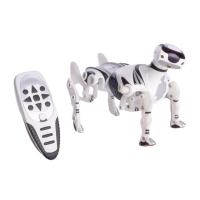
Do you have a question about the WowWee ROBOQUAD and is the answer not in the manual?
Initial setup and operation guide for the Roboquad.
Details on Roboquad's power, requirements, installation, and low power.
Details on remote controller's power, requirements, installation, and low power.
Details the shift button and its four levels for accessing functions.
Explains how to adjust Activity, Aggression, and Awareness settings.
Details the program and program play buttons for programming Roboquad.
Details the autonomy button functions for mode selection.
Details the demo button functions for playing demonstrations.
Details the rotate clockwise and counter-clockwise buttons.
Details the stop button functions for stopping and resetting.
Details the directional pad functions for movement control.
Defines 'BodyCon' and explains power on/off, sleep, and power down.
Functions of the stop button for stopping and resetting the robot.
Making Roboquad walk and changing speed using the directional pad.
Controlling individual leg movements and head orientation.
Rotating Roboquad clockwise or counter-clockwise.
Explains personality settings and their indicator LEDs.
How Activity affects exploration in autonomous mode.
How Aggression affects reactions to sensor inputs.
How Awareness affects scanner range and usage.
Details light and sound sensors and their functions.
How to use and exit autonomous mode.
How Roboquad avoids obstacles using awareness and activity.
Guide to entering, scanning, and reacting in guard mode.
Details the four methods for exiting guard mode.
Instructions for performing dance and movement demonstrations.
Adjusting Roboquad's volume levels.
Overview of vision system, smart-scan, nearest object, escape walk, and flinch.
Explains entering, programming, and clearing programs.
How to play back a stored program.
How to exit program mode.
Where to find additional help and FAQs.
 General
| Control Method | Remote Control |
|---|---|
| Manufacturer Recommended Age | 8 years and up |
| Assembly Required | No |
| Power Source | Battery Powered |
| Manufacturer | WowWee |
| Model | ROBOQUAD |
| Sensors | Infrared Obstacle Detection |
| Features | Obstacle detection, sound effects, programmable movements |
| Type | Robot |


 To Next Page