13
Roboquad Basics
Terminology
The term ‘BodyCon’ is used throughout this manual. A BodyCon describes a
motion associated with a specic sound.
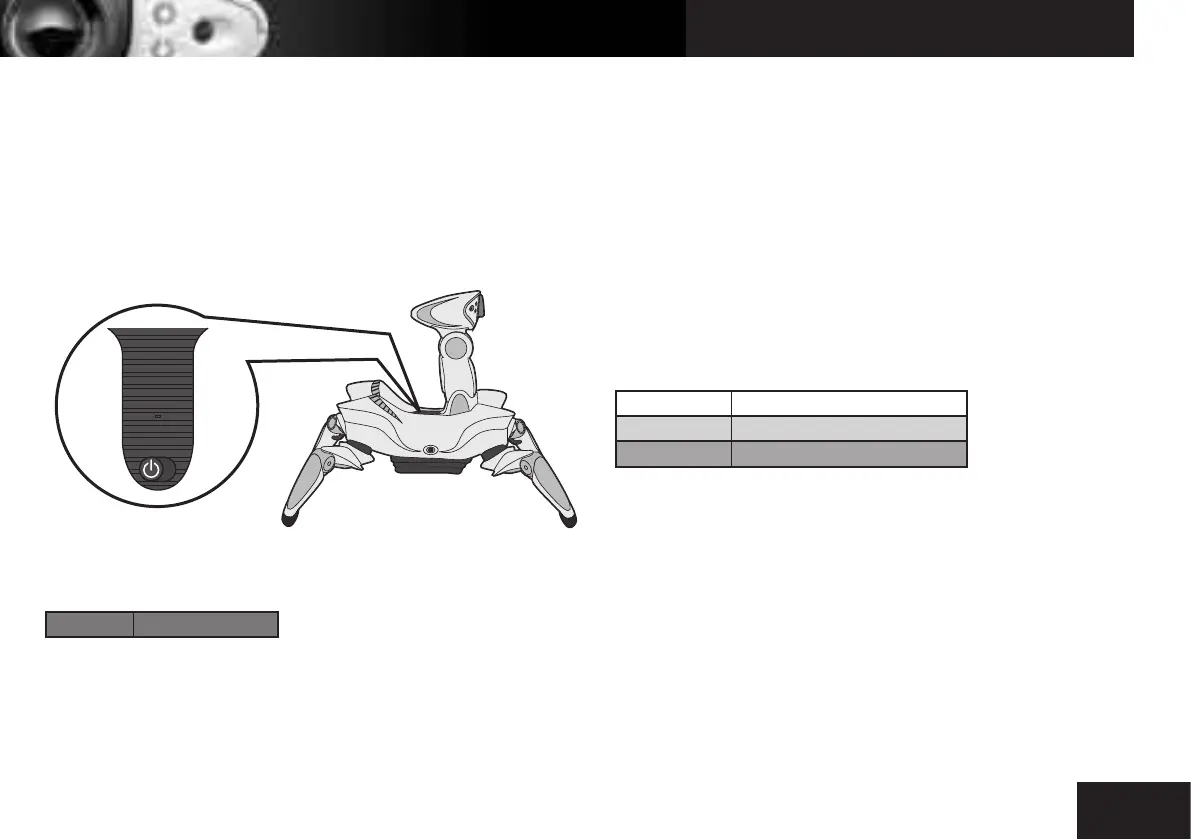
Power on / off
Roboquad’s power button is located on his back. Slide the button to turn him
on or off.
Sleep and power down
Stop button
Shift-Red Sleep mode toggle
Sleep mode
If your Roboquad does not receive a signal from the remote controller for
around 5 minutes, he will go into sleep mode.
Sleep mode toggle
You can manually put Roboquad into sleep mode by pressing the Sleep mode
button combination. Press once to make Roboquad enter sleep mode. Press the
stop button at any shift layer to wake up Roboquad (none of his user
programming will be affected).
Power down
Roboquad will automatically power down and forget all user programming
after around 24 hours in sleep mode.
Stop and reset
Stop button
Unshifted Stop (double tap for full reset)
Shift-Green Leg reset
Shift-Orange Full reset
Stop
Press to stop Roboquad from performing his current action.
Press again within around 6 seconds to perform a full reset to his default
position.
Resets
Leg reset
Roboquad will reset his legs to the default (start-up) position.
Full reset
Roboquad will reset his legs and head to the default (start-up) positions.
This can also be done by double tapping the stop button.
Twitch
With a high Activity setting Roboquad will twitch after a reset.
OFF ON



 To Next Page