Need help?
Do you have a question about the WowWee CHIP and is the answer not in the manual?
Lists all items included in the CHiP package: robot, accessories, and manuals for setup.
Essential safety and handling guidelines for operating CHiP to prevent damage or malfunction.
How to power on CHiP for the first time and its initial reaction to being activated.
CHiP's visual cues for low battery, including eye color and movement patterns.
Step-by-step guide for charging CHiP directly using its AC/DC power adapter.
Instructions for safely installing or changing the internal rechargeable battery in CHiP.
How CHiP autonomously docks with its SmartBed for recharging.
Details on how CHiP recharges via the SmartBed or SmartBand.
Advice on optimal placement of the SmartBed for reliable tracking and docking.
Explains SmartBed LED status and CHiP's eye behavior during charging.
CHiP's initial interaction and play with the SmartBall.
Instructions for powering on the CHiP SmartBall.
How the SmartBall indicates its battery is low.
Guide to installing or changing batteries in the CHiP SmartBall.
CHiP's response to the SmartBand when powered on.
Steps to power the CHiP SmartBand on and off.
How the SmartBand indicates its battery is low.
Instructions for charging the CHiP SmartBand via USB.
Important safety and handling guidelines for all accessory batteries.
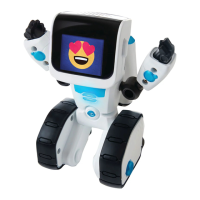
Labels and identifies the various parts and components of the CHiP robot.
Labels and identifies the parts of the CHiP SmartBand.
Labels and identifies the parts of the CHiP SmartBall.
Labels and identifies the parts of the CHiP SmartBed.
Basic interaction introduction and safety advice regarding CHiP's wheels.
How CHiP responds to basic commands and touch without the companion app.
Details CHiP's specific reactions to different types of touch input.
How CHiP reacts to being moved, picked up, or handled.
Lists basic voice commands CHiP recognizes and how to use them.
Introduces the SmartBall as CHiP's toy and its default chase mode.
How to turn on the SmartBall and interpret its connection indicators.
Outlines various games like Wanna Play, Soccer, and Fetch with CHiP and the SmartBall.
Explains the SmartBand's role in the CHiP experience and accessory pairing.
Describes the initial pairing process for accessories with CHiP.
Guides on how to properly wear the CHiP SmartBand on your wrist.
Identifies the buttons on the SmartBand and their primary functions.
How the Like button trains CHiP and helps it find its bed.
Functions of the Exclamation Mark button for play modes and voice commands.
Details the Head button's uses for dancing and Fetch mode.
Information on remapping button functions via the CHiP App and troubleshooting.
How to rename CHiP and record custom voice commands through the CHiP App.
Introduces CHiP's various power-saving features and modes.
CHiP's behavior when not interacted with for short periods.
How CHiP enters Standby Mode after prolonged inactivity.
CHiP's behavior when charging and how to wake it.
Explains CHiP's Sleep Mode and methods to wake it up.
Guides users on downloading and finding the CHiP App on app stores.
Lists compatible iOS and Android devices for the CHiP App.
Overview of the main screens and functions available within the CHiP App.
Answers compatibility questions regarding smart devices and the CHiP App.
Provides an alternative method for downloading the app via Amazon AppStore.
Explains reasons for device incompatibility with the CHiP App.
Offers troubleshooting steps for connection issues between CHiP and the app.
Addresses common connectivity issues like interference and slow performance.
Troubleshoots unexpected shutdowns or power-off issues with CHiP.
Informs about the number of accessories CHiP can support.
Clarifies if CHiP can be used without a smart device.
Directs users to the app or website for pairing or replacing accessories.
Explains why CHiP might not automatically recharge and troubleshooting steps.
States that CHiP is for indoor use and sunlight interference.
Details the terms and conditions of the 90-day limited warranty for CHiP.
Lists what is excluded from the warranty coverage and limitations.
 General
| Type | Robot Dog |
|---|---|
| Manufacturer | WowWee |
| Release Year | 2016 |
| Play Time | 1-2 hours |
| Connectivity | Bluetooth |
| App Compatibility | iOS, Android |
| Voice Recognition | Yes |
| Voice Commands | Yes |
| Autonomous Behavior | Yes |
| Battery | Rechargeable Lithium-ion |
| Sensors | Infrared, Touch Sensors |
| Control | Mobile App |


 To Next Page