3
USING THE CHIP SMARTBED™
When you first plug in the CHiP SmartBed™, CHiP™ will return to it to demonstrate his ability to dock autonomously.
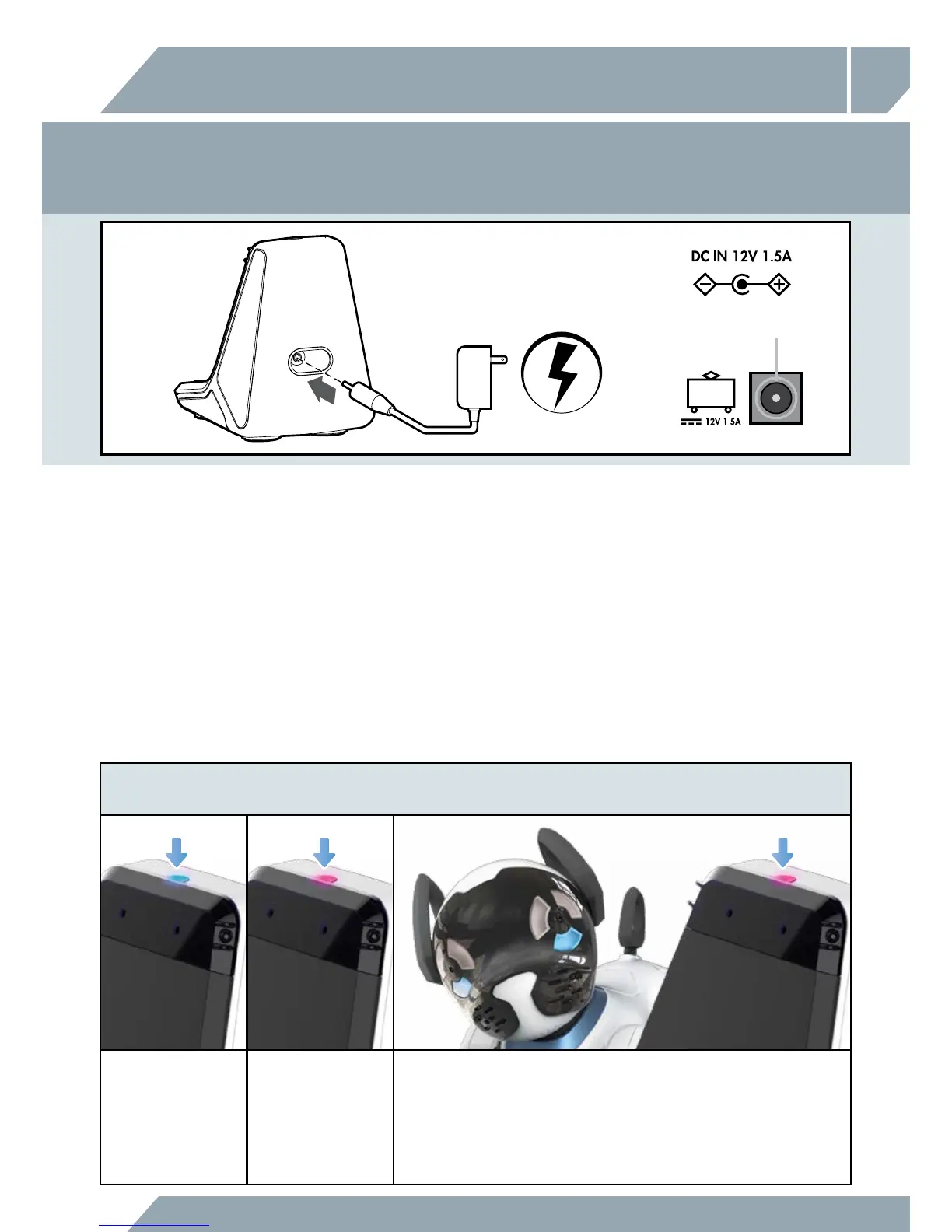
POWERING THE CHIP SMARTBED™
POWERING CHIP™ - WITH THE CHIP SMARTBED™
1. Ensure that both CHiP™ and CHiP SmartBed™ are ON and within close proximity (3 meters). CHiP™ will
automatically detect when its power is low, and will drive to CHiP SmartBed™ and recharge; or
2. Hold the Like button on CHiP SmartBand™ while both CHiP™ and CHiP SmartBed™ are within close
proximity. CHiP™ will drive to CHiP SmartBed™ and recharge; or
3. In the case that CHiP™'s power is extremely low and unresponsive to (1) or (2), use the CHiP SmartBed™'s
AC/DC adaptor to directly charge CHiP™.
4. When CHiP™’s battery is fully charged, he will stand up to avoid over charging. If you want to call
CHiP™ off his SmartBed before he is fully charged, press and hold the CHiP™ button in the center of
your CHiP SmartBand™.
CENTER POSITIVE
For optimal tracking, place the CHiP SmartBed™ in a room where CHiP™ would be most often.
CHiP™ will need to physically see the CHiP SmartBed™ before he can locate it.
When the CHiP SmartBed™
is plugged in, it's LED
will turn BLUE.
CHiP's SmartBed™ LED
with turn PURPLE when
CHiP™ is looking for
it, and will remain
PURPLE while CHiP™
is charging.
CHiP™’s eyes will turn PURPLE while he is looking for the CHiP SmartBed™, and
will change to BLUE sleepy eyes when CHiP™ has made contact and is charging
correctly. If CHiP™’s eyes remain purple after sitting, he will attempt to adjust his
position. We do not recommend forcing CHiP™ into a seated position, but you can
help CHiP™ by removing any objects that may be in his way, and/or unplugging
and replugging the charging bed to restart the process.



 To Next Page