4
POWERING THE CHIP SMARTBALL™
USING THE CHIP SMARTBALL™
When you first turn on the CHiP SmartBall™, CHiP™ will demonstrate his ball handling abilities and play with it.
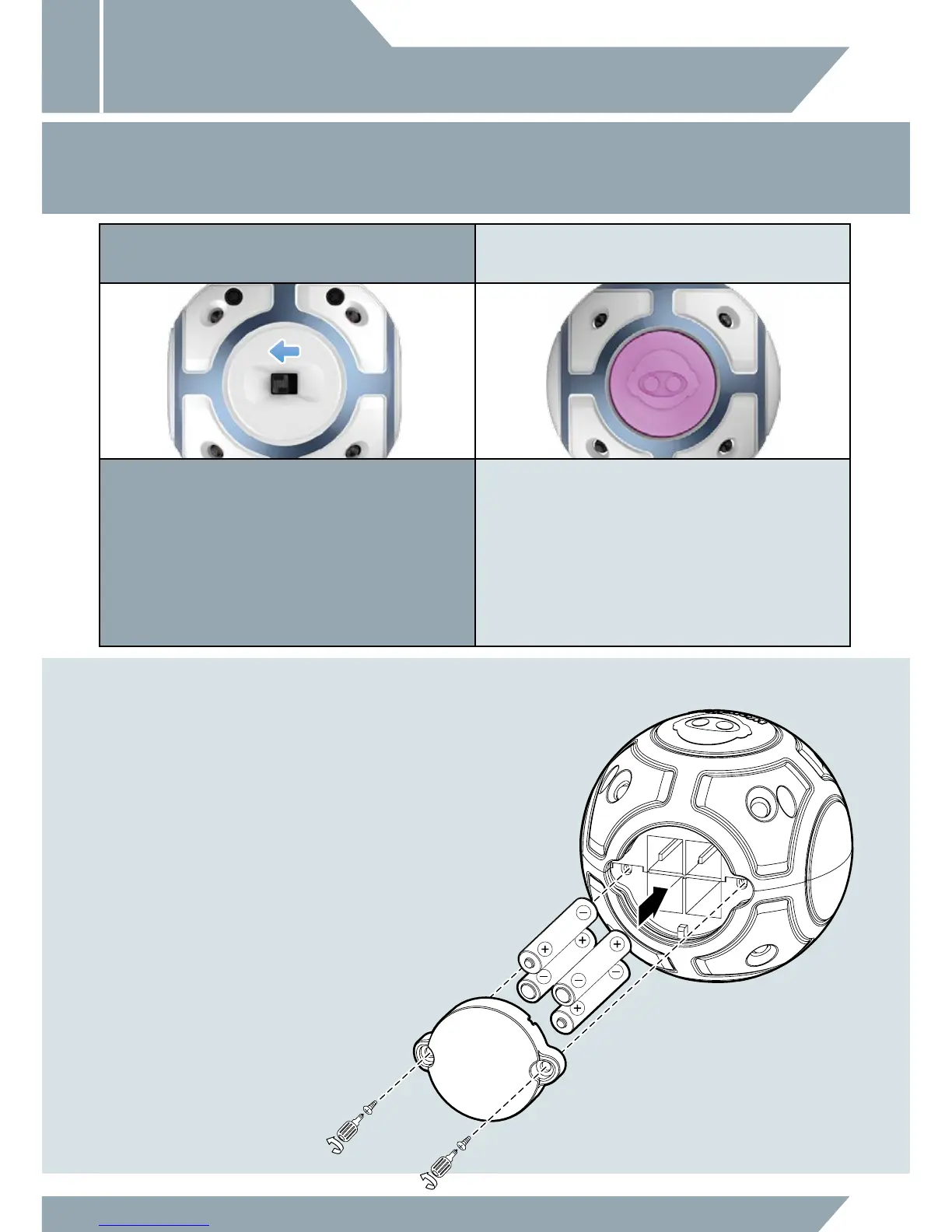
4 x “AAA” Size Alkaline Batteries
(not included)
CHIP SMARTBALL™ BATTERY
DIAGRAM / INSTALLATION
ON OFF
TURNING ON THE CHIP SMARTBALL™ LOW BATTERY INDICATORS
To get started with the CHiP SmartBall™, toggle the power switch to
ON then follow the instructions in the "Playing With CHiP™" section.
When the batteries grow weak, the light on CHiP SmartBall™ will
flash PURPLE and then power down. When this happens, power off
and replace all batteries.
USING CHIP™ INSTALLING OR CHANGING
BATTERIES IN THE CHIP SMARTBALL™:
1. Using a Phillips screwdriver (not included) remove
the screws on the battery compartment cover.
2. Insert the batteries according to the diagram. Ensure
that the positive and negative polarities match the
illustrations inside the battery compartment.
3. Replace the battery compartment cover and
replace the screws using the screwdriver. Do not
over-tighten.



 To Next Page