IMPORTANT BATTERY INFORMATION
•Useonlyfreshbatteriesoftherequiredsizeandrecommendedtype
• Donotmixoldandnewbatteries,differenttypesofbatteries[standard(Carbon-Zinc),
Alkalineorrechargeable]orrechargeablebatteriesofdifferentcapacities
•Removerechargeablebatteriesfromthetoybeforerechargingthem
• Rechargeablebatteriesareonlytobechargedunderadultsupervision
• Pleaserespectthecorrectpolarity,(+)and(-)
• Donottrytorechargenon-rechargeablebatteries
• Donotthrowbatteriesintothere
• Replaceallbatteriesofthesametype/brandatthesametime
• Thesupplyterminalsarenottobeshort-circuited
• Removeexhaustedbatteriesfromthetoy
• Batteriesshouldbereplacedbyadults
• Removebatteriesifthetoyisnotgoingtobeplayedwithforsometime
• Thepackagingshouldbekeptbecauseitcontainsimportantinformation
Battery details - remote controller
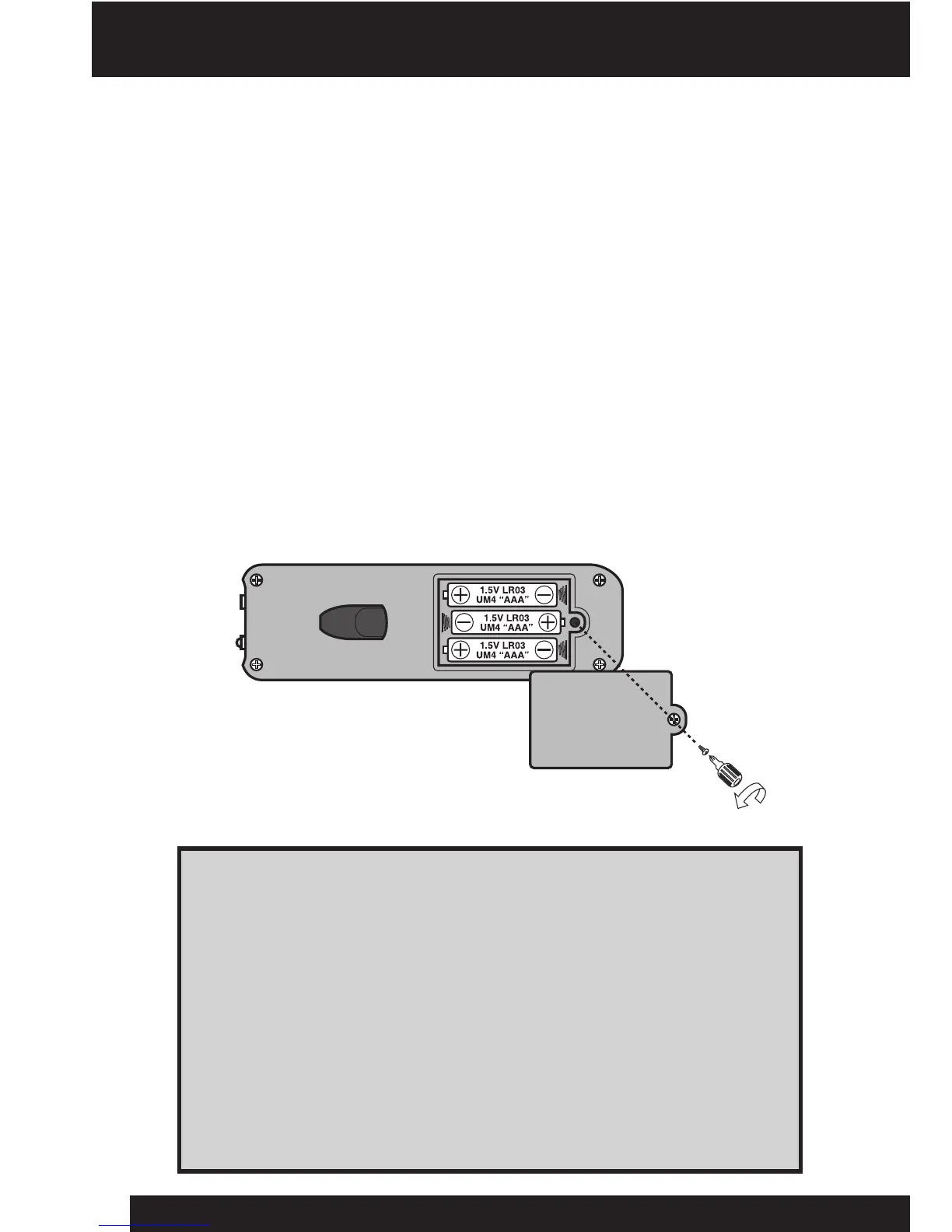
Installing or changing batteries in the remote controller:
1. OpenthebatterycompartmentontheremotecontrollerusingaPhillips
screwdriver(notincluded)toremovethescrewonthebattery
compartmentcover.
2. Insertthebatteriesaccordingtothediagram.Ensurethatthepositiveand
negativepolaritiesmatchtheillustrationsinsidethebatterycompartment.
3. Replacethebatterycompartmentcoverandreplacethescrewusingthe
screwdriver.Donotover-tighten.
NOTE: TheremotecontrollerisequippedwithanLEDindicatorthatlightsupwhen
youpressanybutton.Youwillknowwhenthebatteriesintheremotecontrollerare
nearlydepletedwhentheLEDindicatorshinesdimly.
5












 To Next Page