5-9
Confi guration
5.3.2. The Serial Parameters Menu
The Serial Parameters Menus are used to configure the IPS's serial COM
Port, and allow you to select parameters such as the Baud Rate, Parity and
Modem Initialization String. To access the Serial Parameters Menu, proceed
as follows:
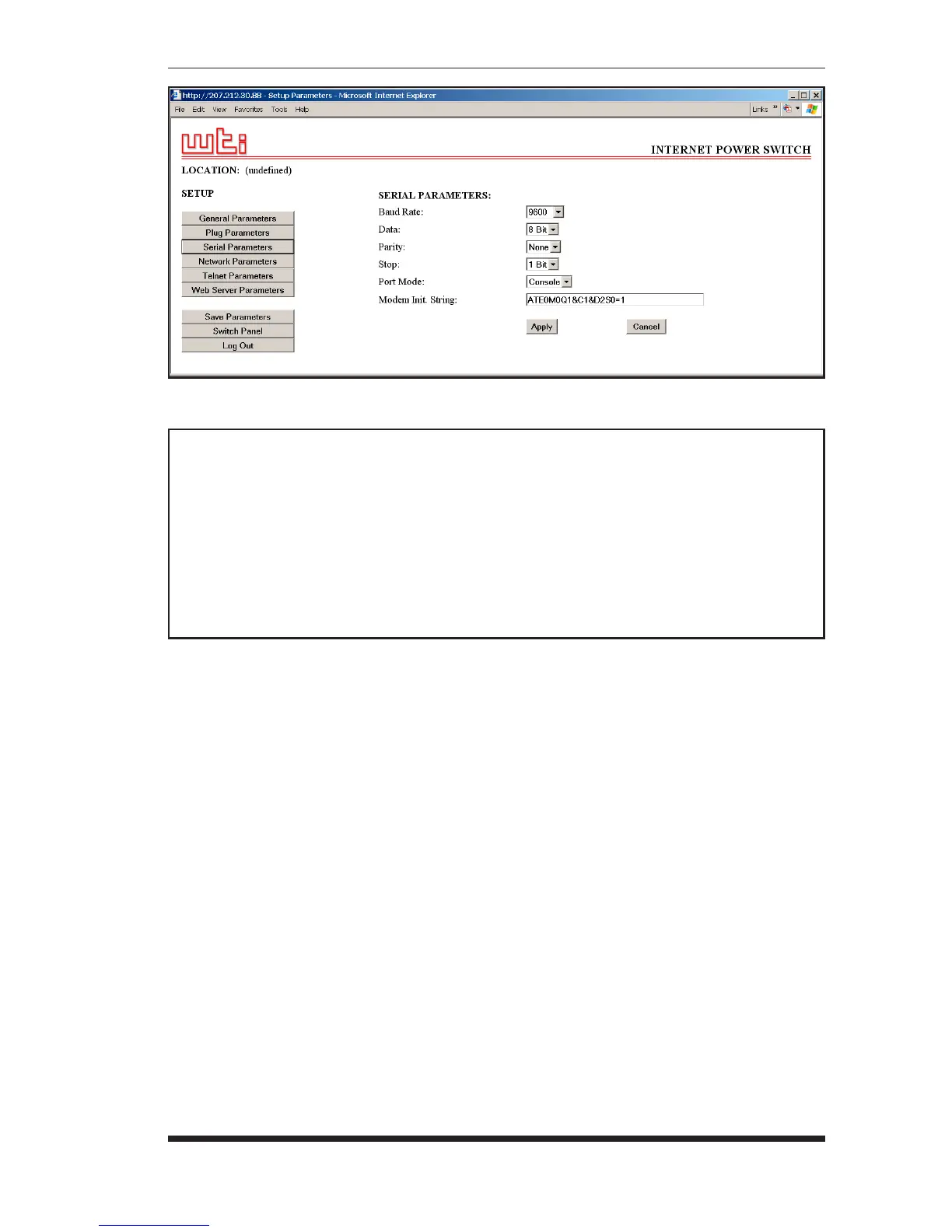
• Web Browser Interface: Click the "Setup" button to access the Setup
Menus, and then click the "Serial Parameters" button. The Serial
Parameters Menu will be displayed as shown in Figure 5.5.
• Text Interface: Type /C and press [Enter]. The Serial Parameters Menu
will be displayed as shown in Figure 5.6.
Figure 5.5: Serial Parameters Menu - Web Browser Interface
SERIAL PARAMETERS:
1. Baud Rate: 9600
2. Data: 8 Bit
3. Parity: None
4. Stop: 1 Bit
5. Port Mode: Console
6. Modem Init. Str: ATE0M0Q1&C1&D2S0=1
Enter selection,
Press <ESC> to return to previous menu ...
Figure 5.6: Serial Parameters Menu - Text Interface


 To Next Page